• Tutorial: How to install split spoofed APKs on Android using only your PC (Windows or Linux)

    From Maria Sophia@mariasophia@comprehension.com to alt.comp.os.windows-10,alt.os.linux,comp.mobile.android on Fri May 8 01:32:14 2026
    From Newsgroup: alt.os.linux

    Tutorial:
    How to install split spoofed APKs on Android using only your PC (Windows or Linux)

    Background:
    Oddly, Android itself doesn't have a way to install split APKs, which,
    if you don't know, is what Google is basically moving every developer to.

    So, while you can install split APKs on Android using special tools such
    as SAI or Muntashirakon, you can also install split APKs using the PC adb.

    It would be no surprise to anyone that my Samsung Android 13 is heavily
    degoogled, so I can't use the Google Play Store app to install APKs but
    that's not an issue because I use an open source Google Play store app.

    However...

    Google is playing whackamole with replacement Google Play Store apps.
    In Google's SDKs, which developers incorporate into their apps, is
    increasingly, a new check for which app installed the split APKs.

    It's binary now.

    Either the app was installed by the Google Play Store app itself.
    Or it wasn't.

    If it wasn't installed literally by the Google Play Store app, then it
    fails to open, unless you log into a Google Play Store account, which,
    if you're degoogled, isn't something you'd ever want to do voluntarily.

    So how do you get around it?

    Particularly on a modern USA Samsung, which, let's just say, is a bitch.
    a. You can't root most (all?) modern USA Samsung's
    b. Samsung adds even more protection than any other OEM does
    c. And Android 12+ adds even more protections fighting you all the time

    Well... what do you do?
    Dunno... but what I did, was this (and it worked perfectly!)
    a. I installed the split APKs
    b. But I spoofed that the installer was the official Google Play Store app

    This worked using both the phone & the PC to install split spoofed APKs:
    1. I installed the Fluffy File Manager <app.fluffy> using Aurora
    <https://play.google.com/store/apps/details?id=app.fluffy>
    2. Unfortunately, Aurora wouldn't save the APKs
    (as Aurora's cache was empty right away)
    3. So I used Muntashirakon App Manager to save the split APK to
    /storage/AppManager/apks/Fluffy_4.1.8.apks
    4. I then deleted the app <app.fluffy> on the Samsung
    5. I copied Fluffy_4.1.8.apks on the phone to Fluffy_4.1.8.zip on the PC
    6. I extracted the split APKs on the PC & ran this spoofing command
    7. I sideload the apks using a spoofed origin label
    adb.exe install-multiple -i com.android.vending base.apk split_config.arm64_v8a.apk split_config.xhdpi.apk split_config.es.apk

    Voila!
    The Play Integrity/LVL check passed because the app recognizes com.android.vending as the installerPackageName.

    This is mainly needed on Samsung, as other brands aren't as locked down.

    On other brands, you can disable the Play Integrity / LVL license provider
    to prevent the app from checking Google Play licensing because on AOSP
    (Pixel, LineageOS, GrapheneOS), the shell user can disable components.

    But, that won't work on USA unrootable degoogled Samsung.
    adb shell pm disable app.fluffy /com.pairip.licensecheck.LicenseContentProvider
    Exception occurred while executing 'disable':
    ... SecurityException: Shell cannot change component state

    Because, on Samsung stock ROMs, with the Samsung security policy intact,
    the shell user is NOT allowed to disable components of third-party apps.

    Since I can't neutralize it from outside the shell, there is also LSPatch which performs DEX patching inside the app, which I may try later.

    Also, supposedly Muntashirakon App Manager can perform installer-source spoofing to set it to com.android.vending, but it failed on my Samsung.

    Running the second test, I kept all the files on the phone at all times.
    This completely uses the PC to install, spoof & test the split APK commit!

    1. Install Ultimate File Manager Pro using Aurora
    <https://play.google.com/store/apps/details?id=za.kilowatch.ultimatefilemanager>
    2. Again, unfortunately, Aurora wouldn't save the APKs
    (as Aurora's cache was empty right away)
    3. So I used Muntashirakon to save it to /storage/AppManager/apks/
    4. Identify the exported .apks archive and the filesystem location
    adb shell ls /storage/emulated/0/AppManager/apks/Ultimate*.apks
    /storage/emulated/0/AppManager/apks/Ultimate File Manager Pro_125.0-GOOGLE.apks
    5. Query the system for the active split APK installation paths
    adb shell pm path za.kilowatch.ultimatefilemanager
    package:/data/app/~~d-kNYBZ6N_XaNUkK7Yo0Jg==/za.kilowatch.ultimatefilemanager-gpxHZM4K-ZfKfSdELCUF7g==/base.apk
    package:/data/app/~~d-kNYBZ6N_XaNUkK7Yo0Jg==/za.kilowatch.ultimatefilemanager-gpxHZM4K-ZfKfSdELCUF7g==/split_config.arm64_v8a.apk
    package:/data/app/~~d-kNYBZ6N_XaNUkK7Yo0Jg==/za.kilowatch.ultimatefilemanager-gpxHZM4K-ZfKfSdELCUF7g==/split_config.xhdpi.apk
    6. Extract or copy the split APK components into a temporary workspace
    adb shell cp /data/app/~~d-kNYBZ6N_XaNUkK7Yo0Jg==/za.kilowatch.ultimatefilemanager-gpxHZM4K-ZfKfSdELCUF7g==/base.apk /data/local/tmp/base.apk
    adb shell cp /data/app/~~d-kNYBZ6N_XaNUkK7Yo0Jg==/za.kilowatch.ultimatefilemanager-gpxHZM4K-ZfKfSdELCUF7g==/split_config.arm64_v8a.apk /data/local/tmp/arch.apk
    adb shell cp /data/app/~~d-kNYBZ6N_XaNUkK7Yo0Jg==/za.kilowatch.ultimatefilemanager-gpxHZM4K-ZfKfSdELCUF7g==/split_config.xhdpi.apk /data/local/tmp/gfx.apk
    Or, just unzip the split APKs into that temporary archive.
    adb shell unzip /storage/emulated/0/AppManager/apks/Ultimate*.apks -d /data/local/tmp/
    Archive: /storage/emulated/0/AppManager/apks/Ultimate File Manager Pro_125.0-GOOGLE.apks
    inflating: /data/local/tmp/split_config.arm64_v8a.apk
    inflating: /data/local/tmp/split_config.xhdpi.apk
    inflating: /data/local/tmp/base.apk
    inflating: /data/local/tmp/icon.png
    inflating: /data/local/tmp/info.json
    7. Remove the currently installed application instance
    adb shell pm uninstall za.kilowatch.ultimatefilemanager
    8. Create a new package installation session with explicit installer attribution
    adb.exe shell pm install-create -i com.android.vending
    Success: created install session [1525310504]
    9. Stream split APK components into the session and finalize installation
    adb shell pm install-write 12978356 base.apk /data/local/tmp/base.apk
    Success: streamed 30927780 bytes
    adb shell pm install-write 12978356 arch.apk /data/local/tmp/split_config.arm64_v8a.apk
    Success: streamed 57566 bytes
    adb shell pm install-write 12978356 gfx.apk /data/local/tmp/split_config.xhdpi.apk
    Success: streamed 129396 bytes
    adb shell pm install-commit 12978356
    Success
    10. Verify installer attribution metadata
    adb shell dumpsys package za.kilowatch.ultimatefilemanager | findstr /i "installerPackageName"
    installerPackageName=com.android.vending
    11. Perform a basic launch test to confirm runtime behavior
    adb shell monkey -p za.kilowatch.ultimatefilemanager -c android.intent.category.LAUNCHER 1
    12.Remove temporary artifacts from the device
    adb shell rm /data/local/tmp/base.apk /data/local/tmp/split_config.arm64_v8a.apk /data/local/tmp/split_config.xhdpi.apk /data/local/tmp/icon.png /data/local/tmp/info.json
    --
    Almost never is there a problem on a computer that we can't solve ourselves.

    --- Synchronet 3.22a-Linux NewsLink 1.2
  • From Maria Sophia@mariasophia@comprehension.com to alt.comp.os.windows-10,alt.os.linux,comp.mobile.android on Fri May 8 12:35:54 2026
    From Newsgroup: alt.os.linux

    Maria Sophia wrote:
    Because, on Samsung stock ROMs, with the Samsung security policy intact,
    the shell user is NOT allowed to disable components of third-party apps.

    Since I can't neutralize it from outside the shell, there is also LSPatch which performs DEX patching inside the app, which I may try later.

    Also, supposedly Muntashirakon App Manager can perform installer-source spoofing to set it to com.android.vending, but it failed on my Samsung.

    Explainer...

    Google "says" split APKs optimize storage size, but in reality, it may be
    that Google moved to split APKs mainly to discourage reuse of APKs, which
    may be why native Android has no way inherently to install split APKs.

    Luckily, SAI, Muntashirakon, Aurora, adb, & even the Google Play Store app
    can handle the streaming of split APKs into a single installer session.

    But when you install or save an APK nowadays, it will only work in the
    future devices with similar attributes as that on which it was installed.

    The point of spoofing is to change the Android "Installer Package Name",
    also informally called the "Installer Source" or the "Installer Origin".
    PackageManager.getInstallerPackageName()
    <https://developer.android.com/reference/android/content/pm/PackageInstaller>

    I've only tried those two file managers (which suck, by the way, but the
    point was I was testing all file managers which work with Shizuku here):
    Newsgroups: comp.mobile.android
    Subject: PSA: What free android file managers are integrated with shizuku
    Date: Thu, 7 May 2026 02:00:47 -0600
    Message-ID: <10thgrg$gtt$1@nnrp.usenet.blueworldhosting.com>

    Shizuku, for folks who don't know Android, is a way for some apps to get elevated permission to run Android system-level APIs without root.
    <https://github.com/RikkaApps/Shizuku/releases/>

    The LSPatch mechanism hasn't been updated for a while but it's over here:
    <https://github.com/LSPosed/LSPatch/releases>
    What it does is change how a app works by modifying DEX in memory.

    Muntashirakon, for those who don't know, is (by far) the most capable app manager in the realm of Android. It does so much, I'll let them explain it.
    <https://muntashir.dev/AppManager/en/>

    The whackamole game Google is playing lately is to incorporate binary checks like this into their SDKs so that only apps (said to be) installed by the official Google Play Store will pass the initial startup check.
    if (!installer.equals("com.android.vending")) {
    // block app startup
    }

    Some apps may incorporate checks using Play Core library instead.
    InstallStateUpdatedListener listener = state -> {
    String installer = state.installingPackageName();
    };

    Or...
    SplitInstallManager manager = SplitInstallManagerFactory.create(context);
    String installer = manager.getInstallerPackageName();

    Nowadays, if getInstallSourceInfo().getInstallingPackageName() or if getInstallerPackageName() doesn't return com.android.vending, the app fails.

    In summary, you can manage your Android almost completely from the PC,
    (either over Wi-Fi or over USB) but if you're degoogled, there's extra
    work to be done 'cuz you have to handle split APKs plus spoofing tasks.
    --- Synchronet 3.22a-Linux NewsLink 1.2
  • From Lawrence =?iso-8859-13?q?D=FFOliveiro?=@ldo@nz.invalid to alt.comp.os.windows-10,alt.os.linux,comp.mobile.android on Fri May 8 20:57:15 2026
    From Newsgroup: alt.os.linux

    On Fri, 8 May 2026 01:32:14 -0600, Maria Sophia wrote:

    7. I sideload the apks using a spoofed origin label
    adb.exe install-multiple -i com.android.vending base.apk split_config.arm64_v8a.apk split_config.xhdpi.apk split_config.es.apk

    Does Windows still require special USB drivers installed in order for
    the SDK to talk to an Android device?

    This isn’t necessary under Linux.
    --- Synchronet 3.22a-Linux NewsLink 1.2
  • From Maria Sophia@mariasophia@comprehension.com to alt.comp.os.windows-10,alt.os.linux,comp.mobile.android on Fri May 8 18:14:30 2026
    From Newsgroup: alt.os.linux

    Lawrence D˘Oliveiro wrote:
    7. I sideload the apks using a spoofed origin label
    adb.exe install-multiple -i com.android.vending base.apk split_config.arm64_v8a.apk split_config.xhdpi.apk split_config.es.apk

    Does Windows still require special USB drivers installed in order for
    the SDK to talk to an Android device?

    This isn˘t necessary under Linux.

    I don't think so. When we install adb, there's always a page for drivers
    for all sorts of phones, but I've never had to install a special driver.

    So I think if the USB works using the default driver that Windows installs
    the first time you connect the phone, then I think adb will also work.

    Besides, adb nowadays works over Wi-Fi also, which doesn't need a driver.

    The beauty of adb is that you can do everything you need to on the phone
    from the PC keyboard/mouse/speakers/clipboard which is extremely handy.

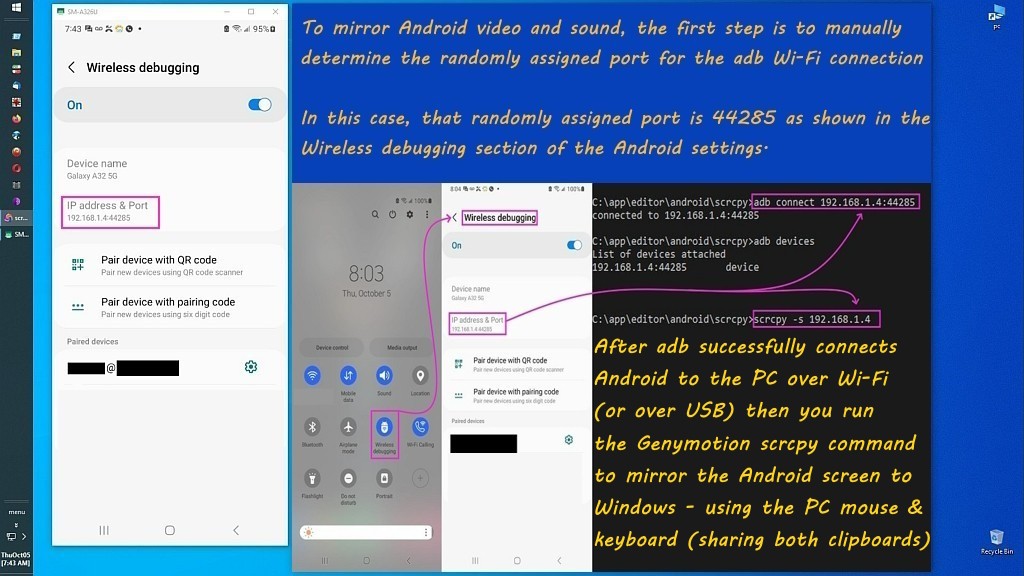
    Scrcpy, which mirrors the phone two feet tall, is powered by adb also.
    <https://i.postimg.cc/pr8NPNKs/scrcpy33.jpg>

    When I'm home, I use the phone without even knowing where the phone is. :)
    (I have to play a song on the phone from the PC just to find the phone.)
    --- Synchronet 3.22a-Linux NewsLink 1.2
  • From Paul@nospam@needed.invalid to alt.comp.os.windows-10,alt.os.linux,comp.mobile.android on Sat May 9 00:55:10 2026
    From Newsgroup: alt.os.linux

    On Fri, 5/8/2026 8:14 PM, Maria Sophia wrote:
    Lawrence D¢Oliveiro wrote:
    7. I sideload the apks using a spoofed origin label
    adb.exe install-multiple -i com.android.vending base.apk split_config.arm64_v8a.apk split_config.xhdpi.apk split_config.es.apk

    Does Windows still require special USB drivers installed in order for
    the SDK to talk to an Android device?

    This isn¢t necessary under Linux.

    I don't think so. When we install adb, there's always a page for drivers
    for all sorts of phones, but I've never had to install a special driver.

    So I think if the USB works using the default driver that Windows installs the first time you connect the phone, then I think adb will also work.

    Besides, adb nowadays works over Wi-Fi also, which doesn't need a driver.

    The beauty of adb is that you can do everything you need to on the phone
    from the PC keyboard/mouse/speakers/clipboard which is extremely handy.

    Scrcpy, which mirrors the phone two feet tall, is powered by adb also.
    <https://i.postimg.cc/pr8NPNKs/scrcpy33.jpg>

    When I'm home, I use the phone without even knowing where the phone is. :)
    (I have to play a song on the phone from the PC just to find the phone.)


    WinUSBCoInstaller2.dll = 1 <=== we need to find out what a "WinUSB" driver is
    WdfCoInstaller01009.dll = 1 <=== grease for installing the Windows Device Framework driver

    https://learn.microsoft.com/en-us/windows-hardware/drivers/usbcon/introduction-to-winusb-for-developers

    "Components of WinUSB

    WinUSB includes:

    A kernel-mode driver (winusb.sys)
    A user-mode dynamic link library (winusb.dll) that exposes WinUSB functions described in winusb.h.
    You can use these functions to manage USB devices with user-mode software.

    By default, winusb.sys is installed in the device's kernel-mode stack as an upper filter driver.
    Apps communicate with the device's User-Mode Driver Framework (UMDF) function driver to
    issue read, write, or device I/O control requests. In this configuration, winusb.sys serves as
    the device stack's Plug and Play and power owner. You can also install winusb.sys as the
    function driver for a USB device.
    "

    That doesn't tell me what it does, but I do have that winusb.sys file and
    I don't own a phone so it could not have been triggered by
    connecting a phone to the PC and a driver getting automatically downloaded.

    Paul
    --- Synchronet 3.22a-Linux NewsLink 1.2
  • From Maria Sophia@mariasophia@comprehension.com to alt.comp.os.windows-10,alt.os.linux,comp.mobile.android on Sat May 9 00:28:35 2026
    From Newsgroup: alt.os.linux

    Paul wrote:
    7. I sideload the apks using a spoofed origin label
    adb.exe install-multiple -i com.android.vending base.apk split_config.arm64_v8a.apk split_config.xhdpi.apk split_config.es.apk

    Does Windows still require special USB drivers installed in order for
    the SDK to talk to an Android device?

    This isn˘t necessary under Linux.

    I don't think so. When we install adb, there's always a page for drivers
    for all sorts of phones, but I've never had to install a special driver.

    So I think if the USB works using the default driver that Windows installs >> the first time you connect the phone, then I think adb will also work.

    Besides, adb nowadays works over Wi-Fi also, which doesn't need a driver.

    The beauty of adb is that you can do everything you need to on the phone
    from the PC keyboard/mouse/speakers/clipboard which is extremely handy.

    Scrcpy, which mirrors the phone two feet tall, is powered by adb also.
    <https://i.postimg.cc/pr8NPNKs/scrcpy33.jpg>

    When I'm home, I use the phone without even knowing where the phone is. :) >> (I have to play a song on the phone from the PC just to find the phone.)


    WinUSBCoInstaller2.dll = 1 <=== we need to find out what a "WinUSB" driver is
    WdfCoInstaller01009.dll = 1 <=== grease for installing the Windows Device Framework driver

    https://learn.microsoft.com/en-us/windows-hardware/drivers/usbcon/introduction-to-winusb-for-developers

    "Components of WinUSB

    WinUSB includes:

    A kernel-mode driver (winusb.sys)
    A user-mode dynamic link library (winusb.dll) that exposes WinUSB functions described in winusb.h.
    You can use these functions to manage USB devices with user-mode software.

    By default, winusb.sys is installed in the device's kernel-mode stack as an upper filter driver.
    Apps communicate with the device's User-Mode Driver Framework (UMDF) function driver to
    issue read, write, or device I/O control requests. In this configuration, winusb.sys serves as
    the device stack's Plug and Play and power owner. You can also install winusb.sys as the
    function driver for a USB device.
    "

    That doesn't tell me what it does, but I do have that winusb.sys file and
    I don't own a phone so it could not have been triggered by
    connecting a phone to the PC and a driver getting automatically downloaded.

    Since, for me, on Windows, and apparently for Lawrence, on Linux, the
    driver installed "just works" when using adb over either USB or Wi-Fi.

    However, I have to admit I have no idea where my current driver came from.
    It may just as well have been that years ago, I installed an OEM driver.

    Lawrence pointed out Linux handles Android devices natively without extra configuration while Windows historically required OEM drivers to recognize Android in ADB USB mode (& as a result, adb documentation provided them).

    Because Linux uses libusb & udev rules, it doesn't need drivers in the
    Windows sense because the communication protocol for ADB is handled at the user-space level. .

    Paul pointed out WinUSB (winusb.sys) is apparently a generic driver
    provided by Microsoft. Instead of every phone manufacturer writing a unique driver from scratch, they can tell Windows to use this generic USB driver.

    Paul noted winusb.sys is a standard system component, which may explain why adb/scrcpy "just works" with Androiud when plugged into Windows USB ports.

    WinUSB is a core Windows component used for everything from specialized keyboards to scientific equipment and USB programmers. As Paul noted,
    whether or not you have a phone, it's on every Windows machine by default.

    On Windows, when we plug in an Android device, the OS looks at two things
    a. The vendor ID (VID), e.g., Google, Samsung, Xiaomi, Motorola, etc.
    b. The Product ID (PID) identifying the specific device or mode it's in
    Then Windows searches for an driver INF file that claims to support them.

    Apparently Windows will prefer an OEM driver, then the Google USB driver
    from the Android SDK, then the WinUSB generic driver, and finally, the MTP driver (if the phone is in file-transfer mode) where adb only works if the driver exposes the ADB Interface.

    Back in the days up to about 2014'ish, there was no universal driver
    standard, so each OEM shipped its own Windows driver package and WinUSB,
    while it existed, many devices didn't expose a WinUSB-compatible i/f.

    Even the Google USB driver only supported Nexus devices in early days.
    MTP was the king for what Windows bound to when Android was plugged in.

    Today, most phones expose a WinUSB-compatible interface for debugging.
    But as Lawrence noted, adb chooses the driver based on the VID/PID match.

    In summary, the FOSS screencopy (scrcpy) & soundcopy (sndcpy) piggybacks on adb, so while Linux (which uses libusb + udev rules) never needed OEM
    drivers, historically, Android debugging required OEM-specific USB drivers because each manufacturer exposed different USB interfaces but, as Paul
    noted, most Android devices expose a WinUSB-compatible interface for adb. .
    --- Synchronet 3.22a-Linux NewsLink 1.2
  • From Maria Sophia@mariasophia@comprehension.com to alt.comp.os.windows-10,alt.os.linux,comp.mobile.android on Sat May 9 01:24:50 2026
    From Newsgroup: alt.os.linux

    Maria Sophia wrote:
    However, I have to admit I have no idea where my current driver came from.
    It may just as well have been that years ago, I installed an OEM driver.

    I just checked if my PC is using a Samsung OEM ADB driver, or WinUSB,
    (where I ran this while scrcpy was mirroring my Android on the PC monitor).

    pnputil /enum-drivers | findstr /i winusb
    (reported nothing)

    pnputil /enum-devices /connected | findstr /i adb
    Instance ID: USB\VID_04E8&PID_6860&ADB\6&421596b&8&0003
    Device Description: SAMSUNG Android ADB Interface

    Apparently:
    a. VID_04E8 = Samsung
    b. Device Description = Samsung

    Apparently If it were WinUSB, it would say something like:
    a. Android ADB Interface or
    b. WinUSB Device
    c. and the driver provider would be Microsoft.

    pnputil /enum-drivers | findstr /i samsung
    Provider Name: SAMSUNG Electronics Co., Ltd.
    Provider Name: SAMSUNG Electronics Co., Ltd.
    Class Name: SAMSUNG Android Phone
    Provider Name: SAMSUNG Electronics Co., Ltd.
    Class Name: SAMSUNG Android Phone
    Provider Name: SAMSUNG Electronics Co., Ltd.
    Class Name: SAMSUNG Android Phone
    Provider Name: SAMSUNG Electronics Co., Ltd.
    Provider Name: SAMSUNG Electronics Co., Ltd.

    pnputil /enum-drivers /drivers | findstr /i oem
    pnputil /add-driver c:\oem\*.inf
    /delete-driver <oem#.inf> [/uninstall] [/force] [/reboot]
    pnputil /delete-driver oem0.inf
    pnputil /delete-driver oem1.inf /force
    /export-driver <oem#.inf | *> <target directory>
    pnputil /export-driver oem6.inf .
    Enumerate all OEM driver packages:

    pnputil /enum-drivers | findstr /i ssud
    Original Name: ssudbus.inf
    Original Name: ssudadb.inf
    Original Name: ssudadb.inf
    Original Name: ssudadb.inf
    Original Name: ssudmdm.inf
    Original Name: ssudrnds.inf

    pnputil /enum-drivers | findstr /i winusb
    (reports nothing so WinUSB isn't being used)
    pnputil /enum-drivers | findstr /i android_winusb
    (reports nothing so Google USB isn't being used)

    wmic path Win32_PnPSignedDriver where "DeviceName like '%ADB%'" get DeviceName,DriverProviderName,DriverVersion,InfName
    DeviceName DriverProviderName DriverVersion InfName
    SAMSUNG Android ADB Interface SAMSUNG Electronics Co., Ltd. 2.19.1.0 oem56.inf

    This confirms Lawrence is likely correct, as is Paul, that I prolly'
    installed a Samsung OEM adb driver at some point in the life of this PC although it's just as likely that Windows update installed it perhaps.

    To see who installed the driver, I ran this command.
    pnputil /enum-drivers
    ... stuff ...
    Published Name: oem56.inf
    Original Name: ssudadb.inf
    Provider Name: SAMSUNG Electronics Co., Ltd.
    Driver Version: 09/26/2022 2.19.1.0
    Signer Name: Microsoft Windows Hardware Compatibility Publisher
    ... stuff ...

    This proves the driver came from Microsoft's driver catalog, so
    it's most likely Windows installed it automatically the first time
    I had plugged the phone into the PC USB port (as far as I can tell).
    --- Synchronet 3.22a-Linux NewsLink 1.2
  • From Paul@nospam@needed.invalid to alt.comp.os.windows-10,alt.os.linux,comp.mobile.android on Sat May 9 08:37:51 2026
    From Newsgroup: alt.os.linux

    On Sat, 5/9/2026 3:24 AM, Maria Sophia wrote:
    Maria Sophia wrote:
    However, I have to admit I have no idea where my current driver came from. >> It may just as well have been that years ago, I installed an OEM driver.

    I just checked if my PC is using a Samsung OEM ADB driver, or WinUSB,
    (where I ran this while scrcpy was mirroring my Android on the PC monitor).

    pnputil /enum-drivers | findstr /i winusb
    (reported nothing)

    pnputil /enum-devices /connected | findstr /i adb
    Instance ID: USB\VID_04E8&PID_6860&ADB\6&421596b&8&0003
    Device Description: SAMSUNG Android ADB Interface

    Apparently:
    a. VID_04E8 = Samsung
    b. Device Description = Samsung

    Apparently If it were WinUSB, it would say something like:
    a. Android ADB Interface or
    b. WinUSB Device
    c. and the driver provider would be Microsoft.

    pnputil /enum-drivers | findstr /i samsung
    Provider Name: SAMSUNG Electronics Co., Ltd.
    Provider Name: SAMSUNG Electronics Co., Ltd.
    Class Name: SAMSUNG Android Phone
    Provider Name: SAMSUNG Electronics Co., Ltd.
    Class Name: SAMSUNG Android Phone
    Provider Name: SAMSUNG Electronics Co., Ltd.
    Class Name: SAMSUNG Android Phone
    Provider Name: SAMSUNG Electronics Co., Ltd.
    Provider Name: SAMSUNG Electronics Co., Ltd.

    pnputil /enum-drivers /drivers | findstr /i oem
    pnputil /add-driver c:\oem\*.inf
    /delete-driver <oem#.inf> [/uninstall] [/force] [/reboot]
    pnputil /delete-driver oem0.inf
    pnputil /delete-driver oem1.inf /force
    /export-driver <oem#.inf | *> <target directory>
    pnputil /export-driver oem6.inf .
    Enumerate all OEM driver packages:

    pnputil /enum-drivers | findstr /i ssud
    Original Name: ssudbus.inf
    Original Name: ssudadb.inf
    Original Name: ssudadb.inf
    Original Name: ssudadb.inf
    Original Name: ssudmdm.inf
    Original Name: ssudrnds.inf

    pnputil /enum-drivers | findstr /i winusb
    (reports nothing so WinUSB isn't being used)
    pnputil /enum-drivers | findstr /i android_winusb
    (reports nothing so Google USB isn't being used)

    wmic path Win32_PnPSignedDriver where "DeviceName like '%ADB%'" get DeviceName,DriverProviderName,DriverVersion,InfName
    DeviceName DriverProviderName DriverVersion InfName
    SAMSUNG Android ADB Interface SAMSUNG Electronics Co., Ltd. 2.19.1.0 oem56.inf

    This confirms Lawrence is likely correct, as is Paul, that I prolly' installed a Samsung OEM adb driver at some point in the life of this PC although it's just as likely that Windows update installed it perhaps.

    To see who installed the driver, I ran this command.
    pnputil /enum-drivers
    ... stuff ...
    Published Name: oem56.inf
    Original Name: ssudadb.inf
    Provider Name: SAMSUNG Electronics Co., Ltd.
    Driver Version: 09/26/2022 2.19.1.0
    Signer Name: Microsoft Windows Hardware Compatibility Publisher
    ... stuff ...

    This proves the driver came from Microsoft's driver catalog, so
    it's most likely Windows installed it automatically the first time
    I had plugged the phone into the PC USB port (as far as I can tell).


    The drivers seem to be from different eras.
    Some seem to have "mdm" modem or Ethernet and they might be
    composite devices or something. Others just mention the framework
    and no specifics (as if the devices on the other side use "class"
    drivers which are in-box for the OS). The Samsung one was provided
    by MCCI

    "Copyright (c) 1997-2009 by MCCI Corporation"

    Some of the URLs at the bottom, can only be found via archive.org .

    https://developer.android.com/studio/run/oem-usb

    It's hard to make sense, at this level, about what is going on :-)

    Paul

    --- Synchronet 3.22a-Linux NewsLink 1.2