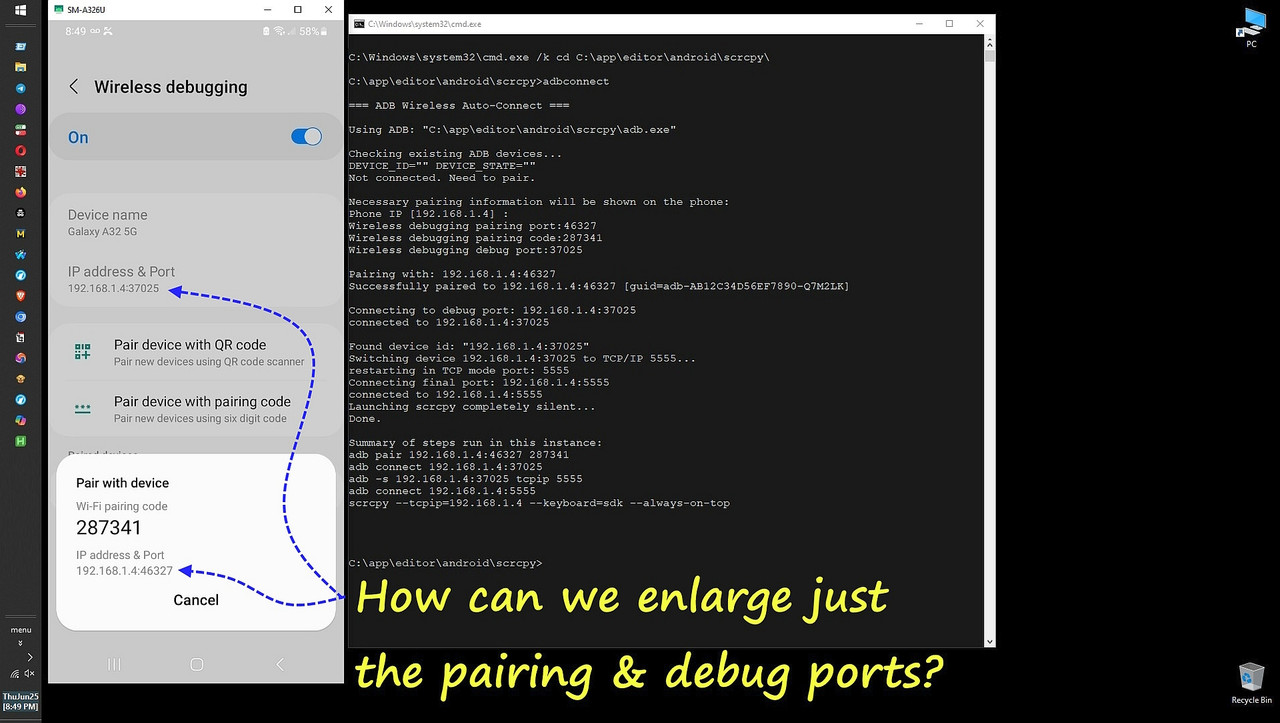
From Newsgroup: alt.os.linux
Herbert Kleebauer wrote:
So many possible answers:
1. Don't use
Pair device with pairing code
Pair new devices using six digit code
but
Pair device with QR code
Pair new devices using QR code scanner
and a QR-Code reader for your PC
2. Use the web cam to display the text on the phone screen on your PC
3. Use an analog or digital magnifier glass
4. Use the built-in magnifier of your phone
https://www.tiktok.com/@mo.bilfunk/video/7186784050210671878
5. or anything else
Hi Herbert,
Thanks for your purposefully helpful kind advice, which I appreciate.
You've helped me a lot over the years, where one of your most famous contributions was the "certutil -f -decode %~f0 showwin.exe>nul" trick.
Little did I know at the time, as I used that script for years, is that at
some point the Genymotion scrcpy folks wrote a vbs script to do the same.
As for the local zoom in an activity, the problem, for me, is Samsung. Apparently, Samsung won't let me do the simplest of zooms I want to do.
Even so, I finally figured the whole damn thing out, and it just sucks.
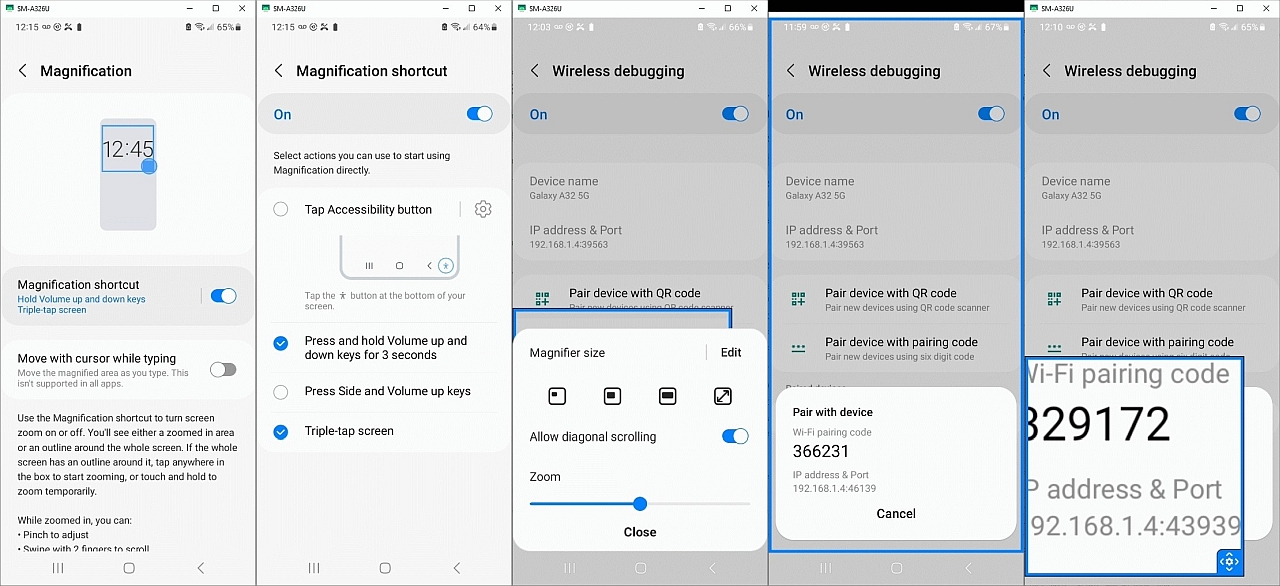
<
https://i.postimg.cc/JzdV4DB4/magnification.jpg>
The more I deal with my Samsung, the more I realize there are 2 Androids
1. Pixel Android (clean, consistent, predictable, open, configurable)
2. Samsung Android (not the above)
In terms of zooming, Pixel Android uses the accessibility framework.
a. On Pixels, triple-tap magnification works everywhere
b. Hence, scrcpy gestures behave predictably
c. System gestures don't conflict with accessibility
Yet, in terms zooming, Samsung rewrites Accessibility
a. Samsung removes triple-tap magnification on my models
b. Hides magnification options depending on other settings
c. Blocks gesture-based accessibility during screen mirroring
d. Replaces Google's gesture recognizers with Samsung's own
Worse, Samsung uses the same words (shortcut, triple-tap) as Google, in
terms of accessibility, but they mean completely different things.
On a Pixel, a shortcut is an icon I tap to start something, while a
triple-tap anywhere on the screen is one way to do a zoom.
On Samsung, a magnification shortcut is simply a way to activate the
magnifier, like a switch, where one way is via a triple tap trigger.
Samsung lets us choose how to activate the magnifier.
They do not allow us to zoom the screen by themselves.
They only turn on the magnifier.
Samsung:Android13
Settings > Accessibility > Visibility enhancements > Magnification
Magnification shortcut = on
Longpress on that last setting to open another activity to set
(_)Tap Accessibility button
(x)Press nd hold Volume up and down keys for 3 seconds
(_)Press Side and Volume up keys
(x)Triple-tap scren
Then I go to the Developer options > Wireless debugging activity.
The first time I use two hands to press & hold volume up & volume down,
after I inevitably end up changing the actual media volume controls,
I get the warning:
"Use Volume keys for Accessibility?
Press and hold both Volume keys for three seconds to use Magnification.
You can select a different function in Settings > Accessibility >
Advanced settings." [Don't use] [Use]
And then, the second time I use both hands to activate it, I get a blue
border around the entire screen, where I can pinch to zoom at a location.
It's clumsy, but I can tap on a teeeny-tiny port and that zooms to it, but
then I have to move the screen around because the zoom is imperfect.
The clumsiness persists in that when you want to zoom into the second port,
I can't just move the screen. I have to first tap and then move it.
Exiting takes two hands again, as you exit the blue box how you got in it. Since two hands on a phone is clumsy, I set the triple-tap next.
Now, when I triple tap, I get a blue box with the suggestion:
"Drag the handle to move the window.
Tap the handle to adjust the magnification"
Again, exiting is a clumsy repeat of the say convoluted entrance method.
Apparently Samsung removed the elegant Pixel-style "triple-tap to zoom" and replaced it with a magnification mode that behaves like a clumsy separate
tool we must enter and exit, not a gesture we can freely use.
Anyway, I got it working (for some forms of the definition of working).
It just sucks.
I'm hoping there is a special magnifier tool app that actually works.
--
Usenet is an assemblage of kind helpful people assisting each other.
--- Synchronet 3.22a-Linux NewsLink 1.2