• compressing and password protect file group individually?

    From JR Dolobson@dolob55J@erols.net to alt.os.linux.ubuntu on Fri Mar 6 16:40:25 2026
    From Newsgroup: alt.os.linux.ubuntu

    In Ubuntu, right now I'm selecting each individual file (left clicking),
    right clicking and choosing compress, keeping same file name, and then entering password, then create but this is going to take a long time for
    well over a hundred files! I don't want to create a new archive name
    for the group as this will mean that all would have to be unzipped
    later. I just want to keep original file names. thanks
    --- Synchronet 3.21d-Linux NewsLink 1.2
  • From George@invalid@invalid.invalid to alt.os.linux.ubuntu on Fri Mar 6 22:55:32 2026
    From Newsgroup: alt.os.linux.ubuntu

    On 06/03/2026 21:40, JR Dolobson wrote:
    In Ubuntu, right now I'm selecting each individual file (left
    clicking), right clicking and choosing compress, keeping same file
    name, and then entering password, then create but this is going to
    take a long time for well over a hundred files!  I don't want to
    create a new archive name for the group as this will mean that all
    would have to be unzipped later.  I just want to keep original file names.  thanks


    Try this:

    #!/usr/bin/env bash
    for f in *; do [[ -f "$f" && ! "$f" =~ \.gz$ ]] && gzip -9 "$f"; done

    ,gz doesn't support passwords!


    --- Synchronet 3.21d-Linux NewsLink 1.2
  • From Paul@nospam@needed.invalid to alt.os.linux.ubuntu on Sat Mar 7 00:01:25 2026
    From Newsgroup: alt.os.linux.ubuntu

    On Fri, 3/6/2026 4:40 PM, JR Dolobson wrote:
    In Ubuntu, right now I'm selecting each individual file (left clicking), right clicking and choosing compress, keeping same file name, and then entering password, then create but this is going to take a long time for well over a hundred files!  I don't want to create a new archive name
    for the group as this will mean that all would have to be unzipped > later.  I just want to keep original file names.  thanks

    You can put a set of files into an archive and access them
    with Archive Manager from Thunar or Nemo.

    If you list the files in the archive, you can hold down
    shift-ctrl and mouse click the random selections you
    want decrypted and decompressed.

    In any case, encryption always comes after compression,
    as encrypted items don't compress. Either a tool
    does the whole job for you (compress then encrypt),
    or you can use two tools, a compression tool first
    followed by an encryption tool.

    I can use 7z instead of p7zip package, to work with .7z archives.
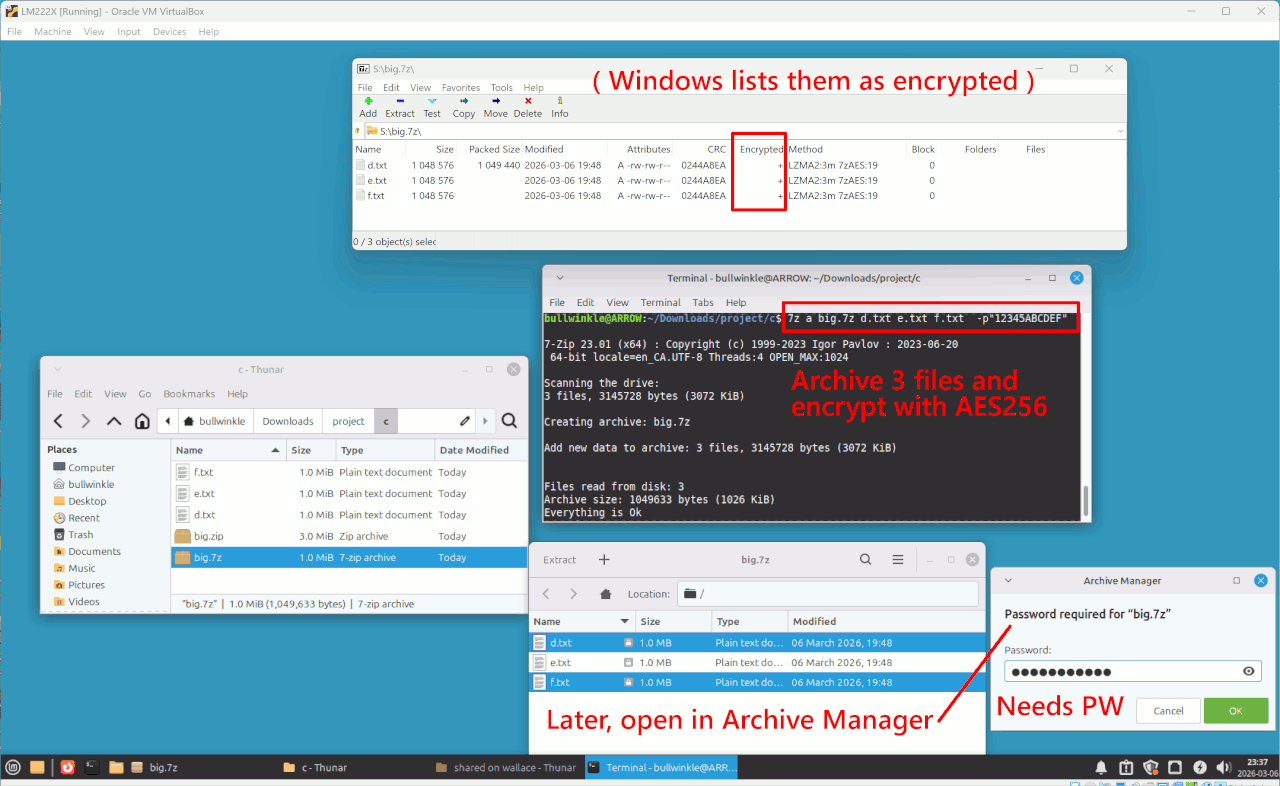
    Here I have put three files into a compressed archive that
    is encrypted with AES256 plus an 11 character password. Then, I
    randomly accessed two of the files, by using shift-ctrl and
    the mouse pointer to join the second file to the set of them
    I was building. I am then asked for the password, by the
    Archive Manager.

    [Picture] Use "Download original" if picture is fuzzy

    https://i.postimg.cc/MGt9r3z1/random-access-files-of-archive.gif

    The rectangle at the top, is a picture of a Windows tool examining
    the same archive file, and the + signs indicate encryption is present.

    I do not have to unpack hundreds of files, to just extract
    one of the files by using Archive Manager.

    Paul
    --- Synchronet 3.21d-Linux NewsLink 1.2