Marion <marion@facts.com> wrote:
On Thu, 10 Apr 2025 17:17:40 -0000 (UTC), badgolferman wrote :
I had to modify the Windows shared folder security permissions to
Read/Write in order to allow writing from the iPhone to the PC.
And does that surprise you?
That is a normal part of setting up a share: deciding what level of
access those to whom it is shared will have.
Easy there, 51. I was adding to your instructions for those in this
group who keep saying they can't write to the Windows shared folder.
Hi badgolferman,
Thank you for adding value so that billions of people can do what most of
them don't know how to do - some of whom are on this very newsgroup now.
We want to always add value - so I appreciate that you explained how to get >> the SMB process to work so that people can copy a file from a PC to iOS.
This is especially important to me because I generally test everything
before I post but I can't test SMB as it doesn't work in my environment.
One question I'd like you to clarify is whether you can do what people want >> to do, which Frank Slootweg also asked - and I concur it's very important. >>
1. From the PC... (Windows or Linux but I think you're on Windows)
2. Can you *initiate* that file/folder transfer from the PC over to iOS?
No, I cannot. Only from the iPhone to the PC.
One question I'd like you to clarify is whether you can do what people want >> to do, which Frank Slootweg also asked - and I concur it's very important. >>
1. From the PC... (Windows or Linux but I think you're on Windows)
2. Can you *initiate* that file/folder transfer from the PC over to iOS?
No, I cannot. Only from the iPhone to the PC.
On Wed, 09 Apr 2025 18:39:38 +0000, Tyrone wrote:
On Apr 9, 2025 at 1:11:30 PM EDT, "Alan" <nuh-uh@nope.com> wrote:
On 2025-04-05 22:30, Marion wrote:
Apple products don't work in the real world so something as trivial as >>>> copying a photo from Windows to iOS is almost impossible without the net. >>> Connect to your Windows machine using the Files app on iOS.
Done.
I said the same thing. Multiple times. But the trolls are not interested in >> the easy, native, SECURE solution. They insist on using the most difficult, >> obscure, 22 step method.
Because they have to maintain the lie that "iOS does not do something as
trivial as copying a photo from Windows to iOS".
And notice that ALL of the "problems" with this method are on the Windows
side. SMB networking is standard. That is how Windows talks to Windows, Linux
and Unix. Of COURSE it can be done on iOS because iOS is Unix.
It does no matter you say you did it right on macos when more than a few others said it doesn't work for them on Windows.
On Thu, 10 Apr 2025 20:57:54 -0000 (UTC), badgolferman wrote :
One question I'd like you to clarify is whether you can do what people want >>> to do, which Frank Slootweg also asked - and I concur it's very important. >>>
1. From the PC... (Windows or Linux but I think you're on Windows)
2. Can you *initiate* that file/folder transfer from the PC over to iOS? >>>
No, I cannot. Only from the iPhone to the PC.
Hmm... thanks for the reply but that's not what I asked but I do appreciate your response. May I clarify the question, since you tried it & I can't?
The first question is whether you can sit at the PC (with the iOS device nowhere near you) and transfer the files while sitting at that PC.
The reason I ask is that's what everyone wants to do and that's what works just fine for all the normal people (who are not Apple trolls, of course).
The second question, no matter where you sit (so for this second question, it's OK to have the iOS device near you) is which direction did not work?
Can a file from the PC be copied to the iOS device in your tests?
On Thu, 10 Apr 2025 20:57:54 -0000 (UTC), badgolferman wrote :
One question I'd like you to clarify is whether you can do what people want >>> to do, which Frank Slootweg also asked - and I concur it's very important. >>>
1. From the PC... (Windows or Linux but I think you're on Windows)
2. Can you *initiate* that file/folder transfer from the PC over to iOS? >>>
No, I cannot. Only from the iPhone to the PC.
Hmm... thanks for the reply but that's not what I asked but I do appreciate your response. May I clarify the question, since you tried it & I can't?
The first question is whether you can sit at the PC (with the iOS device nowhere near you) and transfer the files while sitting at that PC.
The reason I ask is that's what everyone wants to do and that's what works just fine for all the normal people (who are not Apple trolls, of course).
The second question, no matter where you sit (so for this second question, it's OK to have the iOS device near you) is which direction did not work?
Can a file from the PC be copied to the iOS device in your tests?
Marion <marion@facts.com> wrote:
On Thu, 10 Apr 2025 20:57:54 -0000 (UTC), badgolferman wrote :
One question I'd like you to clarify is whether you can do what people want
to do, which Frank Slootweg also asked - and I concur it's very important. >>>>
1. From the PC... (Windows or Linux but I think you're on Windows)
2. Can you *initiate* that file/folder transfer from the PC over to iOS? >>>>
No, I cannot. Only from the iPhone to the PC.
Hmm... thanks for the reply but that's not what I asked but I do appreciate >> your response. May I clarify the question, since you tried it & I can't?
The first question is whether you can sit at the PC (with the iOS device
nowhere near you) and transfer the files while sitting at that PC.
The reason I ask is that's what everyone wants to do and that's what works >> just fine for all the normal people (who are not Apple trolls, of course). >>
The second question, no matter where you sit (so for this second question, >> it's OK to have the iOS device near you) is which direction did not work?
Can a file from the PC be copied to the iOS device in your tests?
No, I cannot push or pull files from the PC to phone. I can only push or
pull files from the phone to the PC.
Can a file from the PC be copied to the iOS device in your tests?
No, I cannot push or pull files from the PC to phone. I can only push or
pull files from the phone to the PC.
On Fri, 11 Apr 2025 00:40:05 -0000 (UTC), badgolferman wrote :
Thanks for showing everyone that all you want is a "win" where you canCan a file from the PC be copied to the iOS device in your tests?
No, I cannot push or pull files from the PC to phone. I can only push or
pull files from the phone to the PC.
Thanks for clarifying that you can't sit at the PC to initiate the process.
Marion <marion@facts.com> wrote at 10:54 this Monday (GMT):
On Mon, 7 Apr 2025 04:30:04 -0000 (UTC), candycanearter07 wrote :
I use Linux myself.
Well then, the universal solution we came up with is good news for you!
Our solution works for *every* operating system. Including Linux.
*Tutorial: How to send files between Windows & iOS over the LAN using LocalSend*
<https://www.novabbs.com/computers/article-flat.php?id=86116&group=alt.comp.os.windows-10#86116>
I only tested PC to/from iOS so it'd be great if you test Linux/iOS.
Here's the Linux LocalSend installation instructions:
<https://localsend.org/download?os=linux>
And here's the LocalSend iOS IPA:
<https://apps.apple.com/us/app/localsend/id1661733229>
All you do is run LocalSend on both platforms and you can then send and
receive files and folders bidirectionally between all the platforms.
If you do test Linux/iOS file transfer, let us know how well it goes.
As the whole point of Usenet is to learn from each others' efforts.
Ah, thanks, but I currently can't install new apps.
candycanearter07 <candycanearter07@candycanearter07.nomail.afraid> wrote:
Marion <marion@facts.com> wrote at 10:54 this Monday (GMT):
On Mon, 7 Apr 2025 04:30:04 -0000 (UTC), candycanearter07 wrote :
I use Linux myself.
Well then, the universal solution we came up with is good news for you!
Our solution works for *every* operating system. Including Linux.
*Tutorial: How to send files between Windows & iOS over the LAN using LocalSend*
<https://www.novabbs.com/computers/article-flat.php?id=86116&group=alt.comp.os.windows-10#86116>
I only tested PC to/from iOS so it'd be great if you test Linux/iOS.
Here's the Linux LocalSend installation instructions:
<https://localsend.org/download?os=linux>
And here's the LocalSend iOS IPA:
<https://apps.apple.com/us/app/localsend/id1661733229>
All you do is run LocalSend on both platforms and you can then send and
receive files and folders bidirectionally between all the platforms.
If you do test Linux/iOS file transfer, let us know how well it goes.
As the whole point of Usenet is to learn from each others' efforts.
Ah, thanks, but I currently can't install new apps.
Then use the far simpler method of connecting to your Windows machine via
the Files app. Make sure you have Sharing enabled in Windows first. Simple and new apps required.
Chris <ithinkiam@gmail.com> wrote:
candycanearter07 <candycanearter07@candycanearter07.nomail.afraid> wrote: >>> Marion <marion@facts.com> wrote at 10:54 this Monday (GMT):
On Mon, 7 Apr 2025 04:30:04 -0000 (UTC), candycanearter07 wrote :
I use Linux myself.
Well then, the universal solution we came up with is good news for you! >>>> Our solution works for *every* operating system. Including Linux.
*Tutorial: How to send files between Windows & iOS over the LAN using
LocalSend*
<https://www.novabbs.com/computers/article-flat.php?id=86116&group=alt.comp.os.windows-10#86116>
I only tested PC to/from iOS so it'd be great if you test Linux/iOS.
Here's the Linux LocalSend installation instructions:
<https://localsend.org/download?os=linux>
And here's the LocalSend iOS IPA:
<https://apps.apple.com/us/app/localsend/id1661733229>
All you do is run LocalSend on both platforms and you can then send and >>>> receive files and folders bidirectionally between all the platforms.
If you do test Linux/iOS file transfer, let us know how well it goes.
As the whole point of Usenet is to learn from each others' efforts.
Ah, thanks, but I currently can't install new apps.
Then use the far simpler method of connecting to your Windows machine via
the Files app. Make sure you have Sharing enabled in Windows first. Simple >> and new apps required.
*no* new apps required.
On Apr 12, 2025 at 3:22:37 AM EDT, "Chris" <ithinkiam@gmail.com> wrote:
Chris <ithinkiam@gmail.com> wrote:
candycanearter07 <candycanearter07@candycanearter07.nomail.afraid> wrote: >>>> Marion <marion@facts.com> wrote at 10:54 this Monday (GMT):
On Mon, 7 Apr 2025 04:30:04 -0000 (UTC), candycanearter07 wrote :
I use Linux myself.
Well then, the universal solution we came up with is good news for you! >>>>> Our solution works for *every* operating system. Including Linux.
*Tutorial: How to send files between Windows & iOS over the LAN using >>>>> LocalSend*
<https://www.novabbs.com/computers/article-flat.php?id=86116&group=alt.comp.os.windows-10#86116>
I only tested PC to/from iOS so it'd be great if you test Linux/iOS. >>>>>
Here's the Linux LocalSend installation instructions:
<https://localsend.org/download?os=linux>
And here's the LocalSend iOS IPA:
<https://apps.apple.com/us/app/localsend/id1661733229>
All you do is run LocalSend on both platforms and you can then send and >>>>> receive files and folders bidirectionally between all the platforms. >>>>>
If you do test Linux/iOS file transfer, let us know how well it goes. >>>>> As the whole point of Usenet is to learn from each others' efforts.
Ah, thanks, but I currently can't install new apps.
Then use the far simpler method of connecting to your Windows machine via >>> the Files app. Make sure you have Sharing enabled in Windows first. Simple >>> and new apps required.
*no* new apps required.
You clearly do not understand. THAT IS IMPOSSIBLE!
Why? Because the one person here who has never even TRIED to do it (Marion The Apple Troll), says THAT IS IMPOSSIBLE! It is quote "Imaginary Functionality".
Nevermind that several people have explained how to do it. Marion claims that "Many people say it does not work". Which really means that "Many people are doing something wrong". Probably not enabling sharing on Windows first.
Tyrone <none@none.none> wrote:
On Apr 12, 2025 at 3:22:37 AM EDT, "Chris" <ithinkiam@gmail.com> wrote:
Chris <ithinkiam@gmail.com> wrote:
candycanearter07 <candycanearter07@candycanearter07.nomail.afraid> wrote: >>>>> Marion <marion@facts.com> wrote at 10:54 this Monday (GMT):
On Mon, 7 Apr 2025 04:30:04 -0000 (UTC), candycanearter07 wrote :
I use Linux myself.
Well then, the universal solution we came up with is good news for you! >>>>>> Our solution works for *every* operating system. Including Linux.
*Tutorial: How to send files between Windows & iOS over the LAN using >>>>>> LocalSend*
<https://www.novabbs.com/computers/article-flat.php?id=86116&group=alt.comp.os.windows-10#86116>
I only tested PC to/from iOS so it'd be great if you test Linux/iOS. >>>>>>
Here's the Linux LocalSend installation instructions:
<https://localsend.org/download?os=linux>
And here's the LocalSend iOS IPA:
<https://apps.apple.com/us/app/localsend/id1661733229>
All you do is run LocalSend on both platforms and you can then send and >>>>>> receive files and folders bidirectionally between all the platforms. >>>>>>
If you do test Linux/iOS file transfer, let us know how well it goes. >>>>>> As the whole point of Usenet is to learn from each others' efforts. >>>>>
Ah, thanks, but I currently can't install new apps.
Then use the far simpler method of connecting to your Windows machine via >>>> the Files app. Make sure you have Sharing enabled in Windows first. Simple >>>> and new apps required.
*no* new apps required.
You clearly do not understand. THAT IS IMPOSSIBLE!
Why? Because the one person here who has never even TRIED to do it (Marion >> The Apple Troll), says THAT IS IMPOSSIBLE! It is quote "Imaginary
Functionality".
Nevermind that several people have explained how to do it. Marion claims that
"Many people say it does not work". Which really means that "Many people are >> doing something wrong". Probably not enabling sharing on Windows first.
I fail to understand why you guys are so against someone using a different method to transfer files between a PC and iPhone.
Yes, the iOS native method is good enough for some people, but others want
to do it a different way. The more choices, the better.
Local Send and Phone Link both work by allowing files to be sent or
retrieved from the PC to the iPhone. The iOS Files app only allows files to be sent or retrieved from the phone.
There is no disputing any of this. Why keep fighting about it?
Tyrone <none@none.none> wrote:
On Apr 12, 2025 at 3:22:37 AM EDT, "Chris" <ithinkiam@gmail.com> wrote:
Chris <ithinkiam@gmail.com> wrote:
candycanearter07 <candycanearter07@candycanearter07.nomail.afraid> wrote: >>>>> Marion <marion@facts.com> wrote at 10:54 this Monday (GMT):
On Mon, 7 Apr 2025 04:30:04 -0000 (UTC), candycanearter07 wrote :
I use Linux myself.
Well then, the universal solution we came up with is good news for you! >>>>>> Our solution works for *every* operating system. Including Linux.
*Tutorial: How to send files between Windows & iOS over the LAN using >>>>>> LocalSend*
<https://www.novabbs.com/computers/article-flat.php?id=86116&group=alt.comp.os.windows-10#86116>
I only tested PC to/from iOS so it'd be great if you test Linux/iOS. >>>>>>
Here's the Linux LocalSend installation instructions:
<https://localsend.org/download?os=linux>
And here's the LocalSend iOS IPA:
<https://apps.apple.com/us/app/localsend/id1661733229>
All you do is run LocalSend on both platforms and you can then send and >>>>>> receive files and folders bidirectionally between all the platforms. >>>>>>
If you do test Linux/iOS file transfer, let us know how well it goes. >>>>>> As the whole point of Usenet is to learn from each others' efforts. >>>>>
Ah, thanks, but I currently can't install new apps.
Then use the far simpler method of connecting to your Windows machine via >>>> the Files app. Make sure you have Sharing enabled in Windows first. Simple >>>> and new apps required.
*no* new apps required.
You clearly do not understand. THAT IS IMPOSSIBLE!
Why? Because the one person here who has never even TRIED to do it (Marion >> The Apple Troll), says THAT IS IMPOSSIBLE! It is quote "Imaginary
Functionality".
Nevermind that several people have explained how to do it. Marion claims that
"Many people say it does not work". Which really means that "Many people are >> doing something wrong". Probably not enabling sharing on Windows first.
I fail to understand why you guys are so against someone using a different method to transfer files between a PC and iPhone.
On 2025-04-12 14:55, badgolferman wrote:
Tyrone <none@none.none> wrote:
On Apr 12, 2025 at 3:22:37 AM EDT, "Chris" <ithinkiam@gmail.com> wrote: >>>
Chris <ithinkiam@gmail.com> wrote:
candycanearter07 <candycanearter07@candycanearter07.nomail.afraid> wrote: >>>>>> Marion <marion@facts.com> wrote at 10:54 this Monday (GMT):
On Mon, 7 Apr 2025 04:30:04 -0000 (UTC), candycanearter07 wrote : >>>>>>>
I use Linux myself.
Well then, the universal solution we came up with is good news for you! >>>>>>> Our solution works for *every* operating system. Including Linux. >>>>>>>
*Tutorial: How to send files between Windows & iOS over the LAN using >>>>>>> LocalSend*
<https://www.novabbs.com/computers/article-flat.php?id=86116&group=alt.comp.os.windows-10#86116>
I only tested PC to/from iOS so it'd be great if you test Linux/iOS. >>>>>>>
Here's the Linux LocalSend installation instructions:
<https://localsend.org/download?os=linux>
And here's the LocalSend iOS IPA:
<https://apps.apple.com/us/app/localsend/id1661733229>
All you do is run LocalSend on both platforms and you can then send and >>>>>>> receive files and folders bidirectionally between all the platforms. >>>>>>>
If you do test Linux/iOS file transfer, let us know how well it goes. >>>>>>> As the whole point of Usenet is to learn from each others' efforts. >>>>>>
Ah, thanks, but I currently can't install new apps.
Then use the far simpler method of connecting to your Windows machine via >>>>> the Files app. Make sure you have Sharing enabled in Windows first. Simple
and new apps required.
*no* new apps required.
You clearly do not understand. THAT IS IMPOSSIBLE!
Why? Because the one person here who has never even TRIED to do it (Marion >>> The Apple Troll), says THAT IS IMPOSSIBLE! It is quote "Imaginary
Functionality".
Nevermind that several people have explained how to do it. Marion claims that
"Many people say it does not work". Which really means that "Many people are
doing something wrong". Probably not enabling sharing on Windows first. >>>
I fail to understand why you guys are so against someone using a different >> method to transfer files between a PC and iPhone.
Where has anyone said anything remotely like that?
The problem is that Arlen is STILL claiming that it can't be done
without installing something on both sides. NOTHING needs to be
installed. It CAN be done, but he is too much of a child to admit he
is wrong.
That you don't know about it does not mean it does not exist.
Tyrone wrote:
The problem is that Arlen is STILL claiming that it can't be done
without installing something on both sides. NOTHING needs to be
installed. It CAN be done, but he is too much of a child to admit he
is wrong.
Arlen accepted when I told him I could transfer using the Files app.
He has also admitted to being wrong numerous times and apologized for
it.
Chris <ithinkiam@gmail.com> wrote:
badgolferman <REMOVETHISbadgolferman@gmail.com> wrote:
Yes, we use Microsoft Intune. They switched over from MaaS360 which was a >>> royal pain in the ass. They are also heavily encouraging us to store ALL >>> our documents on OneDrive and Sharepoint rather than locally on the PC. So >>> far I’ve resisted doing that, but I do keep critical copies on Sharepoint >>> for my colleagues to use in case I get hit by a bus.
Why not just use sharepoint? It's so much easier for everyone. The bus
factor is an important consideration for an organisation.
I have ALL my work files on Sharepoint which makes life easier for me and
my colleagues. I encourage my team to do the same.
I often work offline from home or the road and am not always on the company LAN. I also don’t want my files to get lost or locked up by some technical glitch or hack job. Does that make sense?
On Sun, 13 Apr 2025 00:25:41 +0000, Tyrone wrote :
That you don't know about it does not mean it does not exist.
It's clear you've never read any of your outdated, ancient shill links.
You are well aware I own plenty of Windows, Android & iOS devices, so I
know that Apple locks its owners into their deep subterranean ecosystem.
You Apple trolls, in general, have never used Android so you have no idea
how trivial it is with adult operating systems to copy files onto them.
I'm well aware this copy (which is trivial on every adult platform), is
made miserable as Apple designed the toy iOS operating system that way.
Unfortunately, the only way to tunnel out of the dark dank subterranean tunnels that are the Apple ecosystem, is by some kind of clusterfuck.
Most of the time, people resort to 3rd-party clusterfucks, such as iMazing, DearMob iPhone Manager, Send Anywhere, AnyTrans, FE File Explorer, etc.,
each of which has its own issues, mot the least of which is cost.
Even you just now listed a 3rd-party clusterfuck that requires the Internet in order to copy a file from the PC on the desk to the iOS device on it.
<https://www.anyviewer.com/ss/download/AnyViewerSetup.exe>
Although they do have a local version but it requires login/password
because it's actually using the Internet, much like iOS does every day.
The fact you listed that clusterfuck as a *solution* shows not only that
you don't understand the problem set, but you don't read your own links.
You never do. For years, all you do to "support" your lies is find a link with the keywords - but you *never* read those links because your own link proves that you're trying to supply us with clusterfucks worse than SMB!
As further proof you don't even read your own links, nospam, is your suggestion of Windows Remote Desktop is absurd, given iOS devices do not
have a built-in Remote Desktop server that a standard Windows Remote
Desktop client can connect to.
For iOS, you would need to install a Remote Desktop client app (e.g., Microsoft Remote Desktop, TeamViewer, AnyDesk) which is a clusterfuck.
To use your SMB server model, you'll have to install something like "LAN drive SAMBA Server/Client" which is yet another clusterfuck you proposed. https://apps.apple.com/us/app/lan-drive-samba-server-client/id1317727404
Of course, there's always the iTunes bloatware abomination clusterfuck.
But nobody other than an Apple troll would contemplate that disaster.
There is also Documents by Readdle (not really free) clusterfucks, and the Send Anywhere clusterfuck (which has a free tier).
Then there's that ancient outdated Reddit thread you referenced because you can't find anything within iOS 17 or iOS 18 that works. Classic nospam.
There is Vysor, which will allow you, from Windows, to operate the iOS device, but it costs money for the drag-and-drop of files to iOS' filesys.
In summary, what "just works" on all other operating systems, is a clusterfuck on iOS - no matter which clusterfuck you choose to employ.
badgolferman <REMOVETHISbadgolferman@gmail.com> wrote:
Chris <ithinkiam@gmail.com> wrote:
badgolferman <REMOVETHISbadgolferman@gmail.com> wrote:
Yes, we use Microsoft Intune. They switched over from MaaS360
which was a royal pain in the ass. They are also heavily
encouraging us to store ALL our documents on OneDrive and
Sharepoint rather than locally on the PC. So far I’ve resisted
doing that, but I do keep critical copies on Sharepoint for my >>>>colleagues to use in case I get hit by a bus.
Why not just use sharepoint? It's so much easier for everyone.
The bus factor is an important consideration for an
organisation.
I have ALL my work files on Sharepoint which makes life easier
for me and my colleagues. I encourage my team to do the same.
I often work offline from home or the road and am not always on
the company LAN. I also don’t want my files to get lost or locked
up by some technical glitch or hack job. Does that make sense?
Not really.
I too am often away from the office. SharePoint/OneDrive works fine.
You're more likely to irrecoverably lose local files - to hardware
loss or failure - than using cloud resources.
Very occasionally there is a sync issue with oneDrive but you can
always go back to a working version due to the in-built history.
Chris wrote:
badgolferman <REMOVETHISbadgolferman@gmail.com> wrote:
Chris <ithinkiam@gmail.com> wrote:
badgolferman <REMOVETHISbadgolferman@gmail.com> wrote:
Yes, we use Microsoft Intune. They switched over from MaaS360
which was a royal pain in the ass. They are also heavily
encouraging us to store ALL our documents on OneDrive and
Sharepoint rather than locally on the PC. So far I’ve resisted
doing that, but I do keep critical copies on Sharepoint for my
colleagues to use in case I get hit by a bus.
Why not just use sharepoint? It's so much easier for everyone.
The bus factor is an important consideration for an
organisation.
I have ALL my work files on Sharepoint which makes life easier
for me and my colleagues. I encourage my team to do the same.
I often work offline from home or the road and am not always on
the company LAN. I also don’t want my files to get lost or locked
up by some technical glitch or hack job. Does that make sense?
Not really.
I too am often away from the office. SharePoint/OneDrive works fine.
You're more likely to irrecoverably lose local files - to hardware
loss or failure - than using cloud resources.
Very occasionally there is a sync issue with oneDrive but you can
always go back to a working version due to the in-built history.
Well, I disagree with you. Most of my work documents are Excel files
and they just don't translate well to Sharepoint when you want to work
on them. Keeping backup copies on Sharepoint is one thing, but leaving
my working versions there is something I'm unwilling to do.
This issue is much like the one being argued to death right now. You
prefer the cloud method of working documents and I prefer the local
method of working copies. Both have their pros and cons, but at least
we have a choice on how we want to implement it. The same goes for transferring files between iOS devices and PCs. Some people prefer initiating the transfer from the iPhone side and some people prefer initiating the transfer from the PC side. Both methods work but the
pros of one method outweigh the pros of the other method for each
person.
candycanearter07 <candycanearter07@candycanearter07.nomail.afraid> wrote:
Marion <marion@facts.com> wrote at 10:54 this Monday (GMT):
On Mon, 7 Apr 2025 04:30:04 -0000 (UTC), candycanearter07 wrote :
I use Linux myself.
Well then, the universal solution we came up with is good news for you!
Our solution works for *every* operating system. Including Linux.
*Tutorial: How to send files between Windows & iOS over the LAN using LocalSend*
<https://www.novabbs.com/computers/article-flat.php?id=86116&group=alt.comp.os.windows-10#86116>
I only tested PC to/from iOS so it'd be great if you test Linux/iOS.
Here's the Linux LocalSend installation instructions:
<https://localsend.org/download?os=linux>
And here's the LocalSend iOS IPA:
<https://apps.apple.com/us/app/localsend/id1661733229>
All you do is run LocalSend on both platforms and you can then send and
receive files and folders bidirectionally between all the platforms.
If you do test Linux/iOS file transfer, let us know how well it goes.
As the whole point of Usenet is to learn from each others' efforts.
Ah, thanks, but I currently can't install new apps.
Then use the far simpler method of connecting to your Windows machine via
the Files app. Make sure you have Sharing enabled in Windows first. Simple and new apps required.
On 2025-04-13 05:46, badgolferman wrote:
Chris wrote:
badgolferman <REMOVETHISbadgolferman@gmail.com> wrote:
Chris <ithinkiam@gmail.com> wrote:
badgolferman <REMOVETHISbadgolferman@gmail.com> wrote:
Yes, we use Microsoft Intune. They switched over from
MaaS360 which was a royal pain in the ass. They are also
heavily encouraging us to store ALL our documents on
OneDrive and Sharepoint rather than locally on the PC. So
far I’ve resisted doing that, but I do keep critical copies
on Sharepoint for my colleagues to use in case I get hit
by a bus.
Why not just use sharepoint? It's so much easier for everyone.
The bus factor is an important consideration for an
organisation.
I have ALL my work files on Sharepoint which makes life easier
for me and my colleagues. I encourage my team to do the same.
I often work offline from home or the road and am not always on
the company LAN. I also don’t want my files to get lost or
locked up by some technical glitch or hack job. Does that make
sense?
Not really.
I too am often away from the office. SharePoint/OneDrive works
fine. You're more likely to irrecoverably lose local files - to
hardware loss or failure - than using cloud resources.
Very occasionally there is a sync issue with oneDrive but you can
always go back to a working version due to the in-built history.
Well, I disagree with you. Most of my work documents are Excel
files and they just don't translate well to Sharepoint when you
want to work on them. Keeping backup copies on Sharepoint is one
thing, but leaving my working versions there is something I'm
unwilling to do.
I'm using Excel with online files all the time and never have a
problem.
--
This issue is much like the one being argued to death right now.
You prefer the cloud method of working documents and I prefer the
local method of working copies. Both have their pros and cons, but
at least we have a choice on how we want to implement it. The same
goes for transferring files between iOS devices and PCs. Some
people prefer initiating the transfer from the iPhone side and some
people prefer initiating the transfer from the PC side. Both
methods work but the pros of one method outweigh the pros of the
other method for each person.
On 2025-04-05 22:30, Marion wrote:
Apple products don't work in the real world so something as trivial asConnect to your Windows machine using the Files app on iOS.
copying a photo from Windows to iOS is almost impossible without the net.
Done.
On 4/9/2025 1:11 PM, Alan wrote:
On 2025-04-05 22:30, Marion wrote:
Apple products don't work in the real world so something as trivial as
copying a photo from Windows to iOS is almost impossible without the net. >> Connect to your Windows machine using the Files app on iOS.
Done.
That would be OK if it worked. The transfer is one-way, iOS to Windows, unless there is a setting I'm missing. The iPhone drive appears to be read-only to Windows File Manager.
Alan wrote:
On 2025-04-13 05:46, badgolferman wrote:
Chris wrote:
badgolferman <REMOVETHISbadgolferman@gmail.com> wrote:
Chris <ithinkiam@gmail.com> wrote:
badgolferman <REMOVETHISbadgolferman@gmail.com> wrote:
Yes, we use Microsoft Intune. They switched over from
MaaS360 which was a royal pain in the ass. They are also
heavily encouraging us to store ALL our documents on
OneDrive and Sharepoint rather than locally on the PC. So
far I’ve resisted doing that, but I do keep critical copies
on Sharepoint for my colleagues to use in case I get hit
by a bus.
Why not just use sharepoint? It's so much easier for everyone.
The bus factor is an important consideration for an
organisation.
I have ALL my work files on Sharepoint which makes life easier
for me and my colleagues. I encourage my team to do the same.
I often work offline from home or the road and am not always on
the company LAN. I also don’t want my files to get lost or
locked up by some technical glitch or hack job. Does that make
sense?
Not really.
I too am often away from the office. SharePoint/OneDrive works
fine. You're more likely to irrecoverably lose local files - to
hardware loss or failure - than using cloud resources.
Very occasionally there is a sync issue with oneDrive but you can
always go back to a working version due to the in-built history.
Well, I disagree with you. Most of my work documents are Excel
files and they just don't translate well to Sharepoint when you
want to work on them. Keeping backup copies on Sharepoint is one
thing, but leaving my working versions there is something I'm
unwilling to do.
I'm using Excel with online files all the time and never have a
problem.
Using a PC bring up an Excel file in Sharepoint. Select a cell with
text in it. Press F2 on your keyboard to enable editing within the
cell. Press Insert on your keyboard to enable typeover of the
characters. That won't work on Sharepoint, but it works on the PC application. I typeover individual characters in cells all the time
and want the original number visible while I'm editing that cell. It's cumbersome to use Delete and Backspace keys when the Insert key does
exactly what I want.
Another annoying thing is text size of the whole file. It defaults to
100% when I want it at 80%.
I also have 3-4 spreadsheets open while copying and pasting data back
and forth between them. I can arrange these windows on my PC where
they are all visible at once and easily Tab from one to another.
Keyboard shortcuts don't work elegantly through a web browser.
These are just some of the issues with working on Excel files on
Sharepoint. There are several more and that's why I prefer using the
local version of Microsoft apps rather than the web version.
On 4/9/2025 1:11 PM, Alan wrote:
On 2025-04-05 22:30, Marion wrote:
Apple products don't work in the real world so something as trivial asConnect to your Windows machine using the Files app on iOS.
copying a photo from Windows to iOS is almost impossible without the
net.
Done.
That would be OK if it worked. The transfer is one-way, iOS to Windows, unless there is a setting I'm missing. The iPhone drive appears to be read-only to Windows File Manager.
On Apr 14, 2025 at 2:05:31 PM EDT, "Tom Elam" <thomas.e.elam@gmail.com> wrote:
On 4/9/2025 1:11 PM, Alan wrote:
On 2025-04-05 22:30, Marion wrote:
Apple products don't work in the real world so something as trivial as >>>> copying a photo from Windows to iOS is almost impossible without the net. >>> Connect to your Windows machine using the Files app on iOS.
Done.
That would be OK if it worked. The transfer is one-way, iOS to Windows,
unless there is a setting I'm missing. The iPhone drive appears to be
read-only to Windows File Manager.
The transfer is both ways.
In the Files app, you connect to the Windows shared drive/folder. Again, in the Files app, you then copy to/from Windows. The controls are on the Windows side. The share needs read and write permissions to copy TO Windows. Copying FROM Windows to iOS needs only read permission on the Windows share.
Since it works, it is indeed OK.
I also have 3-4 spreadsheets open while copying and pasting data back
and forth between them. I can arrange these windows on my PC where
they are all visible at once and easily Tab from one to another.
Keyboard shortcuts don't work elegantly through a web browser.
These are just some of the issues with working on Excel files on
Sharepoint. There are several more and that's why I prefer using the
local version of Microsoft apps rather than the web version.
badgolferman <REMOVETHISbadgolferman@gmail.com> wrote:
I also have 3-4 spreadsheets open while copying and pasting data back
and forth between them. I can arrange these windows on my PC where
they are all visible at once and easily Tab from one to another.
Keyboard shortcuts don't work elegantly through a web browser.
Ah. That wasn't what I was suggesting.
These are just some of the issues with working on Excel files on
Sharepoint. There are several more and that's why I prefer using the
local version of Microsoft apps rather than the web version.
Local MS apps and sharepoint files aren't either/or. You can use your local apps with files synced dynamically on sharepoint.
I always do this, as I agree with you the webapps are not fully functional. I've set the default to open all files using my local apps.
I even have my sharepoint files synced locally on my machine for working on when I'm remote or have no network (i.e. on a plane).Same.
On 4/9/2025 1:11 PM, Alan wrote:
On 2025-04-05 22:30, Marion wrote:
Apple products don't work in the real world so something as trivialConnect to your Windows machine using the Files app on iOS.
as copying a photo from Windows to iOS is almost impossible without
the net.
Done.
That would be OK if it worked. The transfer is one-way, iOS to
Windows,
On 2025-04-14 11:20, Tyrone wrote:
On Apr 14, 2025 at 2:05:31 PM EDT, "Tom Elam" <thomas.e.elam@gmail.com> wrote:
On 4/9/2025 1:11 PM, Alan wrote:
On 2025-04-05 22:30, Marion wrote:
Apple products don't work in the real world so something asConnect to your Windows machine using the Files app on iOS.
trivial as copying a photo from Windows to iOS is almost
impossible without the net.
Done.
That would be OK if it worked. The transfer is one-way, iOS to
Windows, unless there is a setting I'm missing. The iPhone drive
appears to be read-only to Windows File Manager.
The transfer is both ways.
In the Files app, you connect to the Windows shared drive/folder.
Again, in the Files app, you then copy to/from Windows. The controls
are on the Windows side. The share needs read and write permissions
to copy TO Windows. Copying FROM Windows to iOS needs only read
permission on the Windows share.
Since it works, it is indeed OK.
In a week, Liarboy Tom will be back to tell you this information as if
he knew it all along.
Then use the far simpler method of connecting to your Windows machine via
the Files app. Make sure you have Sharing enabled in Windows first. Simple >> and new apps required.
Thanks, but I use Linux, and I already stated I'm fine with just using
ifuse and a usb cable. Or KDE Connect.
The fact that these trolls *don't* know such a basic fact it says
everything you need to know about their ignorance about all things
Apple.
That would be OK if it worked. The transfer is one-way, iOS to
Windows,
Bullshit. It's a standard SMB connection where either side can add/edit
files to the share. How in the world do you people not know this?
On 15 Apr 2025 16:13:38 GMT, Jolly Roger wrote :
That would be OK if it worked. The transfer is one-way, iOS to
Windows,
Bullshit. It's a standard SMB connection where either side can add/edit
files to the share. How in the world do you people not know this?
While the Files app eventually added an SMB client, the real problem to
solve if we ever want Apple devices to work in the real world is to be able to transfer files bidirectionally between iOS & Android/Linux.
While setting up an SMB server on Linux isn't all that difficult, since
most Linux desktop owners will also have root access, it won't be that
simple to set up an SMB server on Android (since most are not rooted).
Hence, the real problem with Files:SMB is that it doesn't work in the real world, whereas, the suggestion of using LocalSend does work in the real world.
That, in a nutshell, is the fundamental difference between the subterranean caverns of the underground Apple "ecosystem" and the real world above it.
On 15 Apr 2025 16:13:38 GMT, Jolly Roger wrote :
That would be OK if it worked. The transfer is one-way, iOS to
Windows,
Bullshit. It's a standard SMB connection where either side can add/edit
files to the share. How in the world do you people not know this?
While the Files app eventually added an SMB client, the real problem to
solve if we ever want Apple devices to work in the real world is to be able to transfer files bidirectionally between iOS & Android/Linux.
While setting up an SMB server on Linux isn't all that difficult, since
most Linux desktop owners will also have root access, it won't be that
simple to set up an SMB server on Android (since most are not rooted).
Hence, the real problem with Files:SMB is that it doesn't work
On 2025-04-15, Marion <marion@facts.com> wrote:
On 15 Apr 2025 16:13:38 GMT, Jolly Roger wrote :
That would be OK if it worked. The transfer is one-way, iOS to
Windows,
Bullshit. It's a standard SMB connection where either side can add/edit
files to the share. How in the world do you people not know this?
While the Files app eventually added an SMB client, the real problem to
solve if we ever want Apple devices to work in the real world is to be able >> to transfer files bidirectionally between iOS & Android/Linux.
SMB connections are bi-directional. If you knew anything about
networking, you'd know that.
While setting up an SMB server on Linux isn't all that difficult, since
most Linux desktop owners will also have root access, it won't be that
simple to set up an SMB server on Android (since most are not rooted).
Where the server resides is irrelevant since SMB connections are bi-directional.
Hence, the real problem with Files:SMB is that it doesn't work
Several people have told you it works, yet you continue to push this
lie. You only come off looking like the foolish troll you are. And badgolferman with you for siding with your lies over reality.
If you have 2 male (or 2 female) connectors, no
connection can be made.
On Apr 15, 2025 at 5:50:33 PM EDT, "Jolly Roger" <jollyroger@pobox.com> wrote:
On 2025-04-15, Marion <marion@facts.com> wrote:
On 15 Apr 2025 16:13:38 GMT, Jolly Roger wrote :
That would be OK if it worked. The transfer is one-way, iOS to
Windows,
Bullshit. It's a standard SMB connection where either side can add/edit >>>> files to the share. How in the world do you people not know this?
While the Files app eventually added an SMB client, the real problem to
solve if we ever want Apple devices to work in the real world is to be able >>> to transfer files bidirectionally between iOS & Android/Linux.
SMB connections are bi-directional. If you knew anything about
networking, you'd know that.
Only if the SERVER being connected to by the CLIENT allows it.
While setting up an SMB server on Linux isn't all that difficult, since
most Linux desktop owners will also have root access, it won't be that
simple to set up an SMB server on Android (since most are not rooted).
Where the server resides is irrelevant since SMB connections are
bi-directional.
Only if the SERVER being connected to by the CLIENT allows it.
Hence, the real problem with Files:SMB is that it doesn't work
Several people have told you it works, yet you continue to push this
lie. You only come off looking like the foolish troll you are. And
badgolferman with you for siding with your lies over reality.
It works when connecting to a SMB SERVER. Since phones don't typically have a built-in SMB SERVER, there is nothing for an SMB CLIENT to connect to.
So iOS <> Android using SMB is not going to work (either direction) until one or the other has an SMB SERVER installed. Both are CLIENTS.
Thus, connecting the Files app (SMB CLIENT) to a Windows SMB SERVER or a MacOS
SMB SERVER or a Linux SMB SERVER works fine.
But you can't connect Windows or MacOS or Linux to a phone. The Client contacts the Server. The Server authenticates the Client. The Client then has whatever access permissions the Server grants.
Client/Server. Networking 101, folks. Think of extension power cords and male/female connectors. If you have 2 male (or 2 female) connectors, no connection can be made. 2 clients can't connect and neither can 2 servers.
But Windows and Unix and Linux are both Clients AND Servers. You can connect to other servers with Windows/Linux/Unix AND you can receive Client connections.
I assume that no one ever considered a phone needing to be a server. As long as it can connect TO servers, there is no need for an SMB server on a phone.
Thus, the bottom line is simple. The Files app on iOS works fine. It is VERY EASY to "Copy a photo from Windows to iOS without needing Internet servers".
And 2 phone users are not going worry about any of this. One will simply text the photo to the other. Without needing to be on the same wifi network. Without needing to be in the same country.
That's Networking 201.
Tyrone wrote:
If you have 2 male (or 2 female) connectors, no
connection can be made.
I don't know.... that seems to be a common thing these days and being
taught in elementary schools.
On 15 Apr 2025 16:14:39 GMT, Jolly Roger wrote :
The fact that these trolls *don't* know such a basic fact it says
everything you need to know about their ignorance about all things
Apple.
Heh heh heh... is this the same Jolly Roger who vehemently (and viciously!) repeatedly admonished the Windows, Android and Linux newsgroups that he personally and easily copies files bidirectionally all day with iTunes?
And, specifically, that he backs up his IPAs all the time with iTunes.
Yet, we don't know anything
And, specifically, that he backs up his IPAs all the time with iTunes.
Liar. I've posted instructions in the Apple newsgroups.
SMB Server apps exist on the Apple app store. I assume they must also exist for Android.
Issue solved.
On Sun, 13 Apr 2025 18:50:04 -0000 (UTC), candycanearter07 wrote :
Then use the far simpler method of connecting to your Windows machine via >>> the Files app. Make sure you have Sharing enabled in Windows first. Simple >>> and new apps required.
Thanks, but I use Linux, and I already stated I'm fine with just using
ifuse and a usb cable. Or KDE Connect.
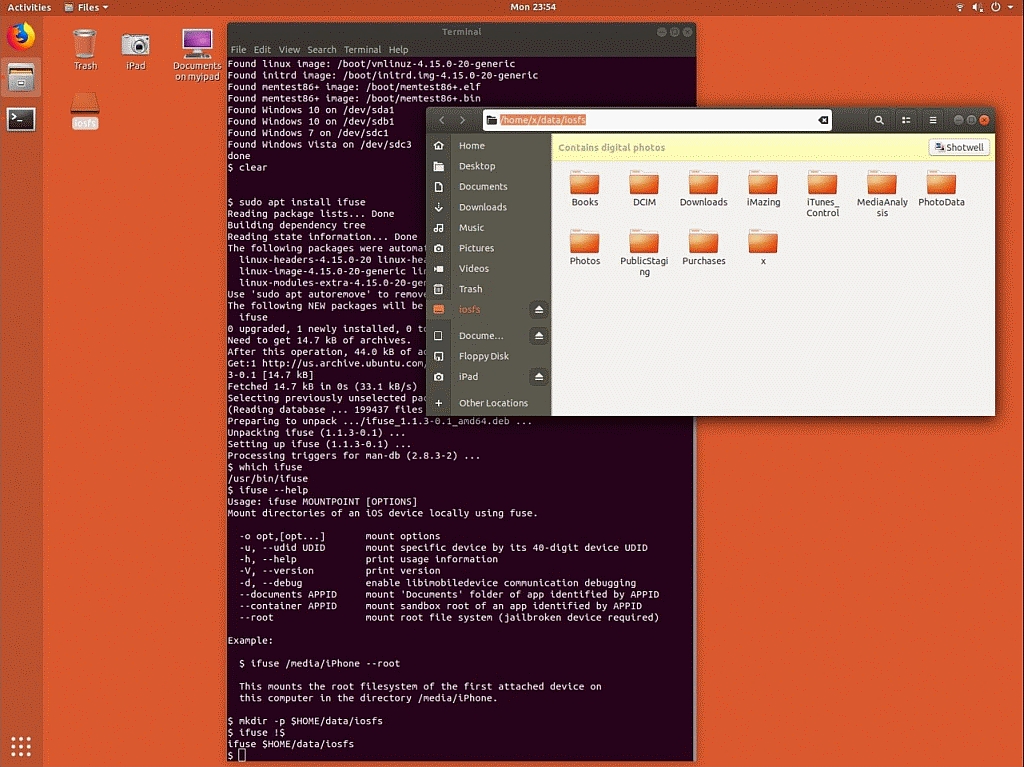
I will agree with anyone who says something sensible that is logically defensible, where I agree with candycane that Linux iFuse is the way to go.
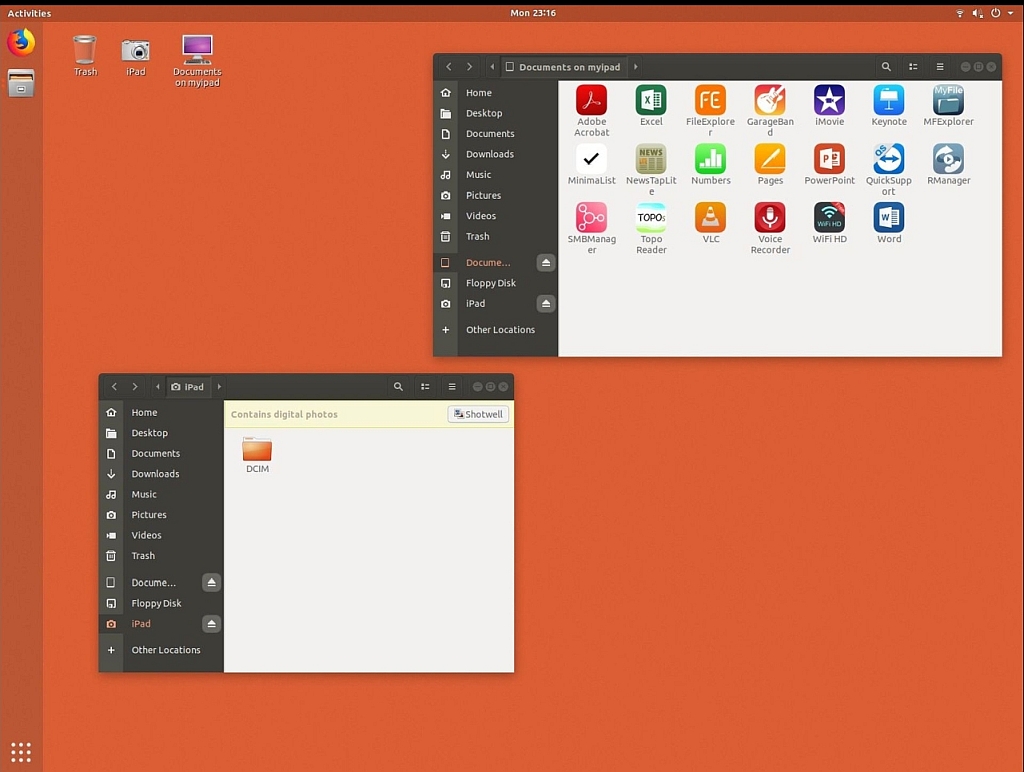
What AFC/iFuse allows on Linux is bidirectional iOS transfers over USB!
a. Note it's over USB (not over Wi-Fi or the cloud)
b. Note you can WRITE to iOS over USB!
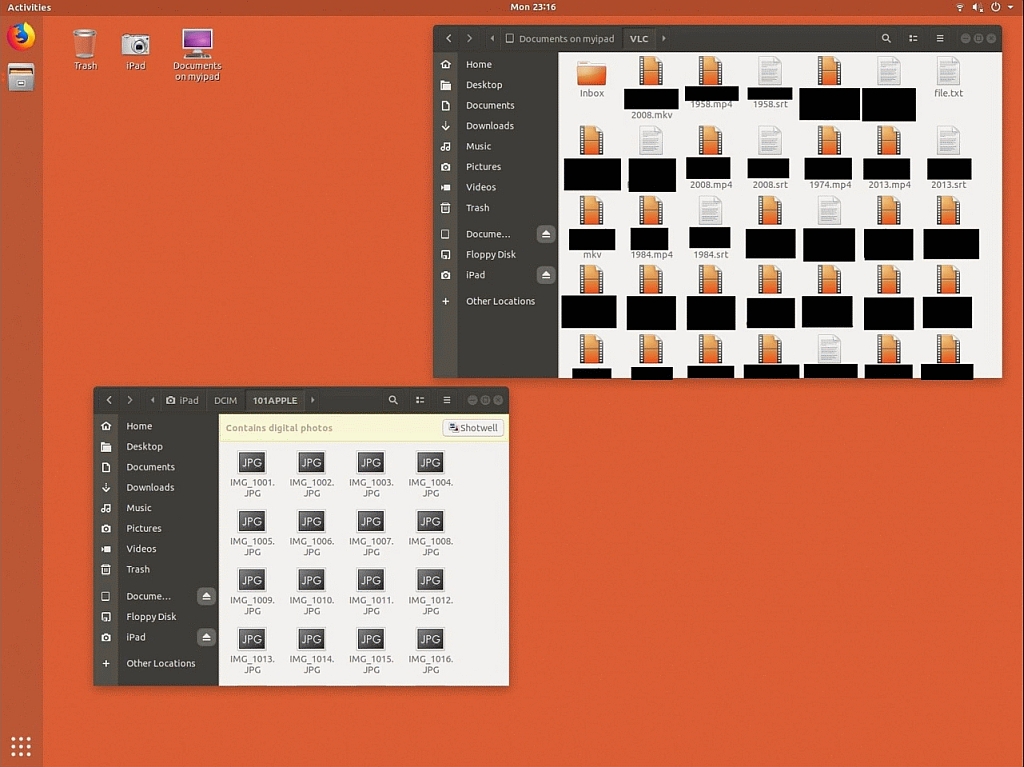
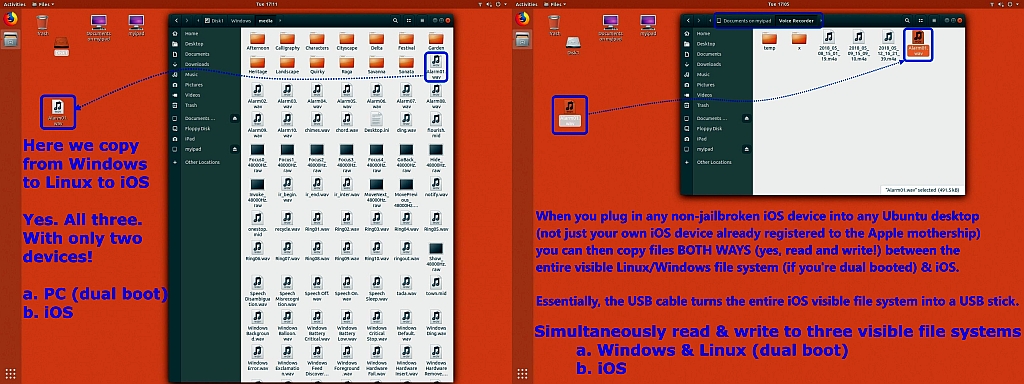
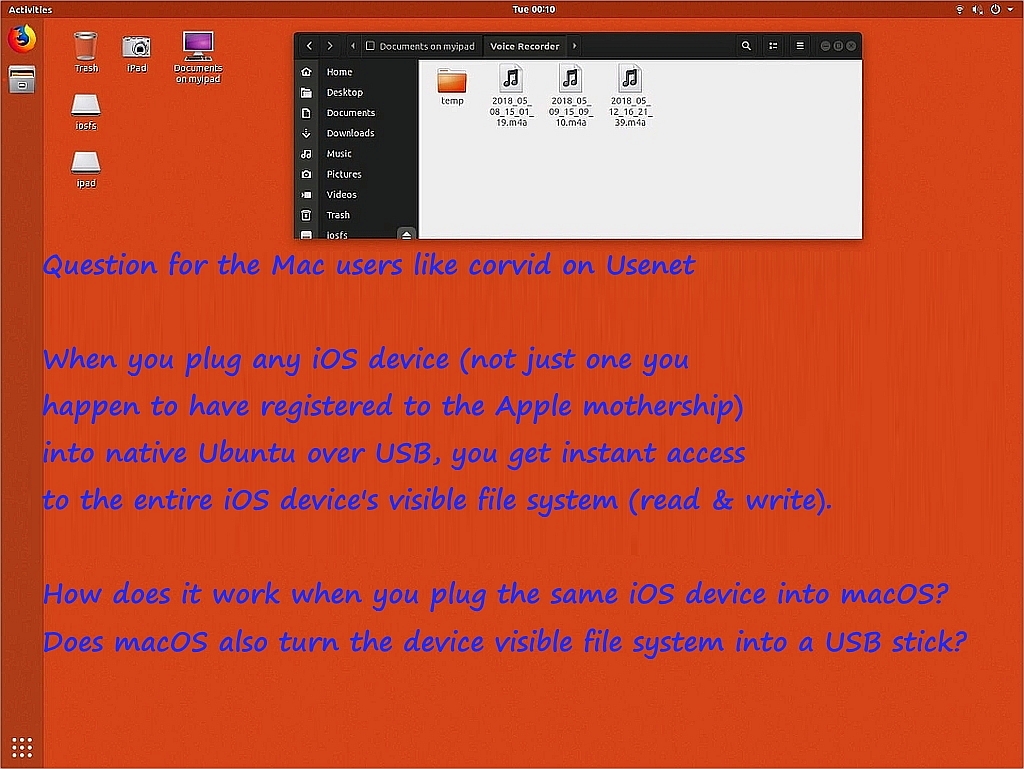
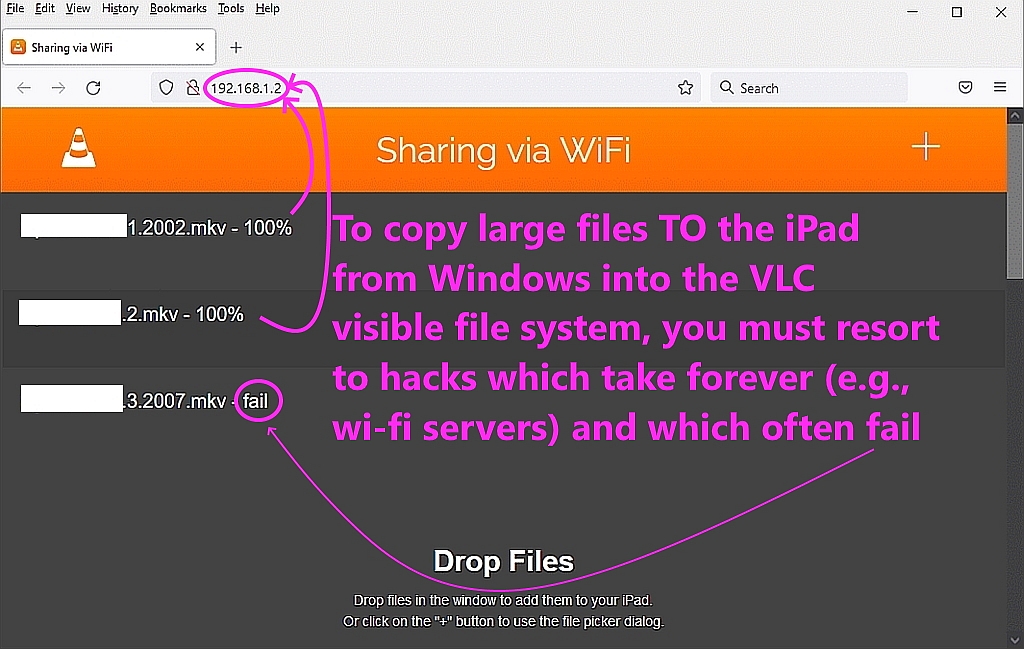
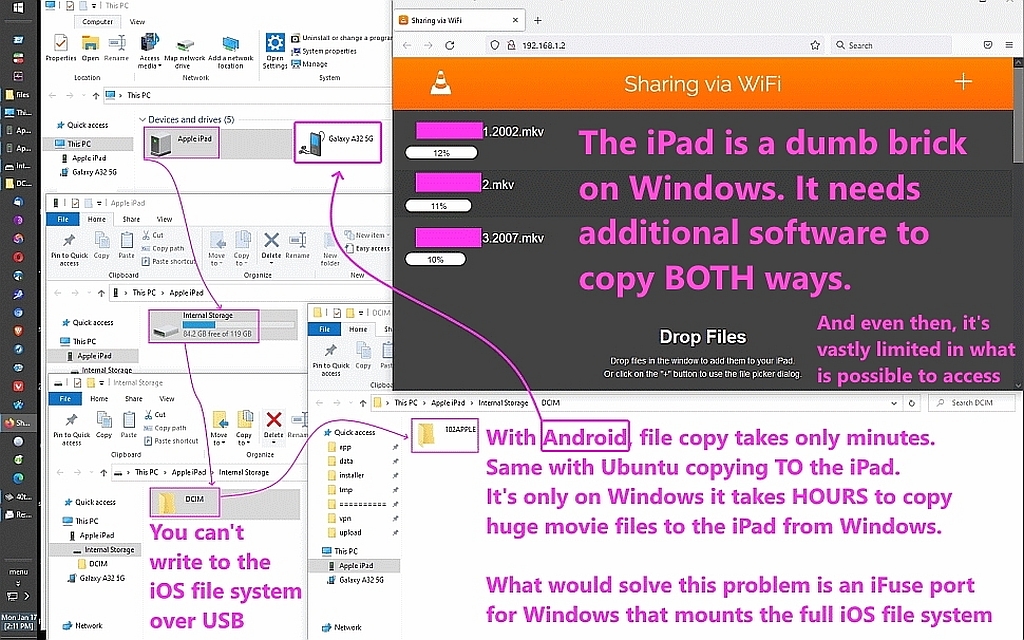
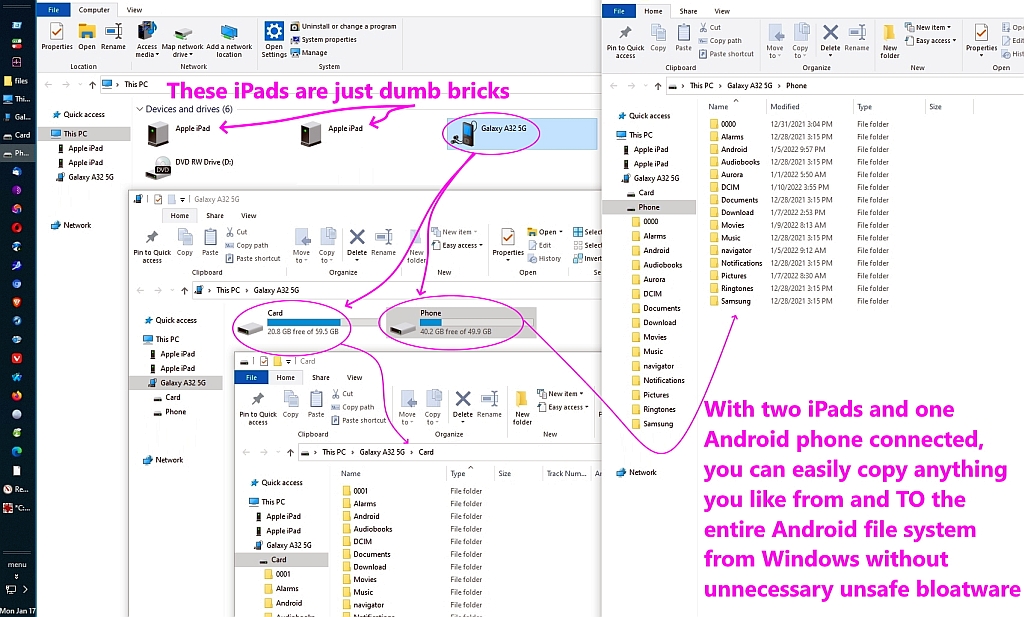
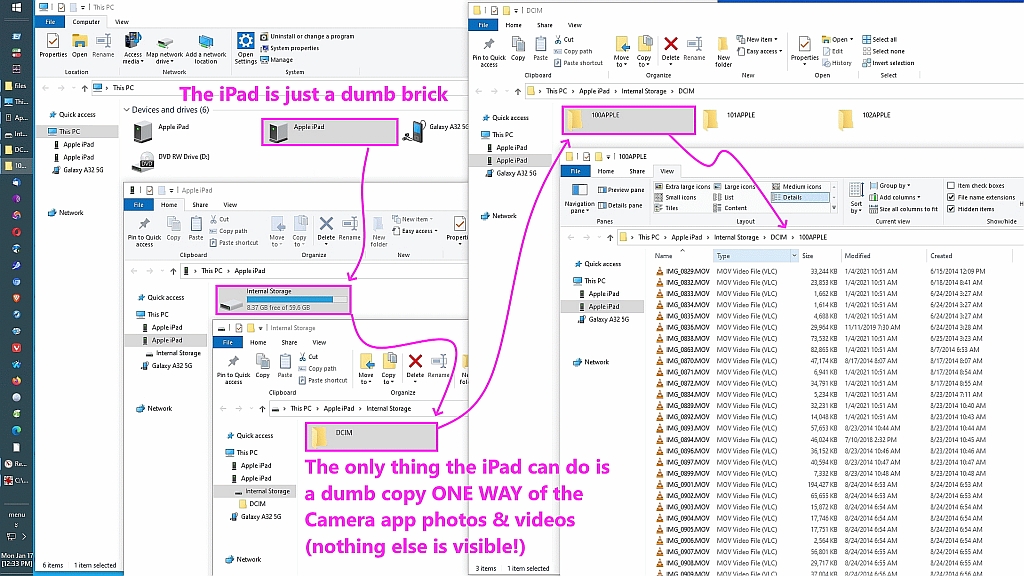
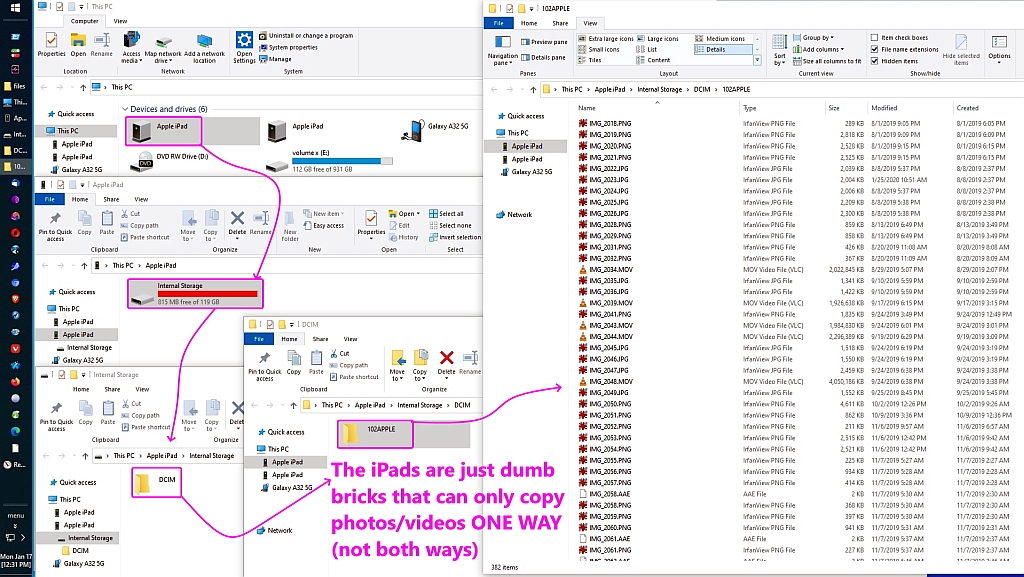
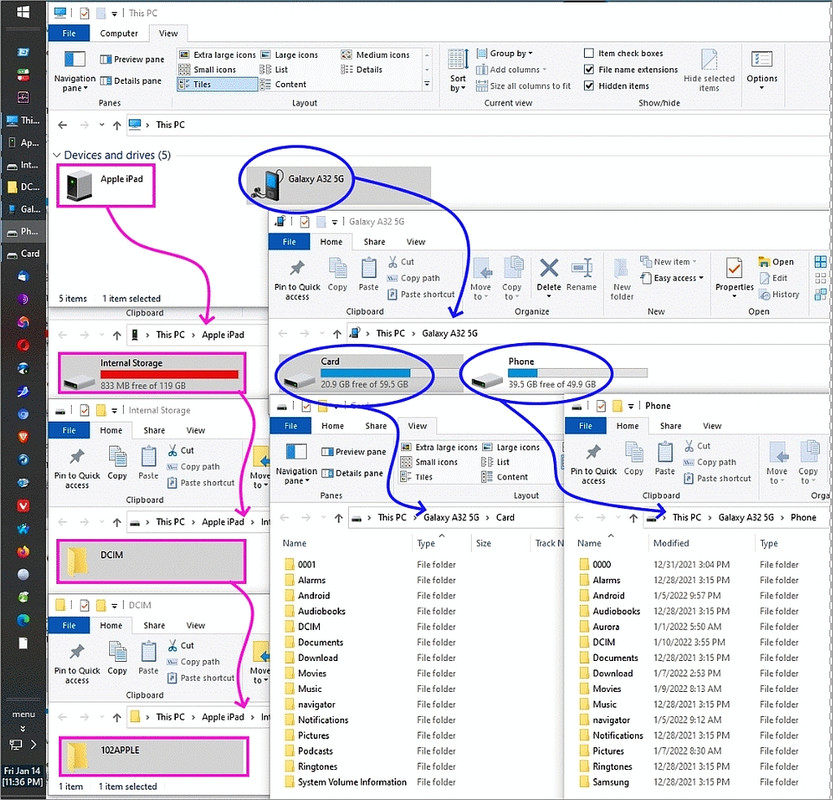
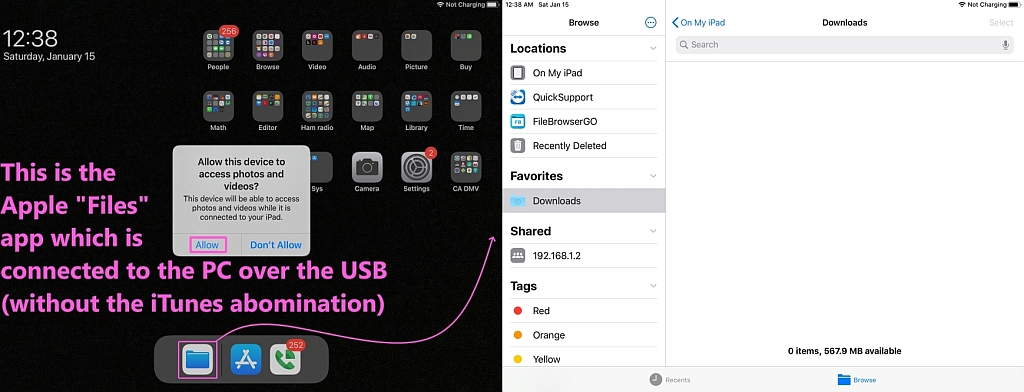
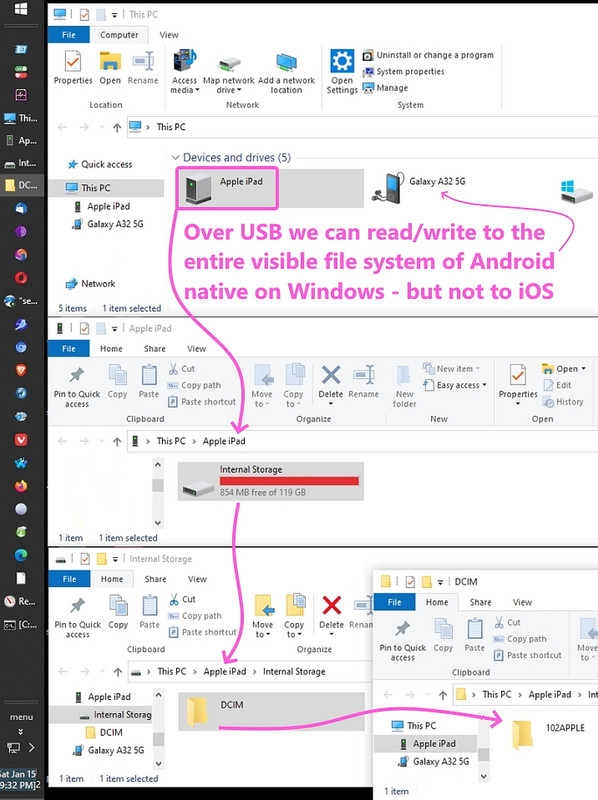
When I used to dual boot my Windows desktop to Ubuntu, I was initially shocked at how *easy* it was to attain USB read access to iOS' file system! <https://i.postimg.cc/s2x0f9Js/files14.jpg> Linux, win10 & iOS together <https://i.postimg.cc/g269S8rT/files13.jpg> How does macOS work with iOS? <https://i.postimg.cc/pVJf72fN/files12.jpg> iOS hacks very often will fail <https://i.postimg.cc/cChf8mx1/files11.jpg> iOS requires hacks to copy <https://i.postimg.cc/9MGdc2s7/files10.jpg> Android is 2-way fast over USB <https://i.postimg.cc/mDx3xkp4/files09.jpg> iOS is only DCIM & only 1-way <https://i.postimg.cc/3xcCBngd/files08.jpg> iOS is a dumb brick on Windows <https://i.postimg.cc/KjK4nHwf/files07.jpg> Ubuntu is two-way, everything <https://i.postimg.cc/Jhmy9KH7/files06.jpg> Ubuntu iFuse is just magical <https://i.postimg.cc/qqg61Rh8/files05.jpg> Ubuntu, movies _to_ iOS on USB <https://i.postimg.cc/QMk7tvZW/files04.jpg> Ubuntu is two way, everything <https://i.postimg.cc/d3SGkdgr/files03.jpg> Android is two way, everything <https://i.postimg.cc/L8b18Zmx/files02.jpg> iOS "Files" is nothing useful <https://i.postimg.cc/NFkXsJ0X/files01.jpg> iOS/Win is 1-way & DCIM only
That's USB. Not SMB. Not anything else. It's USB file transfers with iOS!
Since all that USB magic was done by iFuse, I desperately searched for a Windows implementation of iFuse - but alas - it doesn't appear to exist.
That's sad because with tricks using Apple File Conduit (AFC) over USB that only one in a million people are aware of, you can write to iOS' filesys.
Yes. Write. To much of the iOS filesys. Not just to DCIM! <http://img4.imagetitan.com/img.php?image=18_ios180.jpg> Read & write all! <http://img4.imagetitan.com/img.php?image=18_ios170.jpg> Anywhere you want <http://img4.imagetitan.com/img.php?image=18_ios160.jpg> Any file you want <http://img4.imagetitan.com/img.php?image=18_ios150.jpg> Copy Win10 to iOS <http://img4.imagetitan.com/img.php?image=18_ios140.jpg> read & write iOS <http://img4.imagetitan.com/img.php?image=18_ios130.jpg> iFuse mounts all! <http://img4.imagetitan.com/img.php?image=18_ios120.jpg> iFuse mounts iOS <http://img4.imagetitan.com/img.php?image=18_ios110.jpg> iFuse Windows mnt <http://img4.imagetitan.com/img.php?image=18_ios100.jpg> iFuse is native <http://img4.imagetitan.com/img.php?image=18_ios090.jpg> Nobody knows this <http://img4.imagetitan.com/img.php?image=18_ios080.jpg> The trick! <http://img4.imagetitan.com/img.php?image=18_ios070.jpg> Look closely <http://img4.imagetitan.com/img.php?image=18_ios060.jpg> Both read & write <http://img4.imagetitan.com/img.php?image=18_ios050.jpg> Including DCIM <http://img4.imagetitan.com/img.php?image=18_ios040.jpg> View iOS filesys <http://img4.imagetitan.com/img.php?image=18_ios030.jpg> iOS mounts <http://img4.imagetitan.com/img.php?image=18_ios020.jpg> Allow access? <http://img4.imagetitan.com/img.php?image=18_ios010.jpg> Trust Computer? <http://img4.imagetitan.com/img.php?image=18_ios000.jpg> Ubuntu before iOS
Notice I copied huge feature-length films from Ubuntu to iOS sandboxes!
Alas, iFuse & AFC do not exist (AFAIK) on either Windows and Android.
On Apr 15, 2025 at 5:50:33 PM EDT, "Jolly Roger" <jollyroger@pobox.com> wrote:
On 2025-04-15, Marion <marion@facts.com> wrote:
On 15 Apr 2025 16:13:38 GMT, Jolly Roger wrote :
That would be OK if it worked. The transfer is one-way, iOS to
Windows,
Bullshit. It's a standard SMB connection where either side can add/edit >>>> files to the share. How in the world do you people not know this?
While the Files app eventually added an SMB client, the real problem to
solve if we ever want Apple devices to work in the real world is to be able >>> to transfer files bidirectionally between iOS & Android/Linux.
SMB connections are bi-directional. If you knew anything about
networking, you'd know that.
Only if the SERVER being connected to by the CLIENT allows it.
While setting up an SMB server on Linux isn't all that difficult, since
most Linux desktop owners will also have root access, it won't be that
simple to set up an SMB server on Android (since most are not rooted).
Where the server resides is irrelevant since SMB connections are
bi-directional.
Only if the SERVER being connected to by the CLIENT allows it.
Hence, the real problem with Files:SMB is that it doesn't work
Several people have told you it works, yet you continue to push this
lie. You only come off looking like the foolish troll you are. And
badgolferman with you for siding with your lies over reality.
It works when connecting to a SMB SERVER. Since phones don't typically have a built-in SMB SERVER, there is nothing for an SMB CLIENT to connect to.
So iOS <> Android using SMB is not going to work (either direction) until one or the other has an SMB SERVER installed. Both are CLIENTS.
Thus, connecting the Files app (SMB CLIENT) to a Windows SMB SERVER or a MacOS
SMB SERVER or a Linux SMB SERVER works fine.
But you can't connect Windows or MacOS or Linux to a phone.
The Client contacts the Server.
Client/Server. Networking 101, folks.
I assume that no one ever considered a phone needing to be a server.
Thus, the bottom line is simple. The Files app on iOS works fine. It is VERY EASY to "Copy a photo from Windows to iOS without needing Internet servers".
And 2 phone users are not going worry about any of this. One will simply text the photo to the other. Without needing to be on the same wifi network. Without needing to be in the same country.
That's Networking 201.
On Wed, 16 Apr 2025 01:24:29 +0000, Tyrone wrote :
SMB Server apps exist on the Apple app store. I assume they must also exist >> for Android.
Issue solved.
Frank Slootweg and I discussed this years ago and the problem with Android running an SMB server is the ports are 139 (SMB over NetBIOS) and 445 (SMB directly over TCP/IP) both of which are below 1024 and hence impossible on
a non-rooted Android. Since 139 is deprecated, let's just talk about 445.
It's my understanding non jailbroken iOS has the exact same restrictions.
Hence the paradox:
A. Neither iOS nor Android can run a server on port 445.
B. Yet, these apps "advertise" SMB-server functionality.
Hmmm... what port do they run on?
On 16 Apr 2025 01:43:37 GMT, Jolly Roger wrote :
And, specifically, that he backs up his IPAs all the time with iTunes.
Liar. I've posted instructions in the Apple newsgroups.
Look Jolly Roger, you can get away with your Apple trolling crap only on Apple newsgroups where people don't know how Apple devices work, but not here. We know exactly how Apple does things, Jolly Roger. You do not.
The fact is... you lied.
It's easy to prove you lied. David Empson, many years ago told you that the old (now deprecated) Windows iTunes blah blah blah
There's no IPA on the iOS device to back up.
Tyrone <none@none.none> wrote:
On Apr 12, 2025 at 3:22:37 AM EDT, "Chris" <ithinkiam@gmail.com> wrote: >>> Chris <ithinkiam@gmail.com> wrote:
candycanearter07 <candycanearter07@candycanearter07.nomail.afraid> wrote: >>>>> Marion <marion@facts.com> wrote at 10:54 this Monday (GMT):
On Mon, 7 Apr 2025 04:30:04 -0000 (UTC), candycanearter07 wrote :
I use Linux myself.
Well then, the universal solution we came up with is good news for you! >>>>>> Our solution works for *every* operating system. Including Linux.
*Tutorial: How to send files between Windows & iOS over the LAN using >>>>>> LocalSend*
<https://www.novabbs.com/computers/article-flat.php?id=86116&group=alt.comp.os.windows-10#86116>
I only tested PC to/from iOS so it'd be great if you test Linux/iOS. >>>>>>
Here's the Linux LocalSend installation instructions:
<https://localsend.org/download?os=linux>
And here's the LocalSend iOS IPA:
<https://apps.apple.com/us/app/localsend/id1661733229>
All you do is run LocalSend on both platforms and you can then send and >>>>>> receive files and folders bidirectionally between all the platforms. >>>>>>
If you do test Linux/iOS file transfer, let us know how well it goes. >>>>>> As the whole point of Usenet is to learn from each others' efforts. >>>>>
Ah, thanks, but I currently can't install new apps.
Then use the far simpler method of connecting to your Windows machine via >>>> the Files app. Make sure you have Sharing enabled in Windows first. Simple >>>> and new apps required.
*no* new apps required.
You clearly do not understand. THAT IS IMPOSSIBLE!
Why? Because the one person here who has never even TRIED to do it (Marion >> The Apple Troll), says THAT IS IMPOSSIBLE! It is quote "Imaginary
Functionality".
Nevermind that several people have explained how to do it. Marion claims that
"Many people say it does not work". Which really means that "Many people are >> doing something wrong". Probably not enabling sharing on Windows first.
I fail to understand why you guys are so against someone using a different method to transfer files between a PC and iPhone.
Yes, the iOS native method is good enough for some people
There is no disputing any of this. Why keep fighting about it?
Tyrone wrote:
The problem is that Arlen is STILL claiming that it can't be done
without installing something on both sides. NOTHING needs to be
installed. It CAN be done, but he is too much of a child to admit he
is wrong.
Arlen accepted when I told him I could transfer using the Files app.
He has also admitted to being wrong numerous times and apologized for
it.
On Wed, 16 Apr 2025 14:00:04 -0000 (UTC), candycanearter07 wrote :
| Sysop: | DaiTengu |
|---|---|
| Location: | Appleton, WI |
| Users: | 1,116 |
| Nodes: | 10 (0 / 10) |
| Uptime: | 87:47:53 |
| Calls: | 14,305 |
| Files: | 186,338 |
| D/L today: |
1,215 files (384M bytes) |
| Messages: | 2,525,533 |