• Factory unlock phone: Who pushes the OS upgrades?

    From VanguardLH@V@nguard.LH to comp.mobile.android on Sun Dec 21 03:11:17 2025
    From Newsgroup: comp.mobile.android

    Looking at replacing my ancient phone with another unlocked phone.
    Specs says the new one is "factory unlocked", and has up to 4 Android
    upgrades.

    Samsung Galaxy S22 Ultra
    Factory unlocked

    Just where do the upgrades come from? Where is the Software Update on
    the phone look for newer Android versions?
    --- Synchronet 3.21a-Linux NewsLink 1.2
  • From Theo@theom+news@chiark.greenend.org.uk to comp.mobile.android on Sun Dec 21 09:36:18 2025
    From Newsgroup: comp.mobile.android

    VanguardLH <V@nguard.lh> wrote:
    Looking at replacing my ancient phone with another unlocked phone.
    Specs says the new one is "factory unlocked", and has up to 4 Android upgrades.

    Samsung Galaxy S22 Ultra
    Factory unlocked

    Just where do the upgrades come from? Where is the Software Update on
    the phone look for newer Android versions?

    Tbey come from Samsung, ie from a Samsung server.

    Some third party sites show you what has been released for each phone and
    let you download images if you want to flash yourself, eg: https://www.sammobile.com/firmwares/

    but that may wipe the phone in the process, which the OTA update won't.

    Theo
    --- Synchronet 3.21a-Linux NewsLink 1.2
  • From VanguardLH@V@nguard.LH to comp.mobile.android on Sun Dec 21 04:56:24 2025
    From Newsgroup: comp.mobile.android

    Theo <theom+news@chiark.greenend.org.uk> wrote:

    VanguardLH <V@nguard.lh> wrote:

    Looking at replacing my ancient phone with another unlocked phone.
    Specs says the new one is "factory unlocked", and has up to 4 Android
    upgrades.

    Samsung Galaxy S22 Ultra
    Factory unlocked

    Just where do the upgrades come from? Where is the Software Update on
    the phone look for newer Android versions?

    Tbey come from Samsung, ie from a Samsung server.

    Some third party sites show you what has been released for each phone and
    let you download images if you want to flash yourself, eg: https://www.sammobile.com/firmwares/

    but that may wipe the phone in the process, which the OTA update won't.

    Although unlocked, some phones have sub-models to indicate an initial
    carrier, like my LG V20 [sub]model H910 that's an AT&T unlocked phone.
    I was concerned who pushed the OTA OS update. Thanks for the info.
    --- Synchronet 3.21a-Linux NewsLink 1.2
  • From Theo@theom+news@chiark.greenend.org.uk to comp.mobile.android on Sun Dec 21 12:46:45 2025
    From Newsgroup: comp.mobile.android

    VanguardLH <V@nguard.lh> wrote:
    Theo <theom+news@chiark.greenend.org.uk> wrote:
    Some third party sites show you what has been released for each phone and let you download images if you want to flash yourself, eg: https://www.sammobile.com/firmwares/

    but that may wipe the phone in the process, which the OTA update won't.

    Although unlocked, some phones have sub-models to indicate an initial carrier, like my LG V20 [sub]model H910 that's an AT&T unlocked phone.
    I was concerned who pushed the OTA OS update. Thanks for the info.

    Generally speaking you can cross-flash a non-carrier firmware to the same hardware. eg if you have the SM-S908B version of the S22 Ultra then
    checking the above website you can choose from various countries and
    carriers, eg Europe (EUX), France (Bouygues), France (SFR), United Kingdom (EE), etc. If you cross-flash with a generic version like 'Europe' then you can remove any carrier apps and extra stuff they put on there. It turns the phone into one that's just the same as if you'd bought a non-carrier phone.

    Not sure what the AT&T model is, but the SM-S908U has various firmwares
    for AT&T, DISH, MetroPCS, Spectrum, T-Mobile, Comcast, US Cellular, Verizon,
    as well as a generic 'United States (DSA)'. So if you were to flash it with United States you'd presumably now have a generic phone and get your updates from Samsung and not from AT&T.

    Doing this typically requires a flashing tool like Odin or Heimdall running
    on a PC and a USB connection.

    (I haven't done this since the late 2010s so I'm possibly out of date here)

    Theo
    --- Synchronet 3.21a-Linux NewsLink 1.2
  • From VanguardLH@V@nguard.LH to comp.mobile.android on Sun Dec 21 12:37:23 2025
    From Newsgroup: comp.mobile.android

    Theo <theom+news@chiark.greenend.org.uk> wrote:

    VanguardLH <V@nguard.lh> wrote:
    Theo <theom+news@chiark.greenend.org.uk> wrote:
    Some third party sites show you what has been released for each phone and >>> let you download images if you want to flash yourself, eg:
    https://www.sammobile.com/firmwares/

    but that may wipe the phone in the process, which the OTA update won't.

    Although unlocked, some phones have sub-models to indicate an initial
    carrier, like my LG V20 [sub]model H910 that's an AT&T unlocked phone.
    I was concerned who pushed the OTA OS update. Thanks for the info.

    Generally speaking you can cross-flash a non-carrier firmware to the same hardware. eg if you have the SM-S908B version of the S22 Ultra then
    checking the above website you can choose from various countries and carriers, eg Europe (EUX), France (Bouygues), France (SFR), United Kingdom (EE), etc. If you cross-flash with a generic version like 'Europe' then you can remove any carrier apps and extra stuff they put on there. It turns the phone into one that's just the same as if you'd bought a non-carrier phone.

    Not sure what the AT&T model is, but the SM-S908U has various firmwares
    for AT&T, DISH, MetroPCS, Spectrum, T-Mobile, Comcast, US Cellular, Verizon, as well as a generic 'United States (DSA)'. So if you were to flash it with United States you'd presumably now have a generic phone and get your updates from Samsung and not from AT&T.

    Doing this typically requires a flashing tool like Odin or Heimdall running on a PC and a USB connection.

    (I haven't done this since the late 2010s so I'm possibly out of date here)

    Flashing non-OTA updates, rooting, or using a non-Android OS (e.g.,
    LineageOS) are events I'll postpone until I get the new phone, and might
    try on my old LG V20. I don't want to bork my working phone, but I
    might experiment on an old one that would otherwise get stowed in a
    drawer.

    Thanks for the info, though.
    --- Synchronet 3.21a-Linux NewsLink 1.2
  • From Marian@marianjones@helpfulpeople.com to comp.mobile.android on Sun Dec 21 18:01:55 2025
    From Newsgroup: comp.mobile.android

    Theo wrote:
    Just where do the upgrades come from? Where is the Software Update on
    the phone look for newer Android versions?

    Tbey come from Samsung, ie from a Samsung server.

    Just to be "clear"... since this Android newsgroup is a technical group...

    The original post doesn't make it clear "what" is being unlocked.
    Or, maybe it's clear, and I just didn't catch "what" is being unlocked.

    If you want a "network unlock", for example, that's usually done by the carrier, and, in fact, for my T-Mobile device which was free, T-Mobile automatically unlocked the entire set of Android & iOS devices I got.

    They did that AUTOMATICALLY - presumably with a carrier update over the air
    for EVERY T-Mobile phone in the USA that was locked until you fully owned
    it (which took two years from the date that you received it for free).

    As for a "bootloader unlock", that's a different beast altogether.
    --- Synchronet 3.21a-Linux NewsLink 1.2
  • From VanguardLH@V@nguard.LH to comp.mobile.android on Sun Dec 21 21:19:45 2025
    From Newsgroup: comp.mobile.android

    Marian <marianjones@helpfulpeople.com> wrote:

    Theo wrote:
    Just where do the upgrades come from? Where is the Software Update on
    the phone look for newer Android versions?

    Tbey come from Samsung, ie from a Samsung server.

    Just to be "clear"... since this Android newsgroup is a technical group...

    The original post doesn't make it clear "what" is being unlocked.
    Or, maybe it's clear, and I just didn't catch "what" is being unlocked.

    If you want a "network unlock", for example, that's usually done by the carrier, and, in fact, for my T-Mobile device which was free, T-Mobile automatically unlocked the entire set of Android & iOS devices I got.

    They did that AUTOMATICALLY - presumably with a carrier update over the air for EVERY T-Mobile phone in the USA that was locked until you fully owned
    it (which took two years from the date that you received it for free).

    As for a "bootloader unlock", that's a different beast altogether.

    What I see remarked for sales of cell phones is:

    - Network unlocked (what you describe).
    - Factory unlocked (not associated with any carrier thereafter).

    I want a phone usable with ANY carrier.

    From what I've read, so far, and for Samsung phones, factory unlocked
    phones have u1 at the end of the model number. If just u then it was
    meant for major carriers. Supposedly most u models can be flashed to u1 models, except possibly Verizon models. Many factory unlocked phones
    were u models that got flashed to u1. That's why you'll see factory
    unlocked phones that still have the carrier's logon on boot. Alas,
    seems most sellers don't know what they're selling.

    Get assaulted with a carrier-unlocked cell phone that displays a splash
    screen for the carrier (although I'm using a different one) is okay, but reminds me it wasn't really factory unlocked. Whether factory or
    carrier unlocked, you have to ensure you get a cell phone that works in
    your region. Guess the bands differ in different regions. For me, I
    have to check the cell phone says for US, not Europe or elsewhere.
    --- Synchronet 3.21a-Linux NewsLink 1.2
  • From Marian@marianjones@helpfulpeople.com to comp.mobile.android on Sun Dec 21 20:51:47 2025
    From Newsgroup: comp.mobile.android

    VanguardLH wrote:
    As for a "bootloader unlock", that's a different beast altogether.

    What I see remarked for sales of cell phones is:

    - Network unlocked (what you describe).
    - Factory unlocked (not associated with any carrier thereafter).

    I have a thread on each topic in the XDA Developers web site.
    With photos. And actual details compiled since 2021.

    Network unlock:
    <https://i.postimg.cc/502mtgQB/networkunlock02.jpg>
    <http://xdaforums.com/t/did-t-mobile-usa-unilaterally-unlock-your-free-samsung-galaxy-a32-5g-sm-a326u-when-the-2-year-24-months-1-24th-credits-finally-paid-for-the-phone.4589195>

    Bootloader unlock:
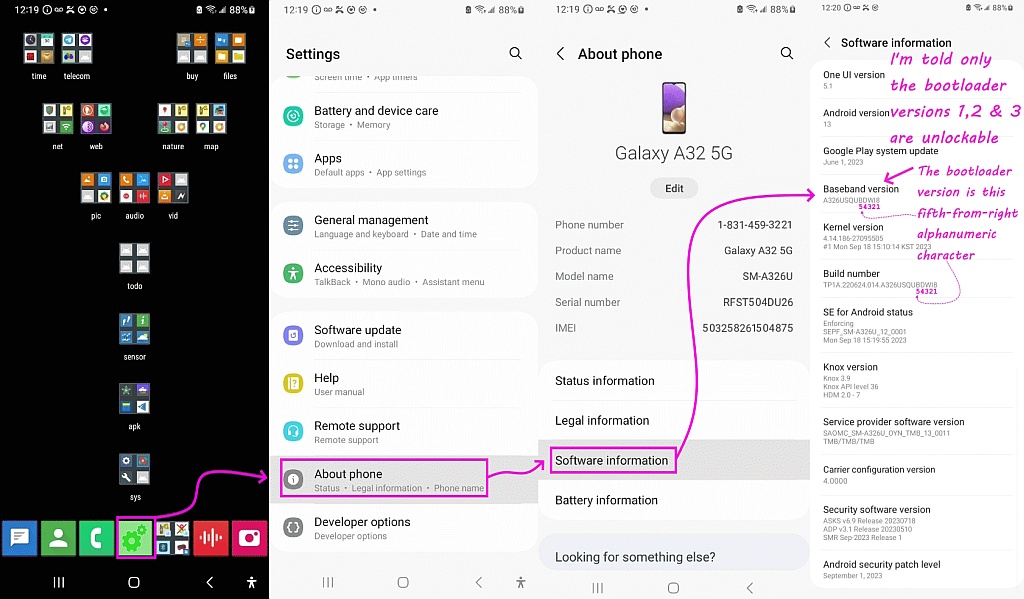
    <https://i.postimg.cc/xCqyz5rK/bootloader02.jpg>
    <https://xdaforums.com/t/is-my-almost-3-year-old-t-mobile-network-unlocked-samsung-galaxy-sm-a326u-bootloader-still-unlockable-and-hence-is-my-sm-a326u-still-unrootable.4638955>

    I want a phone usable with ANY carrier.

    Then, as far as I know, you simply want a "network" unlock.
    <https://i.postimg.cc/NMcttY2s/networkunlock01.jpg>

    From what I've read, so far, and for Samsung phones, factory unlocked
    phones have u1 at the end of the model number. If just u then it was
    meant for major carriers. Supposedly most u models can be flashed to u1 models, except possibly Verizon models. Many factory unlocked phones
    were u models that got flashed to u1. That's why you'll see factory
    unlocked phones that still have the carrier's logon on boot. Alas,
    seems most sellers don't know what they're selling.

    As far as I'm aware, the key criteria is the bootloader unlockable.
    From the thread listed above, most USA Samsungs lately are not.

    But I could be wrong as I've only looked up the detail for my Samsung.

    Get assaulted with a carrier-unlocked cell phone that displays a splash screen for the carrier (although I'm using a different one) is okay, but reminds me it wasn't really factory unlocked. Whether factory or
    carrier unlocked, you have to ensure you get a cell phone that works in
    your region. Guess the bands differ in different regions. For me, I
    have to check the cell phone says for US, not Europe or elsewhere.

    When you say "factory unlocked", that could mean different things...

    In short, these are three completely separate things:
    1. network unlocking,
    2. factory/U1 firmware, and
    3. bootloader unlocking.

    A phone that's "network unlocked" simply works with any carrier.
    That's all you need for carrier flexibility.

    "Factory unlocked" (U1) only means it was sold by Samsung without carrier software, but not that the bootloader can be unlocked.

    And in the U.S., no Samsung Snapdragon model-U or U1-allows bootloader unlocking at all as far as I'm aware from the XDA Developers site queries
    I've listed above.

    So the only thing that matters for your goal is that the phone is network unlocked and supports the right U.S. bands; the rest of the terminology
    doesn't affect carrier compatibility and is where much confusion arises.
    --
    I respond as an adult to anyone as long as they act like an adult.
    My goal is to help people and to learn more from those people I help.
    --- Synchronet 3.21a-Linux NewsLink 1.2
  • From VanguardLH@V@nguard.LH to comp.mobile.android on Mon Dec 22 00:52:44 2025
    From Newsgroup: comp.mobile.android

    Marian <marianjones@helpfulpeople.com> wrote:

    When you say "factory unlocked", that could mean different things...

    In short, these are three completely separate things:
    1. network unlocking,
    2. factory/U1 firmware, and
    3. bootloader unlocking.

    A phone that's "network unlocked" simply works with any carrier.
    That's all you need for carrier flexibility.

    That's okay, but usually displays the carrier's logo during boot. No
    big deal. I'm not sure the boot is any faster without showing the logo.

    "Factory unlocked" (U1) only means it was sold by Samsung without
    carrier software, but not that the bootloader can be unlocked.

    Without the bloatware would be nice. However, wouldn't I still be able
    to uninstall the crap using ADB? For stuff bundled crap I don't want, I usually just go into the app drawer to disable it, so it doesn't show in
    the default view of the app drawer; i.e., out of sight, out of mind.

    And in the U.S., no Samsung Snapdragon model-U or U1-allows bootloader unlocking at all as far as I'm aware from the XDA Developers site
    queries I've listed above.

    So the only thing that matters for your goal is that the phone is network unlocked and supports the right U.S. bands; the rest of the terminology doesn't affect carrier compatibility and is where much confusion arises.

    Sounds about right for not locking me into a particular carrier, but I
    still have to watch for region for the phone.
    --- Synchronet 3.21a-Linux NewsLink 1.2
  • From Marian@marianjones@helpfulpeople.com to comp.mobile.android on Mon Dec 22 10:34:46 2025
    From Newsgroup: comp.mobile.android

    VanguardLH wrote:
    A phone that's "network unlocked" simply works with any carrier.
    That's all you need for carrier flexibility.

    That's okay, but usually displays the carrier's logo during boot. No
    big deal. I'm not sure the boot is any faster without showing the logo.

    Agreed. I get the magenta T-Mobile logo even though I'm carrier unlocked.
    But I'm also on the T-Mobile carrier.

    I'm not sure what happens when another carrier updates their software.

    "Factory unlocked" (U1) only means it was sold by Samsung without
    carrier software, but not that the bootloader can be unlocked.

    Without the bloatware would be nice. However, wouldn't I still be able
    to uninstall the crap using ADB? For stuff bundled crap I don't want, I usually just go into the app drawer to disable it, so it doesn't show in
    the default view of the app drawer; i.e., out of sight, out of mind.

    Yup. Even without being root, my experience has been I've been able to uninstall about 98 or 99 out of 100 carrier bloat apps using Windows adb.

    There's also a local adb, but it's so much more difficult to set up than Windows adb that I wouldn't recommend debloating without using a PC.

    Note that adb uninstalling will leave system apps in the system partition.
    But they're out of sight and out of mind so they're effectively gone.

    And in the U.S., no Samsung Snapdragon model-U or U1-allows bootloader
    unlocking at all as far as I'm aware from the XDA Developers site
    queries I've listed above.

    So the only thing that matters for your goal is that the phone is network
    unlocked and supports the right U.S. bands; the rest of the terminology
    doesn't affect carrier compatibility and is where much confusion arises.

    Sounds about right for not locking me into a particular carrier, but I
    still have to watch for region for the phone.

    In the USA, pretty much, all the carriers allow unlocking as per FTC rules.
    But what's interesting is Verizon has particularly stringent FTC rules.

    There's more about that in a recent thread by me on that specific topic.
    From: Marian <marianjones@helpfulpeople.com>
    Newsgroups: misc.phone.mobile.iphone,comp.mobile.android
    Subject: Verizon refused to unlock man's phone - then he sued - and they unlocked it
    Date: Fri, 19 Dec 2025 10:48:12 -0700
    Organization: BWH Usenet Archive (https://usenet.blueworldhosting.com)
    Message-ID: <10i434s$pb5$1@nnrp.usenet.blueworldhosting.com>
    --
    I converse civilly with anyone who remains civil, no matter who they are.
    --- Synchronet 3.21a-Linux NewsLink 1.2