• Re: SImple question, how do I make Lens actually scan a QR code?

    From David@wibble@btinternet.com to comp.mobile.android on Mon Feb 23 19:01:20 2026
    From Newsgroup: comp.mobile.android

    On Sat, 14 Feb 2026 11:59:54 +0000, Richmond wrote:

    Chris Green <cl@isbd.net> writes:

    I am trying to scan a QR code and failing miserably.

    If I just use 'Camera' then nothing at all happens when the QR code is
    shown. Searching tells me to "Enable Google Lens SUggestions" in my
    camera app's 'General' settings, there isn't any 'General' settings
    area and none of the options available are anything like "Enable Google
    Lens SUggestions".

    So, I tried running Google Lens directly, that sees the QR code OK and
    if I ask it tells me that it's a QR code and all about QR codes. But it
    doesn't seem to want to actually scan the code and go to the web site
    that it is (hopefully) pointing at.

    What am I doing wrong?

    The phone I'm using is an Umidigi running Android 11.

    The android search box, by default a google search, has a camera icon on
    the right, which I use to scan. When scanning a code it typically will display a web address and then I have to click on it.

    Unfortunately this doesn't work on my phone.
    realme 6 Pro running Android 11.

    It locates the QR code but doesn't seem to be able to translate it into anything.

    Seems happier with a barcode.

    Cheers


    Dave R
    --
    AMD FX-6300 in GA-990X-Gaming SLI-CF running Windows 10 x64

    --
    This email has been checked for viruses by Avast antivirus software. www.avast.com
    --- Synchronet 3.21b-Linux NewsLink 1.2
  • From Frank Slootweg@this@ddress.is.invalid to comp.mobile.android on Tue Feb 24 13:40:29 2026
    From Newsgroup: comp.mobile.android

    David <wibble@btinternet.com> wrote:
    On Sat, 14 Feb 2026 11:59:54 +0000, Richmond wrote:

    Chris Green <cl@isbd.net> writes:

    I am trying to scan a QR code and failing miserably.

    If I just use 'Camera' then nothing at all happens when the QR code is
    shown. Searching tells me to "Enable Google Lens SUggestions" in my
    camera app's 'General' settings, there isn't any 'General' settings
    area and none of the options available are anything like "Enable Google
    Lens SUggestions".

    So, I tried running Google Lens directly, that sees the QR code OK and
    if I ask it tells me that it's a QR code and all about QR codes. But it
    doesn't seem to want to actually scan the code and go to the web site
    that it is (hopefully) pointing at.

    What am I doing wrong?

    The phone I'm using is an Umidigi running Android 11.

    The android search box, by default a google search, has a camera icon on the right, which I use to scan. When scanning a code it typically will display a web address and then I have to click on it.

    Unfortunately this doesn't work on my phone.
    realme 6 Pro running Android 11.

    It locates the QR code but doesn't seem to be able to translate it into anything.

    Seems happier with a barcode.

    Are the apps you use up-to-date? I.e. specifically the 'Google' app
    (the app with the name 'Google') and the (Google) 'Chrome' app (the app
    with the name 'Chrome'. (Note: We are *not* talking about QR code
    scanning with the device's 'Camera' app, because that app is manufacturer-dependent.)

    They both work on my current phone, but I wanted to try them on an
    older (Android 13) phone, but didn't have a QR code handy, so I asked
    Google for a "sample QR code with web address".

    Apparently the Chrome browser - at least on Windows - can create a QR
    code for any webpage by just right-clicking on that webpage and
    selecting 'Create QR Code for this page', which will create a .png file
    which you can display with any image viewer and then scan with the
    'Google' or 'Chrome' apps on your Android devices.

    So update the 'Google' and 'Chrome' apps on your Android devices and
    generate and scan a QR code.

    At least your "Samsung Tab A8 tablet (Android 14)" should work,
    because it has a newer Android version than my Samsung Galaxy A51
    (Android 13) phone.

    Hope this helps.
    --- Synchronet 3.21b-Linux NewsLink 1.2
  • From Maria Sophia@mariasophia@comprehension.com to comp.mobile.android on Tue Feb 24 09:51:02 2026
    From Newsgroup: comp.mobile.android

    Frank Slootweg wrote:
    They both work on my current phone, but I wanted to try them on an
    older (Android 13) phone, but didn't have a QR code handy, so I asked
    Google for a "sample QR code with web address".

    Apparently the Chrome browser - at least on Windows - can create a QR
    code for any webpage by just right-clicking on that webpage and
    selecting 'Create QR Code for this page', which will create a .png file
    which you can display with any image viewer and then scan with the
    'Google' or 'Chrome' apps on your Android devices.

    So update the 'Google' and 'Chrome' apps on your Android devices and generate and scan a QR code.

    To add further additional value to Frank's suggestion above about QR code generation, I hacked out a quick PSA for finding free ad free generators.

    Newsgroups: comp.mobile.android
    Subject: PSA: Free ad-free Android QR code generator apps
    Date: Tue, 24 Feb 2026 09:39:31 -0600
    Message-ID: <10nkgnj$2r8p$1@nnrp.usenet.blueworldhosting.com>

    Caveat:
    I didn't test them all, and some only have 10+ or 100+ downloads,
    whereas those with 100K+ downloads were too commercialized (IMHO).
    --- Synchronet 3.21b-Linux NewsLink 1.2
  • From David@wibble@btinternet.com to comp.mobile.android on Tue Feb 24 17:11:30 2026
    From Newsgroup: comp.mobile.android

    On Tue, 24 Feb 2026 13:40:29 +0000, Frank Slootweg wrote:

    David <wibble@btinternet.com> wrote:
    On Sat, 14 Feb 2026 11:59:54 +0000, Richmond wrote:

    Chris Green <cl@isbd.net> writes:

    I am trying to scan a QR code and failing miserably.

    If I just use 'Camera' then nothing at all happens when the QR code
    is shown. Searching tells me to "Enable Google Lens SUggestions" in
    my camera app's 'General' settings, there isn't any 'General'
    settings area and none of the options available are anything like
    "Enable Google Lens SUggestions".

    So, I tried running Google Lens directly, that sees the QR code OK
    and if I ask it tells me that it's a QR code and all about QR codes.
    But it doesn't seem to want to actually scan the code and go to the
    web site that it is (hopefully) pointing at.

    What am I doing wrong?

    The phone I'm using is an Umidigi running Android 11.

    The android search box, by default a google search, has a camera icon
    on the right, which I use to scan. When scanning a code it typically
    will display a web address and then I have to click on it.

    Unfortunately this doesn't work on my phone.
    realme 6 Pro running Android 11.

    It locates the QR code but doesn't seem to be able to translate it into
    anything.

    Seems happier with a barcode.

    Are the apps you use up-to-date? I.e. specifically the 'Google' app
    (the app with the name 'Google') and the (Google) 'Chrome' app (the app
    with the name 'Chrome'. (Note: We are *not* talking about QR code
    scanning with the device's 'Camera' app, because that app is manufacturer-dependent.)
    <snip>
    All my Apps auto update, so everything should be on the latest version.
    --
    AMD FX-6300 in GA-990X-Gaming SLI-CF running Windows 10 x64

    --
    This email has been checked for viruses by Avast antivirus software. www.avast.com
    --- Synchronet 3.21b-Linux NewsLink 1.2
  • From Richmond@dnomhcir@gmx.com to comp.mobile.android on Tue Feb 24 17:49:23 2026
    From Newsgroup: comp.mobile.android

    David <wibble@btinternet.com> writes:

    On Tue, 24 Feb 2026 13:40:29 +0000, Frank Slootweg wrote:

    David <wibble@btinternet.com> wrote:
    On Sat, 14 Feb 2026 11:59:54 +0000, Richmond wrote:

    Chris Green <cl@isbd.net> writes:

    I am trying to scan a QR code and failing miserably.

    If I just use 'Camera' then nothing at all happens when the QR
    code is shown. Searching tells me to "Enable Google Lens
    SUggestions" in my camera app's 'General' settings, there isn't
    any 'General' settings area and none of the options available are
    anything like "Enable Google Lens SUggestions".

    So, I tried running Google Lens directly, that sees the QR code
    OK and if I ask it tells me that it's a QR code and all about QR
    codes. But it doesn't seem to want to actually scan the code and
    go to the web site that it is (hopefully) pointing at.

    What am I doing wrong?

    The phone I'm using is an Umidigi running Android 11.

    The android search box, by default a google search, has a camera
    icon on the right, which I use to scan. When scanning a code it
    typically will display a web address and then I have to click on
    it.

    Unfortunately this doesn't work on my phone. realme 6 Pro running
    Android 11.

    It locates the QR code but doesn't seem to be able to translate it
    into anything.

    Seems happier with a barcode.

    Are the apps you use up-to-date? I.e. specifically the 'Google' app
    (the app with the name 'Google') and the (Google) 'Chrome' app (the
    app with the name 'Chrome'. (Note: We are *not* talking about QR code
    scanning with the device's 'Camera' app, because that app is
    manufacturer-dependent.) > <snip> > All my Apps auto update, so
    everything should be on the latest version.


    I just noticed that Vivaldi, on my Amazon Tablet, which is based on
    Android 11, has a QR code scanner. It appears on the right of the
    location bar when you put the cursor in the location bar. (I side loaded Vivaldi from the Vivaldi website).
    --- Synchronet 3.21b-Linux NewsLink 1.2
  • From Maria Sophia@mariasophia@comprehension.com to comp.mobile.android on Tue Feb 24 12:12:39 2026
    From Newsgroup: comp.mobile.android

    David wrote:
    All my Apps auto update, so everything should be on the latest version.

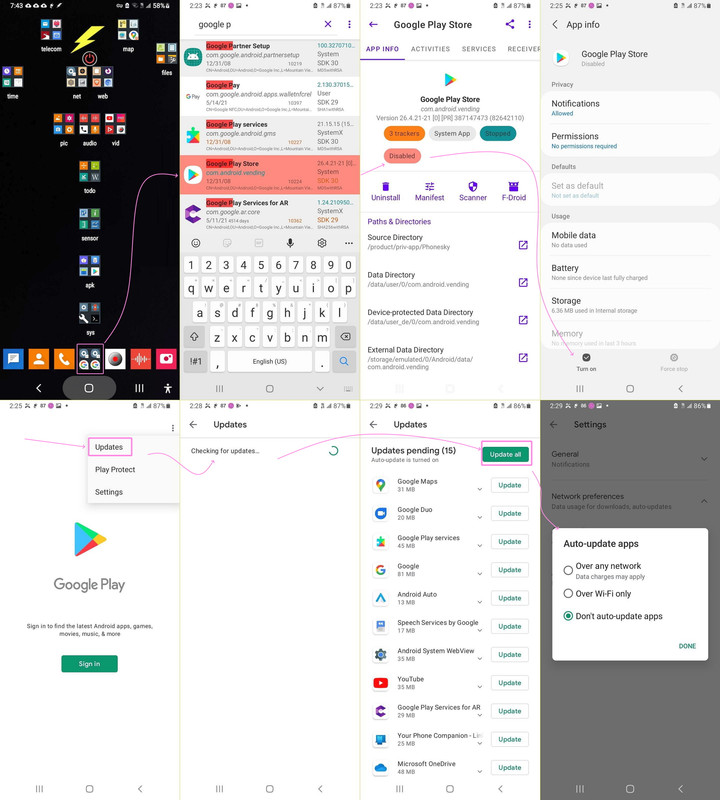
    I wrote a tutorial on auto update, where I found that almsot none of the
    apps people *thought* were automatically updated by Google Play, were.

    If you're expecting Google Play Store app to automatically keep track of updates, then you'll find out that in most cases, it's not even close.

    Ask me how I know this...
    <https://i.postimg.cc/02xKj04h/updateallapps03.jpg>
    --- Synchronet 3.21b-Linux NewsLink 1.2
  • From Frank Slootweg@this@ddress.is.invalid to comp.mobile.android on Tue Feb 24 18:24:39 2026
    From Newsgroup: comp.mobile.android

    David <wibble@btinternet.com> wrote:
    On Tue, 24 Feb 2026 13:40:29 +0000, Frank Slootweg wrote:

    David <wibble@btinternet.com> wrote:
    On Sat, 14 Feb 2026 11:59:54 +0000, Richmond wrote:

    Chris Green <cl@isbd.net> writes:

    I am trying to scan a QR code and failing miserably.

    If I just use 'Camera' then nothing at all happens when the QR code
    is shown. Searching tells me to "Enable Google Lens SUggestions" in
    my camera app's 'General' settings, there isn't any 'General'
    settings area and none of the options available are anything like
    "Enable Google Lens SUggestions".

    So, I tried running Google Lens directly, that sees the QR code OK
    and if I ask it tells me that it's a QR code and all about QR codes.
    But it doesn't seem to want to actually scan the code and go to the
    web site that it is (hopefully) pointing at.

    What am I doing wrong?

    The phone I'm using is an Umidigi running Android 11.

    The android search box, by default a google search, has a camera icon
    on the right, which I use to scan. When scanning a code it typically
    will display a web address and then I have to click on it.

    Unfortunately this doesn't work on my phone.
    realme 6 Pro running Android 11.

    It locates the QR code but doesn't seem to be able to translate it into
    anything.

    Seems happier with a barcode.

    Are the apps you use up-to-date? I.e. specifically the 'Google' app
    (the app with the name 'Google') and the (Google) 'Chrome' app (the app with the name 'Chrome'. (Note: We are *not* talking about QR code
    scanning with the device's 'Camera' app, because that app is manufacturer-dependent.)
    <snip>
    All my Apps auto update, so everything should be on the latest version.

    Sigh! Why did you snip all the rest and did not respond to any of it!?
    --- Synchronet 3.21b-Linux NewsLink 1.2
  • From Andy Burns@usenet@andyburns.uk to comp.mobile.android on Wed Feb 25 12:48:46 2026
    From Newsgroup: comp.mobile.android

    Maria Sophia wrote:

    If you're expecting Google Play Store app to automatically keep track of updates, then you'll find out that in most cases, it's not even close.

    Ask me how I know this...

    With your non-typical use of Android devices, I'm not sure that your experience matches most users ...
    --- Synchronet 3.21b-Linux NewsLink 1.2
  • From Maria Sophia@mariasophia@comprehension.com to comp.mobile.android on Wed Feb 25 09:59:01 2026
    From Newsgroup: comp.mobile.android

    Andy Burns wrote:
    Maria Sophia wrote:

    If you're expecting Google Play Store app to automatically keep track of
    updates, then you'll find out that in most cases, it's not even close.

    Ask me how I know this...

    With your non-typical use of Android devices, I'm not sure that your experience matches most users ...

    Hi Andy,

    That's a good point.
    The Google Play Store package <com.android.vending> is not a real updater.

    For example, it doesn't know about side-loaded apps. Nor even apps from
    the Google Play repo but loaded by alternative means (e.g., Aurora).

    It even misses apps loaded using the EXACT Google Play Store signatures!
    (Which happens when re-installing APKs original from the Play Store app.)

    The best we can say about it is that Google Play's updater is sort of like
    a librarian who only updates books she personally remembers checking out.

    And even then, she's lazy in that she's optimizes for battery life and
    server load, not completeness, so she may delay updates for days or weeks.

    Worse, if you're not signed into a Google Account, supposedly there is no "library", but in my tests, the updater does update about 15 specific apps.
    <https://i.postimg.cc/HsXKj7WK/updateallapps01.jpg>

    Huh?

    It turns out that Google Play has (at least) two different mechanisms for deciding whether it should update an app,
    1. Library-based ownership (but no account === no library)
    2. System-adopted packages (no Google account is required)

    Google Play will automatically update any app that meets ALL conditions:
    a. System apps
    b. Pre-installed Google apps
    c. OEM apps signed with the same key as the Play Store version
    d. Some apps bundled by the manufacturer
    e. Any app originally present in /system or /product
    f. Any app marked as "updatable by Play" in the system metadata

    On my system, last I checked (which was long ago), that's:
    Google Maps
    Google Duo
    Google Play Services
    Google
    Android Auto
    Speech Services by Google
    Android System WebView
    YouTube
    Google Play Services for AR
    Your Phone Companion
    Microsoft OneDrive
    .... (the screenshot was cut at that point) ...

    Note the three categories of apps that are updated on my device.
    1. Google system-level components (e.g., Google Play Services)
    2. Google apps that shipped with my ROM (e.g., Google Maps)
    3. OEM-bundled apps that Play recognizes (e.g., Microsoft OneDrive)

    On my system, as you noted, the Google Play Store updater only updates
    [x] apps pre-installed on the device
    [x] apps signed with the same key as the Play Store version
    [x] apps marked as Play-updatable in system metadata
    [x] apps recognized as "owned" by the system, not the user
    [x] apps not dependent on a Google account library

    It's all or nothing.
    Every checkmark above must be made before the updater, updates.

    In short, if you always log into a Google Account, and if you *only* load
    apps from the Google Play Store while logged into that account, and you
    *never* copy apps to another phone, then, and only then will the Google
    Play Store upater update them.

    On my system, out of about a thousand packages (of which about six hundred
    were installed by me), the update only catches about a score of those.
    --
    It's just not possible to create an account and still have privacy.


    --- Synchronet 3.21c-Linux NewsLink 1.2
  • From Carlos E.R.@robin_listas@es.invalid to comp.mobile.android on Wed Feb 25 21:54:00 2026
    From Newsgroup: comp.mobile.android

    On 2026-02-25 16:59, Maria Sophia wrote:
    Andy Burns wrote:
    Maria Sophia wrote:

    If you're expecting Google Play Store app to automatically keep track of >>> updates, then you'll find out that in most cases, it's not even close.

    Ask me how I know this...

    With your non-typical use of Android devices, I'm not sure that your
    experience matches most users ...

    Hi Andy,

    That's a good point. The Google Play Store package <com.android.vending>
    is not a real updater.

    For example, it doesn't know about side-loaded apps. Nor even apps from
    the Google Play repo but loaded by alternative means (e.g., Aurora).

    It shouldn't.


    ...
    --
    Cheers, Carlos.
    ES🇪🇸, EU🇪🇺;
    --- Synchronet 3.21c-Linux NewsLink 1.2
  • From Maria Sophia@mariasophia@comprehension.com to comp.mobile.android on Thu Feb 26 17:48:01 2026
    From Newsgroup: comp.mobile.android

    Carlos E.R. wrote:
    For example, it doesn't know about side-loaded apps. Nor even apps from
    the Google Play repo but loaded by alternative means (e.g., Aurora).

    It shouldn't.

    Hi Carlos,

    You bring up a good point in that the it" in "it shouldn't", makes sense if
    we only look at the updater functionality of the <com.android.vending> app.

    But guess what?

    Android Authority reported Google is rolling out a feature where the Play
    Store can detect sideloaded apps to offer an 'Update from Play" option.
    <https://www.androidauthority.com/play-store-update-permission-apk-3466169/>

    I have no idea what the status of that rollout option is though.
    Does anyone?
    --
    The point of Usenet is for smart people to help each other & for results
    to be archived so that anyone can access our immense tribal knowledge.
    --- Synchronet 3.21c-Linux NewsLink 1.2