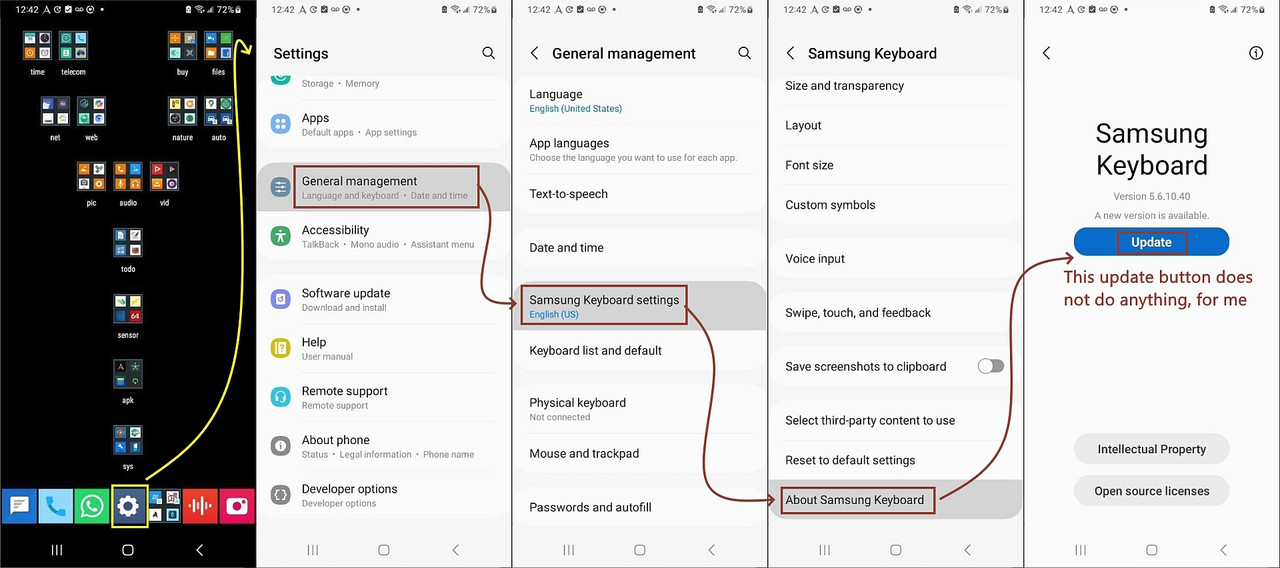
• Curious what you use for offline keyboard/STT (speech to text) on Android

    From Maria Sophia@mariasophia@comprehension.com to comp.mobile.android on Mon Apr 27 18:58:13 2026
    From Newsgroup: comp.mobile.android

    I'm designing my own keyboard/STT setup for Android 13 where the options
    are overwhelming in complexity, even as marketing solutions do exist.

    To that end, it would be useful to know what other people use in terms of
    Q: What offline keyboard, if any, do you use on Android?
    Q: What offline speech to text, if any, do you use on Android?

    If you use an online mechanism, this question isn't about that capability.

    I'm curious what you use for offline speech to text on Android because,
    well, I goofed by clearing the Samsung models by clearing the "data" stored
    in the sandboxed protected area of the Samsung Keyboard on Android 13.

    The problems with reinstalling them are...
    a. They require a Samsung Account to get 'em back (which I don't have)
    b. They're not easily found on the Internet in a reputable archive
    c. They're not easily copied from another phone's protected area
    Which knocks out Samsung's rather useable speech to text mechanism.

    No big deal, right?
    I'll try some other privacy-aware keyboard and speech-to-text engine.

    But which ones?

    Obviously, if anyone knows me, Google keyboards & STT packs are a no go.
    But I do agree that both can be used offline, so I make no judgments.

    So what's that leave me with as viable offline keyboard/STT options?

    It's a relay-race where everything needs to be timed to the handoffs
    because we're essentially swapping the entire system's input focus.
    a. The keyboard has have a customizable trigger with a mic button placement
    b. The voice activity detection must be quick for start & stop
    c. The automatic speech recognition inference has to be quick
    d. The transcription/translation has to be smooth & not jerky
    e. The injection has to result in text on top of the original keyboard

    Note that it's an exquisitely timed keyboard-to-service-to-keyboard loop
    that has to result in the middle voice interaction part being ephemeral.

    I'm sure the well-marketed solutions do that, but I'm doing a DIY solution.
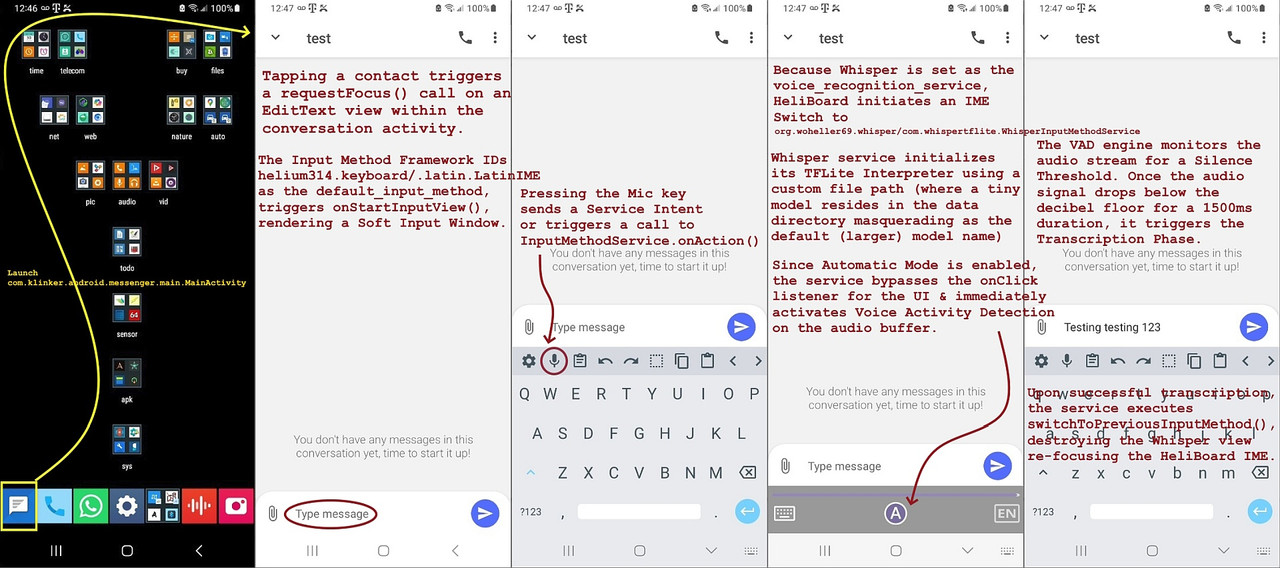
    1. You bring up your application that has a text-entry field (e.g., SMS)
    2. The cursor must stay active in the text field throughout the whole loop
    3. You get a keyboard, which you can type on but it also has a mic button
    4. You press the mic button, and now your keyboard turns into ASR
    5. You talk and the VAD/ASR capture, transcribe & output the text smoothly
    6. When done, the VAD detects the silence & flips you back to the keyboard

    I'm sure the pre-packaged solutions work fine, as do the DIY solutions.
    So as to gather more input for my DIY solution, I would like to ask...

    Q: What offline keyboard, if any, do you use on Android?
    Q: What offline speech to text, if any, do you use on Android?
    --
    On Usenet, old friends around the world can bounce DIY ideas around.
    --- Synchronet 3.21f-Linux NewsLink 1.2
  • From Arno Welzel@usenet@arnowelzel.de to comp.mobile.android on Tue Apr 28 09:48:58 2026
    From Newsgroup: comp.mobile.android

    Maria Sophia, 2026-04-28 02:58:

    I'm designing my own keyboard/STT setup for Android 13 where the options
    are overwhelming in complexity, even as marketing solutions do exist.

    To that end, it would be useful to know what other people use in terms of
    Q: What offline keyboard, if any, do you use on Android?

    GBoard - works offline as well, at least on a Google Pixel 6a.

    Another alternative is <https://voiceinput.futo.org>

    Q: What offline speech to text, if any, do you use on Android?

    Built on speech output - works offline as well, at least on a Google
    Pixel 6a.
    --
    Arno Welzel
    https://arnowelzel.de
    --- Synchronet 3.21f-Linux NewsLink 1.2
  • From Andy Burns@usenet@andyburns.uk to comp.mobile.android on Tue Apr 28 09:05:47 2026
    From Newsgroup: comp.mobile.android

    Maria Sophia wrote:

    I'm curious what you use for offline speech to text on Android

    I dislike talking to computers, so avoid it most of the time.

    --- Synchronet 3.21f-Linux NewsLink 1.2
  • From Maria Sophia@mariasophia@comprehension.com to comp.mobile.android on Tue Apr 28 13:32:33 2026
    From Newsgroup: comp.mobile.android

    Andy Burns wrote:
    Maria Sophia wrote:

    I'm curious what you use for offline speech to text on Android

    I dislike talking to computers, so avoid it most of the time.

    Hi Andy,

    That's interesting. You must have slender fingertips! And good eyes!

    Mine, on the other hand, are large enough that my phone thinks I'm trying
    to play the tuba on the touchscreen. Add my old tired eyes to the mix and voice-to-text is the only thing standing between me & linguistic anarchy.

    I care about your response because you're our token Pixel owner here. :)

    You *must* be using a keyboard. Looking it up, the default Pixel keyboard appears to be "Gboard" and it seems to come with a mic button.

    Apparently standard Gboard (which works on all Android's apparently)
    uses Google's online STT but with language packs it can work offline.

    Exclusive to the Pixel 6+ (including Fold and Tablet), apparently, the mic
    uses google assistant's "enhanced STT" which is an on-device recognition.
    <https://support.google.com/gboard/answer/11197787>

    Apparently you need an entire Android Authority guide just to use it! :)
    <https://www.androidauthority.com/gboard-voice-typing-3222912/>
    --- Synchronet 3.21f-Linux NewsLink 1.2
  • From Andy Burns@usenet@andyburns.uk to comp.mobile.android on Tue Apr 28 21:20:23 2026
    From Newsgroup: comp.mobile.android

    Maria Sophia wrote:
    Andy Burns wrote:
    Maria Sophia wrote:

    I'm curious what you use for offline speech to text on Android

    I dislike talking to computers, so avoid it most of the time.

    Hi Andy,

    That's interesting. You must have slender fingertips! And good eyes!

    Mine, on the other hand, are large enough that my phone thinks I'm trying
    to play the tuba on the touchscreen.

    I find the swipe gestures very intuitive and quick (except those words
    it seems to deliberately muddle up, you soon learn to hunt and peck those).

    Add my old tired eyes to the mix and
    voice-to-text is the only thing standing between me & linguistic anarchy.

    My eyes aren't the best, but providing I've got the right set of glasses
    on they do OK on phones/tablets.

    I care about your response because you're our token Pixel owner here. :)

    You *must* be using a keyboard. Looking it up, the default Pixel keyboard appears to be "Gboard" and it seems to come with a mic button.

    It does.

    Apparently standard Gboard (which works on all Android's apparently)
    uses Google's online STT but with language packs it can work offline.

    Exclusive to the Pixel 6+ (including Fold and Tablet), apparently, the mic uses google assistant's "enhanced STT" which is an on-device recognition.
    <https://support.google.com/gboard/answer/11197787>

    Apparently you need an entire Android Authority guide just to use it! :)
    <https://www.androidauthority.com/gboard-voice-typing-3222912/>

    --- Synchronet 3.21f-Linux NewsLink 1.2
  • From Maria Sophia@mariasophia@comprehension.com to comp.mobile.android on Tue Apr 28 14:48:07 2026
    From Newsgroup: comp.mobile.android

    Arno Welzel wrote:
    To that end, it would be useful to know what other people use in terms of
    Q: What offline keyboard, if any, do you use on Android?

    GBoard - works offline as well, at least on a Google Pixel 6a.

    Another alternative is <https://voiceinput.futo.org>

    Q: What offline speech to text, if any, do you use on Android?

    Built on speech output - works offline as well, at least on a Google
    Pixel 6a.

    Thanks Arno,

    Thanks for your helpful advice, as I had figured most people would be
    using whatever their default's are (e.g., google or samsung mostly).

    Apparently, both Samsung Keyboard & Google's Gboard come with a built-in
    mic button so both support offline speech-to-text as long as an offline language pack is installed separately by the user.
    Google: <https://support.google.com/gboard/answer/11197787>
    Samsung: <https://www.samsung.com/us/support/answer/ANS10001592/>

    As you can imagine, I don't have a Google or Samsung account where, in my experience, I can get the Google but not the Samsung language packs w/o it.

    Note that I'm aware that the Internet "says" you can download the Samsung language packs but in my experience, you can't so this may be a YMMV case.

    But, I'm always seeking generic solutions that work for everyone, even
    those on Motorola, as much as I had hated my Moto G from Google.

    The advice of FUTO is a good start as it's not in this article I read.
    <https://www.umevo.ai/blogs/ume-all-posts/talk-to-text-android-your-complete-guide-to-seamless-voice-to-text-in-2025>

    But it's on the Windows Forum (of all places):
    <https://windowsforum.com/threads/futo-keyboard-the-offline-first-android-keyboard-for-true-on-device-privacy.405419/>

    Here's the first rough ad hoc draft of my guide for installing Futo...
    1. Go to <https://voiceinput.futo.org/>
    2. Press the Download button <https://voiceinput.futo.org/#download>
    3. <https://voiceinput.futo.org/VoiceInput/standalone.apk>
    Name: standalone.apk
    Size: 71142264 bytes (67 MiB)
    SHA256: A515FEC7187188F66A789EE98CA0578BD86F5299F0E0B28D861D3DE2FF97A975
    4. Install it and open the Futo voice input app
    5. Go to Models (or Languages & Models).
    6. Find your language
    7. Choose a model size
    8. Tap download
    9. Enable it as your "Voice Assistant"

    Whoa! I've not had to use the "Voice Assistant" yet. Ever. Why now?
    Hmmm... (have I ever mentioned that keyboards are strikingly complex?)

    Android has (at least) 3 different ways to do stt (maybe more).
    a. IME (like Sayboard/Vosk, and, Whisper half the time)
    b. Service (like Whisper, half the time)
    c. Digital assistant (apparently it's what Futo uses)
    These drive me nuts because they step on each other all the time.

    There are maybe more (since the Copilot app, for example, has its own mic button which is outside of those three, but I don't understand that one).

    Looking up why Futo wants to be the "Default Assistant", apparently that's because it's the only way it can hijack the long-press of the power button
    or the microphone icon in the browser's search bar.

    But luckily, Futo can also be used as an IME, apparently.

    Interestingly, Futo uses Whisper (which I'm familiar with).
    <https://github.com/futo-org/voice-input>
    So, just like it's Sayboard/Vosk, it's Futo/Whisper as the duo.
    Adding Whisper is why the standalone.apk was so massive (67MB).
    Apparently Futo defaults to the English-39 Whisper models.
    That's good 'cuz you want the "tiny" equivalent for starters.

    That standalone.apk apparently does NOT include the Futo keyboard.
    It is just the voice engine.

    To get the Futo keyboard, we go to <https://keyboard.futo.org/>
    <https://keyboard.futo.org/keyboard.apk>
    It's even bigger because it's the whole shebang (keboard + whisper).
    Name: keyboard.apk
    Size: 135895729 bytes (129 MiB)
    SHA256: B5BDCE62468FEEC275183D1DA7C8BA18386FDBD2F90A1F7B0E246E386D529E0D

    This is getting long so I'll see what I can figure out about Futo.
    Thanks for that good advice. Much appreciated. We learn from each other.
    --
    On Usenet, wizened old men discuss topics of interest, where each adds
    their own flavor of value so that the group, as a whole, benefits greatly.
    --- Synchronet 3.21f-Linux NewsLink 1.2
  • From Maria Sophia@mariasophia@comprehension.com to comp.mobile.android on Tue Apr 28 19:05:23 2026
    From Newsgroup: comp.mobile.android

    Maria Sophia wrote:
    This is getting long so I'll see what I can figure out about Futo.
    Thanks for that good advice. Much appreciated. We learn from each other.

    I started looking more deeply at the Futo keyboard & whisper model
    integration and found it works differently than HeliBoard/WhisperIME does.
    <https://explore.market.dev/ecosystems/whisper/projects/whisperime>
    <https://gigazine.net/gsc_news/en/20260328-voiceinput/>

    Have I ever mentioned how complicated Android speech-to-text really is?

    If you ask 1 million people if they think keyboards on Android are
    complicated, only 3 will tell you that they are, because, they are.

    Heliboard + whisperIME is a separate keyboard + voice-input IME combo. Futo/Whisper is an integrated keyboard with built-in Whisper voice input.

    They're completely different beasts.
    Even though, on the surface, they may appear to act the same way.

    If that wasn't enough variety, Sayboard is a keyboard that integrates Vosk,
    as its own offline speech-to-text engine but Sayboard's Vosk models can
    work with HeliBoard's mic also because Sayboard's keyboard is coded to
    allow external voice input providers.

    Meanwhile, Samsung Keyboard is hardcoded to only work with either Samsung
    voice input or Google voice input. They won't work with anything else.

    At the same time, apps like Copilot have a mic, but that mic ties only to
    it's own cloud-based speech-to-text service, although you can trick it by
    using Cromite set to the Microsoft URL and set as a desktop app, and first
    type any character to set the focus before using voice to text engines.

    And then there are apps like Google Voice Access or Vocal (open-source)
    which don't care about your keyboard. They use Android's Accessibility
    Service permissions to look at the screen to reach into any text box.

    There are others like Transcribo, which is a file-based Transcriber that
    uses whisper offline using Android's share intent to process recorded audio
    to text.

    All this is because Android handles voice input through two primary
    channels, one being the system-level RecognitionService and the other being
    the individual Keyboard (IME) implementations.

    If that sounds confusing, it's because it is.
    I can't summarize it better, yet.

    Because it's very confusing when you're trying to use it to do stuff.
    --- Synchronet 3.21f-Linux NewsLink 1.2
  • From Maria Sophia@mariasophia@comprehension.com to comp.mobile.android on Tue Apr 28 19:34:23 2026
    From Newsgroup: comp.mobile.android

    Andy Burns wrote:
    My eyes aren't the best, but providing I've got the right set of glasses
    on they do OK on phones/tablets.

    I envy those like you who can see the phone without too much trouble.

    Me? I like to make the phone two feet tall on the PC using scrcpy, which,
    after all, is what caused me to have to figure out what STT to implement.

    What happened was I had Samsung keyboard doing just fine with the Samsung models tucked away in its private sandbox but then I used "scrcpy -k"
    instead of "scrcpy --keyboard=sdk" to halve the number of steps to bring up
    the keyboard from two steps (click & type) to one step (type).

    Samsung Keyboard's internal services (including the Voice-to-Text listener) went into a Sleep/Suppressed state because the InputMethodService detected
    a hardware override. I thought the app was corrupted, but it was just
    standing down to let the hardware (scrcpy) take over.

    That broke my Samsung voice-to-text implementation, so I did the "rm -rf *"
    of wiping out not only Samsung Keyboard's Cache, but also offline Data!

    That deleted the offline acoustic models and language packs that Samsung downloads on-demand after the first boot after a factory reset.
    /data/user/0/com.samsung.android.honeyboard/

    That wiped out the models stored in Samsung Keyboard's sandbox, and, w/o a Samsung account, you can't get that back (as far as I am able to tell).

    I didn't know that when "scrcpy -k" hides the keyboard, all I needed to do
    in the Samsung Keyboard settings was toggle "Show Keyboard while physical keyboard is connected" which keeps the internal services (and the models)
    alive while still letting me type 100x faster from my PC keyboard.

    At this point, I could do a factory reset since when Samsung ships a phone, they don't expect everyone to have a Samsung account immediately.
    Therefore, they pre-load a base version of the voice models inside the
    system partition (or a hidden carrier/vendor partition). These aren't
    stored in the active "Honeyboard" folder but they are stored as compressed resource files within the system's protected apps.

    Since I'm unrooted, even with Shizuku, I can't see into that partition.

    But I just invested a few hours into getting STT to work with Whisper and HeliBoard (which is a port of OpenBoard) that I wish I had known about
    AJL's suggestion to use Futo/Whisper instead since it's more elegant.

    The basic difference between those two implementation is my current implementation is modular while Futo's implementation is integrated.

    First, the Heliboard mic sends a RECOGNIZE_SPEECH Intent voice request
    & then Android picks a registered service & sends it to WhisperIME
    where the audio goes from a hardware mic to the OS to WhisperIME, & then
    after translation, back to the OS to HeliBoard to the text edit field.

    With the much fatter Futo binary, the Whisper.cpp engine is already
    compiled into the keyboard, so there are no interprocess communications.
    Futo opens its own audio streams and types directly into the text field.

    While that all-in-one model is much like the Samsung/Google model, what's different is Futo can import models that Google/Samsung can't import.

    Did I mention that speech to text on Android is complicated yet?
    --- Synchronet 3.21f-Linux NewsLink 1.2
  • From AJL@noemail@none.com to comp.mobile.android on Wed Apr 29 02:56:54 2026
    From Newsgroup: comp.mobile.android

    On 4/28/26 6:34 PM, Maria Sophia wrote:

    I just invested a few hours into getting STT to work with Whisper and >HeliBoard (which is a port of OpenBoard) that I wish I had known about
    AJL's suggestion to use Futo/Whisper instead since it's more elegant.

    Not my suggestion. I don't have a clue what Futo/Whisper is. And my feet
    don't even talk much less whisper...


    --- Synchronet 3.21f-Linux NewsLink 1.2
  • From Maria Sophia@mariasophia@comprehension.com to comp.mobile.android on Wed Apr 29 01:25:28 2026
    From Newsgroup: comp.mobile.android

    AJL wrote:
    On 4/28/26 6:34 PM, Maria Sophia wrote:

    I just invested a few hours into getting STT to work with Whisper and >>HeliBoard (which is a port of OpenBoard) that I wish I had known about >>AJL's suggestion to use Futo/Whisper instead since it's more elegant.

    Not my suggestion. I don't have a clue what Futo/Whisper is. And my feet
    don't even talk much less whisper...

    Oh. It was Arno. My bad. Sorry for mixing you guys up.

    Anyway, I've got it all figured out, but it's as complicated as Google
    could possibly have made it.

    If I were to start over, I'd actually use Futo/Whisper.cpp, but since I
    already did it with Heliboard/WhisperIME, I'm gonna stick with this.

    It's working perfectly inside of PulseSMS and inside of WhatsApp which is mainly where I use voice to text. It works inside of Copilot too, but it's
    a few more button presses 'cuz Copilot's mic is desperate to send voice to Microsoft's cloud servers and when you use another mic, Copilot gets upset.

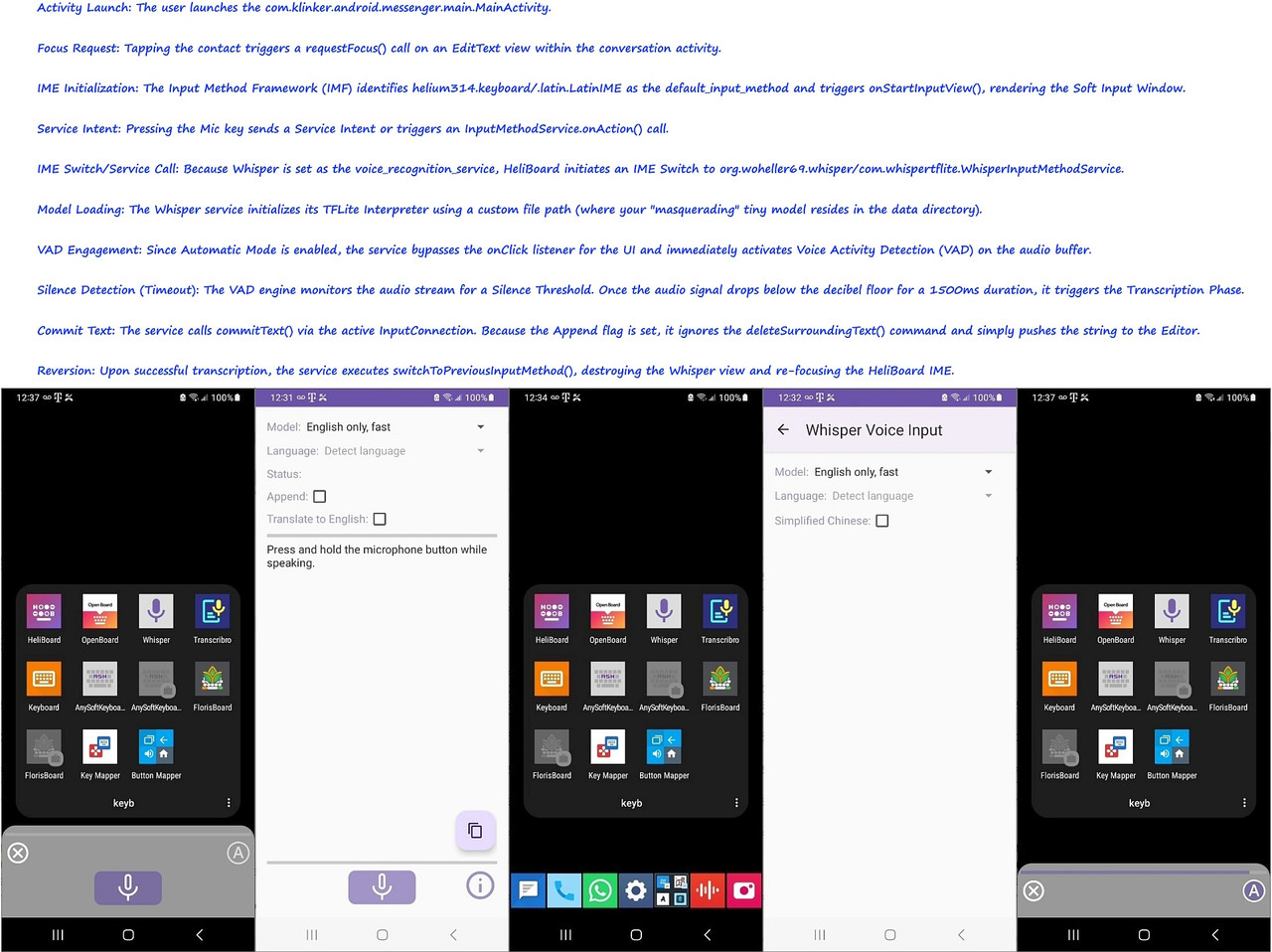
    Here are some screenshots of the working setup, but warning, it's complex!
    <https://i.postimg.cc/hjLR3wTH/whisper02.jpg>

    It's amazing, to me anyway, how super complicated keyboards are on Android.
    <https://i.postimg.cc/hvmzwKpf/whisper01.jpg>

    You'd never know it though, unless you tried to set up your own outside
    of Google/Samsung keyboards, although I suspect Futo/Whisper.cpp is easy.
    --- Synchronet 3.21f-Linux NewsLink 1.2
  • From Richmond@dnomhcir@gmx.com to comp.mobile.android on Wed Apr 29 09:28:30 2026
    From Newsgroup: comp.mobile.android

    Maria Sophia <mariasophia@comprehension.com> writes:

    AJL wrote:
    On 4/28/26 6:34 PM, Maria Sophia wrote:

    I just invested a few hours into getting STT to work with Whisper and >>>HeliBoard (which is a port of OpenBoard) that I wish I had known
    about AJL's suggestion to use Futo/Whisper instead since it's more >>>elegant.

    Not my suggestion. I don't have a clue what Futo/Whisper is. And my
    feet don't even talk much less whisper...

    Oh. It was Arno. My bad. Sorry for mixing you guys up.

    Anyway, I've got it all figured out, but it's as complicated as Google
    could possibly have made it.

    If I were to start over, I'd actually use Futo/Whisper.cpp, but since
    I already did it with Heliboard/WhisperIME, I'm gonna stick with this.

    It's working perfectly inside of PulseSMS and inside of WhatsApp which
    is mainly where I use voice to text. It works inside of Copilot too,
    but it's a few more button presses 'cuz Copilot's mic is desperate to
    send voice to Microsoft's cloud servers and when you use another mic,
    Copilot gets upset.

    Here are some screenshots of the working setup, but warning, it's
    complex! <https://i.postimg.cc/hjLR3wTH/whisper02.jpg>

    It's amazing, to me anyway, how super complicated keyboards are on
    Android. <https://i.postimg.cc/hvmzwKpf/whisper01.jpg>

    You'd never know it though, unless you tried to set up your own
    outside of Google/Samsung keyboards, although I suspect
    Futo/Whisper.cpp is easy.

    I use Futo with Amazon FireOS 8. Amazon for some reason decided to
    remove the speech to text from its keyboard, maybe to make people use
    Alexa, which isn't a solution.

    Although Futo is open source it asks for money from time to time, and
    the permissions keep getting reset. Also it does not display any text
    until the speech is finished and then all appears in one go. Apart from
    that it works well.
    --- Synchronet 3.21f-Linux NewsLink 1.2
  • From AJL@noemail@none.com to comp.mobile.android on Wed Apr 29 16:02:17 2026
    From Newsgroup: comp.mobile.android

    On 4/29/26 1:28 AM, Richmond wrote:

    I use Futo with Amazon FireOS 8. Amazon for some reason decided to
    remove the speech to text from its keyboard, maybe to make people use
    Alexa, which isn't a solution.

    Perhaps another reason not to use Alexa: A quote from settings on the Fire
    tablet I'm posting with (also OS 8): "Alexa is a cloud-based voice service,
    Amazon processes and retains audio, interactions, and other data in the
    cloud to provide and improve our services".

    Fortunately there's an Alexa on-off switch. But I wonder if they're still
    listening... 8-O

    As posted earlier I covered this tablet's cameras and plugged its mike hole
    with fingernail polish. Also like someone else here, I just don't like
    talking to computers. Me paranoid? Nah...


    --- Synchronet 3.21f-Linux NewsLink 1.2
  • From Maria Sophia@mariasophia@comprehension.com to comp.mobile.android on Wed Apr 29 12:15:27 2026
    From Newsgroup: comp.mobile.android

    AJL wrote:
    On 4/29/26 1:28 AM, Richmond wrote:

    I use Futo with Amazon FireOS 8. Amazon for some reason decided to
    remove the speech to text from its keyboard, maybe to make people use >>Alexa, which isn't a solution.

    Perhaps another reason not to use Alexa: A quote from settings on the Fire
    tablet I'm posting with (also OS 8): "Alexa is a cloud-based voice service,
    Amazon processes and retains audio, interactions, and other data in the
    cloud to provide and improve our services".

    Fortunately there's an Alexa on-off switch. But I wonder if they're still
    listening... 8-O

    As posted earlier I covered this tablet's cameras and plugged its mike hole
    with fingernail polish. Also like someone else here, I just don't like
    talking to computers. Me paranoid? Nah...

    Wow. That's GREAT information from both of you. Thanks for helping out!

    While I was fighting the Copilot dedicated-cloud microphone button, I
    realized that they do it on purpose. The average person doesn't fight the system like we do. They just go with the easiest way there is.

    So, they end up using whatever the company wants them to use.
    In the case of Amazon, I wouldn't doubt they'd be pushing toward Alexa.

    In the situation with keyboards, I'll wager most people not on Samsung just
    use the Google keyboard (I think it's called 'gboard' but it's actually
    more complex than that as it uses a bunch of google packages in addition).

    For those people not on Samsung, in addition to using Gboard, I'll wager
    those who want offline packs use the Google-provided offline models.
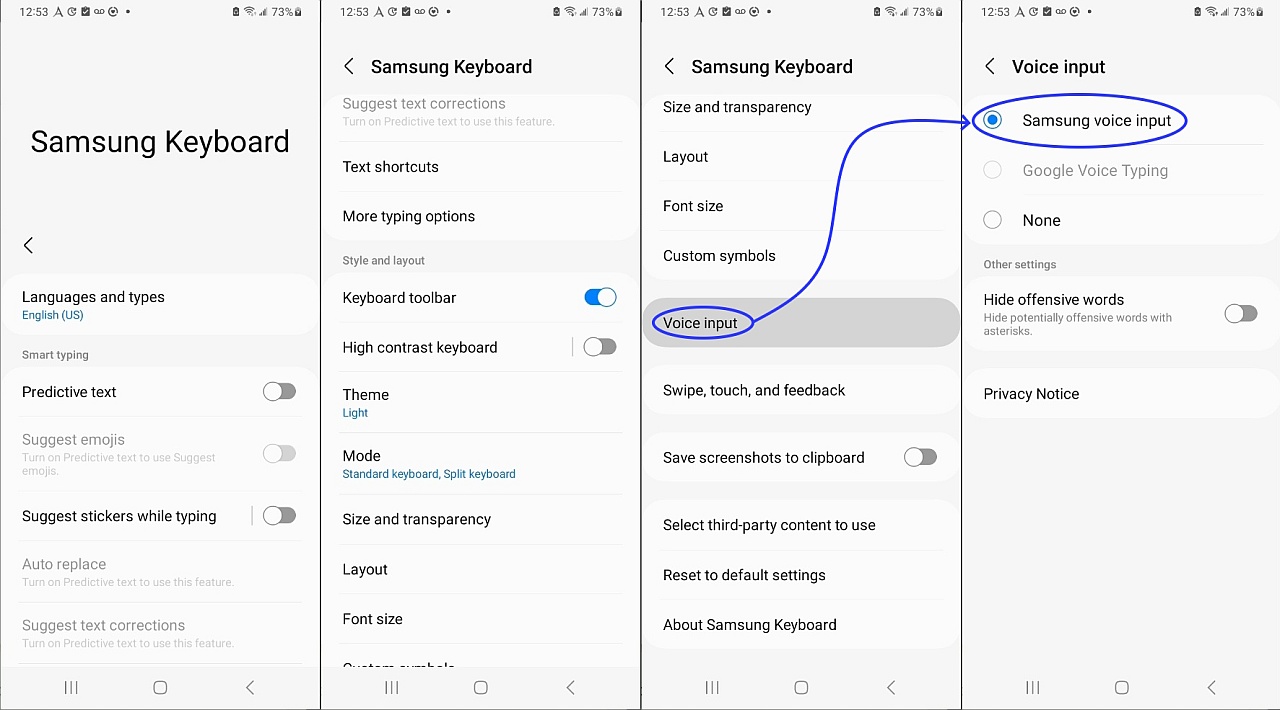
    <https://i.postimg.cc/HsQ38mdV/keyboard04.jpg>

    For those (like Frank and me) on Samsung, I'll wager most Samsung owners
    stick with the Samsung Keyboard, and when it comes time to do models, they
    have the choice of the Google or Samsung offline language packs for that.

    My "problem" is I degoogled so thoroughly that there is no hope of even
    Project Mainline working, let along Google's keyboard & search engines.

    And, in debugging "scrcpy -k" I had cleared the Samsung Keyboard "Data",
    which, surprisingly, is almost impossible to add back if you don't have a Samsung account or if you don't want to factory reset (as they're stored in
    a compressed folder in an area non-accessible to even adb with Shizuku.
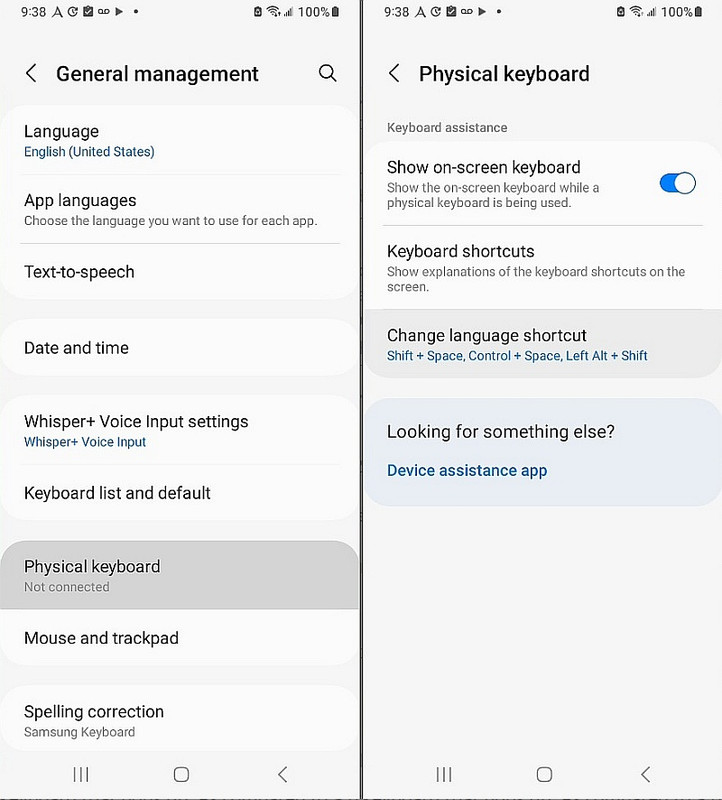
    <https://i.postimg.cc/PxgzN37T/keyboard07.jpg>

    Ask me how I know those two unfortunately facts about Samsung voice models!
    <https://i.postimg.cc/W3HgCWVH/keyboard03.jpg>

    In the end, I've got it working (almost) flawlessly in that:
    a. In my SMS/MMS app, the mic works flawlessly now, offline
    b. In most apps (like browsers), the mic works flawlessly
    c. But apps that come with their own mic button take more steps
    (you have to type a space or an "x" to "anchor" the focus)

    My point was that Copilot, for sure, makes that microphone so hard to
    replace that I'd wager the average person doesn't know how to subvert it.

    While I don't do Alexa, I'm sure Amazon is as clever.
    --- Synchronet 3.21f-Linux NewsLink 1.2