On 2025-04-15 15:18, Frank Slootweg wrote:[...]
For a non-automated backup you can use MTP. With MTP you *can* access the /Internal storage/Android folders. For example in Windows File Explorer, this accesses the folder which contains the OsmAnd+ maps:
MTP is what I do. Sometimes I have used a WiFi file server app on the
phone instead. Sometimes I found that one can see files the other
doesn't, but I don't remember which.
This PC\Frank's Galaxy A51\Internal storage\Android\data\net.osmand.plus\files
But 'This PC\Frank's Galaxy A51\Internal storage' is only accessible
in File Explorer, it's not part of the normal file system, nor
accessible as a Network Share, so you can't use normal copy or backup utilities. (Perhaps in Windows PowerShell one can 'program'/control File Explorer? No idea.)
In Linux we can access the filesystem. Once I tell the equivalent of the file explorer to access the phone, then it is also accessible under:
/run/user/1000/gvfs/mtp:host=motorola_moto_g52_SOME_LETTERS
for any app. This is using with a gtk desktop, with KDE it is somewhere else.
Then I can use rsync and copy links to the files in the previous backup.
On Tue, 15 Apr 2025 17:26:01 -0000 (UTC), badgolferman wrote :
Actions speak louder than words, little boy. And you always side with >>>Arlen - religiously (you even forgave him for impersonating you lol).
I will agree with anyone who speaks the truth or makes a rational
statement, even you on occasion. But I learned my lesson the last
time I agreed with you when I realized you were lying.
Carlos E.R. <robin_listas@es.invalid> wrote:
On 2025-04-15 15:18, Frank Slootweg wrote:[...]
For a non-automated backup you can use MTP. With MTP you *can* access >>> the /Internal storage/Android folders. For example in Windows File
Explorer, this accesses the folder which contains the OsmAnd+ maps:
MTP is what I do. Sometimes I have used a WiFi file server app on the
phone instead. Sometimes I found that one can see files the other
doesn't, but I don't remember which.
Yes, I have also found such servers, but none for recent Android
versions (10 and higher), which can access the /Internal storage/Android folders.
This PC\Frank's Galaxy A51\Internal storage\Android\data\net.osmand.plus\files
But 'This PC\Frank's Galaxy A51\Internal storage' is only accessible >>> in File Explorer, it's not part of the normal file system, nor
accessible as a Network Share, so you can't use normal copy or backup
utilities. (Perhaps in Windows PowerShell one can 'program'/control File >>> Explorer? No idea.)
In Linux we can access the filesystem. Once I tell the equivalent of the
file explorer to access the phone, then it is also accessible under:
/run/user/1000/gvfs/mtp:host=motorola_moto_g52_SOME_LETTERS
for any app. This is using with a gtk desktop, with KDE it is somewhere
else.
Then I can use rsync and copy links to the files in the previous backup.
Could you give an example (Linux) 'cp' command which shows what the
source and destination paths look like?
In Windows you can't specify a source path for a 'copy', etc., because such a path does not exist for MTP, so - being an old Unix/UNIX and
current GNU user - I am interested what it looks like on Linux (for
MTP).
Or is the source just a path relative to /run/user/1000/gvfs/mtp?
[...]
On 2025-04-15 20:27, Frank Slootweg wrote:
In Windows you can't specify a source path for a 'copy', etc., because >> such a path does not exist for MTP, so - being an old Unix/UNIX and
current GNU user - I am interested what it looks like on Linux (for
MTP).
Or is the source just a path relative to /run/user/1000/gvfs/mtp?
[...]
It is an emulation layer. MTP does not support every operation a true filesystem does.
This PC\Frank's Galaxy A51\Internal storage\Android\data\net.osmand.plus\files
But 'This PC\Frank's Galaxy A51\Internal storage' is only accessible
in File Explorer, it's not part of the normal file system, nor
accessible as a Network Share, so you can't use normal copy or backup utilities. (Perhaps in Windows PowerShell one can 'program'/control File Explorer? No idea.)
On 2025-04-14 17:48, Frank Slootweg wrote:
Arno Welzel <usenet@arnowelzel.de> wrote:
Arno Welzel, 2025-04-14 13:18:
Frank Slootweg, 2025-04-13 15:57:[...]
Yes, I agree, that Android has the flexibility to user other methods as
well, like backup apps, ADB and so on - but this needs enough experience >>> by the user like how to set up ADB on a computer or how to transfer the
backup to another device using USB and so on.
The methods I mentioned do not require the user to setup ADB. The
Smart Switch Android-to-Windows backup does use a USB-cable, but no ADB.
The Smart Switch Android app can transfer to another phone by Wi-Fi or
USB and can backup to cloud, SD-card or USB-stick.
That's a Samsung app, I understand. What about a generic full backup
app, non adb? For any operating system, not Windows only?
On 15/04/2025 6:01 am, Carlos E.R. wrote:
On 2025-04-14 17:48, Frank Slootweg wrote:
Arno Welzel <usenet@arnowelzel.de> wrote:
Arno Welzel, 2025-04-14 13:18:
Frank Slootweg, 2025-04-13 15:57:[...]
Yes, I agree, that Android has the flexibility to user other methods as >>>> well, like backup apps, ADB and so on - but this needs enough experience >>>> by the user like how to set up ADB on a computer or how to transfer the >>>> backup to another device using USB and so on.
The methods I mentioned do not require the user to setup ADB. The
Smart Switch Android-to-Windows backup does use a USB-cable, but no ADB. >>> The Smart Switch Android app can transfer to another phone by Wi-Fi or
USB and can backup to cloud, SD-card or USB-stick.
That's a Samsung app, I understand. What about a generic full backup app, non adb? For any operating system, not Windows only?
Don't know about a Samsung App but, in Linux, I can use a 'dd' commandline command to back up both my Windows and Linux installations.
Is there a similar commandline command for Android and/or Apple Mac??
On 15/04/2025 6:01 am, Carlos E.R. wrote:
On 2025-04-14 17:48, Frank Slootweg wrote:
Arno Welzel <usenet@arnowelzel.de> wrote:
Arno Welzel, 2025-04-14 13:18:
Frank Slootweg, 2025-04-13 15:57:[...]
Yes, I agree, that Android has the flexibility to user other methods as >>>> well, like backup apps, ADB and so on - but this needs enough
experience
by the user like how to set up ADB on a computer or how to transfer the >>>> backup to another device using USB and so on.
The methods I mentioned do not require the user to setup ADB. The
Smart Switch Android-to-Windows backup does use a USB-cable, but no ADB. >>> The Smart Switch Android app can transfer to another phone by Wi-Fi or
USB and can backup to cloud, SD-card or USB-stick.
That's a Samsung app, I understand. What about a generic full backup
app, non adb? For any operating system, not Windows only?
Don't know about a Samsung App but, in Linux, I can use a 'dd'
commandline command to back up both my Windows and Linux installations.
Is there a similar commandline command for Android and/or Apple Mac??
On Wed, 4/16/2025 6:53 AM, Daniel70 wrote:
On 15/04/2025 6:01 am, Carlos E.R. wrote:
On 2025-04-14 17:48, Frank Slootweg wrote:
Arno Welzel <usenet@arnowelzel.de> wrote:
Arno Welzel, 2025-04-14 13:18:
Frank Slootweg, 2025-04-13 15:57:[...]
Yes, I agree, that Android has the flexibility to user other methods as >>>>> well, like backup apps, ADB and so on - but this needs enough experience >>>>> by the user like how to set up ADB on a computer or how to transfer the >>>>> backup to another device using USB and so on.
The methods I mentioned do not require the user to setup ADB. The >>>> Smart Switch Android-to-Windows backup does use a USB-cable, but no ADB. >>>> The Smart Switch Android app can transfer to another phone by Wi-Fi or >>>> USB and can backup to cloud, SD-card or USB-stick.
That's a Samsung app, I understand. What about a generic full backup app, non adb? For any operating system, not Windows only?
Don't know about a Samsung App but, in Linux, I can use a 'dd' commandline command to back up both my Windows and Linux installations.
Is there a similar commandline command for Android and/or Apple Mac??
On computing devices that support booting from a second OS, you can
gain "dd" access from the second OS. On my MacG4, I booted the Ubuntu PPC DVD, and used Ubuntu "dd" to transfer out the disk (which would be at-rest). I used a command line FTP session, and you can mix shell commands into
the ftp commands -- dd can be piped into a (binary) "put". And on the computer
I did that on, the GbE at 112MB/sec, that's the fastest interface it has got.
But something like a phone, there are fewer opportunities for tricks like that.
Rooting the phone, if you can manage it, is as close as you're getting
to a good time.
On at least one phone, the NAND is hidden underneath something, and
you can't cable up and read-out the NAND chip with external equipment.
For some of the devices, it's pretty well secured. You would not expect
a simple trick to work in such a case.
Paul
On 2025-04-16 05:28, Paul wrote:
On Wed, 4/16/2025 6:53 AM, Daniel70 wrote:
On 15/04/2025 6:01 am, Carlos E.R. wrote:
On 2025-04-14 17:48, Frank Slootweg wrote:
Arno Welzel <usenet@arnowelzel.de> wrote:
Arno Welzel, 2025-04-14 13:18:
Frank Slootweg, 2025-04-13 15:57:[...]
Yes, I agree, that Android has the flexibility to user other
methods as
well, like backup apps, ADB and so on - but this needs enough
experience
by the user like how to set up ADB on a computer or how to
transfer the
backup to another device using USB and so on.
The methods I mentioned do not require the user to setup ADB. The >>>>> Smart Switch Android-to-Windows backup does use a USB-cable, but no >>>>> ADB.
The Smart Switch Android app can transfer to another phone by Wi-Fi or >>>>> USB and can backup to cloud, SD-card or USB-stick.
That's a Samsung app, I understand. What about a generic full backup
app, non adb? For any operating system, not Windows only?
Don't know about a Samsung App but, in Linux, I can use a 'dd'
commandline command to back up both my Windows and Linux installations.
Is there a similar commandline command for Android and/or Apple Mac??
On computing devices that support booting from a second OS, you can
gain "dd" access from the second OS. On my MacG4, I booted the Ubuntu PPC
DVD, and used Ubuntu "dd" to transfer out the disk (which would be at-
rest).
I used a command line FTP session, and you can mix shell commands into
the ftp commands -- dd can be piped into a (binary) "put". And on the
computer
I did that on, the GbE at 112MB/sec, that's the fastest interface it
has got.
But something like a phone, there are fewer opportunities for tricks
like that.
Rooting the phone, if you can manage it, is as close as you're getting
to a good time.
On at least one phone, the NAND is hidden underneath something, and
you can't cable up and read-out the NAND chip with external equipment.
For some of the devices, it's pretty well secured. You would not expect
a simple trick to work in such a case.
Paul
Or you could just use the "dd" command built into the Unix sub-system of every Mac since Mac OS X was first released in 2001...
On 2025-04-16 05:28, Paul wrote:
On Wed, 4/16/2025 6:53 AM, Daniel70 wrote:
On 15/04/2025 6:01 am, Carlos E.R. wrote:
On 2025-04-14 17:48, Frank Slootweg wrote:
Arno Welzel <usenet@arnowelzel.de> wrote:
Arno Welzel, 2025-04-14 13:18:
Frank Slootweg, 2025-04-13 15:57:[...]
Yes, I agree, that Android has the flexibility to user other methods as >>>>>> well, like backup apps, ADB and so on - but this needs enough experience >>>>>> by the user like how to set up ADB on a computer or how to transfer the >>>>>> backup to another device using USB and so on.
The methods I mentioned do not require the user to setup ADB. The >>>>> Smart Switch Android-to-Windows backup does use a USB-cable, but no ADB. >>>>> The Smart Switch Android app can transfer to another phone by Wi-Fi or >>>>> USB and can backup to cloud, SD-card or USB-stick.
That's a Samsung app, I understand. What about a generic full backup app, non adb? For any operating system, not Windows only?
Don't know about a Samsung App but, in Linux, I can use a 'dd' commandline command to back up both my Windows and Linux installations.
Is there a similar commandline command for Android and/or Apple Mac??
On computing devices that support booting from a second OS, you can
gain "dd" access from the second OS. On my MacG4, I booted the Ubuntu PPC
DVD, and used Ubuntu "dd" to transfer out the disk (which would be at-rest). >> I used a command line FTP session, and you can mix shell commands into
the ftp commands -- dd can be piped into a (binary) "put". And on the computer
I did that on, the GbE at 112MB/sec, that's the fastest interface it has got.
But something like a phone, there are fewer opportunities for tricks like that.
Rooting the phone, if you can manage it, is as close as you're getting
to a good time.
On at least one phone, the NAND is hidden underneath something, and
you can't cable up and read-out the NAND chip with external equipment.
For some of the devices, it's pretty well secured. You would not expect
a simple trick to work in such a case.
Paul
Or you could just use the "dd" command built into the Unix sub-system of every Mac since Mac OS X was first released in 2001...
On 2025-04-16 22:26, Alan wrote:
On 2025-04-16 05:28, Paul wrote:
On Wed, 4/16/2025 6:53 AM, Daniel70 wrote:
On 15/04/2025 6:01 am, Carlos E.R. wrote:
On 2025-04-14 17:48, Frank Slootweg wrote:
Arno Welzel <usenet@arnowelzel.de> wrote:
Arno Welzel, 2025-04-14 13:18:
Frank Slootweg, 2025-04-13 15:57:[...]
Yes, I agree, that Android has the flexibility to user other
methods as
well, like backup apps, ADB and so on - but this needs enough
experience
by the user like how to set up ADB on a computer or how to
transfer the
backup to another device using USB and so on.
The methods I mentioned do not require the user to setup ADB. The >>>>>> Smart Switch Android-to-Windows backup does use a USB-cable, but
no ADB.
The Smart Switch Android app can transfer to another phone by Wi- >>>>>> Fi or
USB and can backup to cloud, SD-card or USB-stick.
That's a Samsung app, I understand. What about a generic full
backup app, non adb? For any operating system, not Windows only?
Don't know about a Samsung App but, in Linux, I can use a 'dd'
commandline command to back up both my Windows and Linux installations. >>>>
Is there a similar commandline command for Android and/or Apple Mac??
On computing devices that support booting from a second OS, you can
gain "dd" access from the second OS. On my MacG4, I booted the Ubuntu
PPC
DVD, and used Ubuntu "dd" to transfer out the disk (which would be
at- rest).
I used a command line FTP session, and you can mix shell commands into
the ftp commands -- dd can be piped into a (binary) "put". And on the
computer
I did that on, the GbE at 112MB/sec, that's the fastest interface it
has got.
But something like a phone, there are fewer opportunities for tricks
like that.
Rooting the phone, if you can manage it, is as close as you're getting
to a good time.
On at least one phone, the NAND is hidden underneath something, and
you can't cable up and read-out the NAND chip with external equipment.
For some of the devices, it's pretty well secured. You would not expect
a simple trick to work in such a case.
Paul
Or you could just use the "dd" command built into the Unix sub-system
of every Mac since Mac OS X was first released in 2001...
Not on a phone.
On 2025-04-16 14:10, Carlos E.R. wrote:
On 2025-04-16 22:26, Alan wrote:
On 2025-04-16 05:28, Paul wrote:
On Wed, 4/16/2025 6:53 AM, Daniel70 wrote:
On 15/04/2025 6:01 am, Carlos E.R. wrote:On computing devices that support booting from a second OS, you can
On 2025-04-14 17:48, Frank Slootweg wrote:
Arno Welzel <usenet@arnowelzel.de> wrote:
Arno Welzel, 2025-04-14 13:18:
Frank Slootweg, 2025-04-13 15:57:[...]
Yes, I agree, that Android has the flexibility to user other
methods as
well, like backup apps, ADB and so on - but this needs enough >>>>>>>> experience
by the user like how to set up ADB on a computer or how to
transfer the
backup to another device using USB and so on.
The methods I mentioned do not require the user to setup >>>>>>> ADB. The
Smart Switch Android-to-Windows backup does use a USB-cable, but >>>>>>> no ADB.
The Smart Switch Android app can transfer to another phone by Wi- >>>>>>> Fi or
USB and can backup to cloud, SD-card or USB-stick.
That's a Samsung app, I understand. What about a generic full
backup app, non adb? For any operating system, not Windows only?
Don't know about a Samsung App but, in Linux, I can use a 'dd'
commandline command to back up both my Windows and Linux
installations.
Is there a similar commandline command for Android and/or Apple Mac?? >>>>
gain "dd" access from the second OS. On my MacG4, I booted the
Ubuntu PPC
DVD, and used Ubuntu "dd" to transfer out the disk (which would be
at- rest).
I used a command line FTP session, and you can mix shell commands into >>>> the ftp commands -- dd can be piped into a (binary) "put". And on
the computer
I did that on, the GbE at 112MB/sec, that's the fastest interface it
has got.
But something like a phone, there are fewer opportunities for tricks
like that.
Rooting the phone, if you can manage it, is as close as you're getting >>>> to a good time.
On at least one phone, the NAND is hidden underneath something, and
you can't cable up and read-out the NAND chip with external equipment. >>>> For some of the devices, it's pretty well secured. You would not expect >>>> a simple trick to work in such a case.
Paul
Or you could just use the "dd" command built into the Unix sub-system
of every Mac since Mac OS X was first released in 2001...
Not on a phone.
You seem to be a little hard of reading:
"Is there a similar commandline command [] or Apple Mac??"
"On my MacG4, I booted the Ubuntu PPC DVD, and used Ubuntu "dd" to
transfer out the disk (which would be at- rest)."
But of those make direct reference to a Mac.
Alan wrote:
On 2025-04-16 14:10, Carlos E.R. wrote:
On 2025-04-16 22:26, Alan wrote:
On 2025-04-16 05:28, Paul wrote:
On Wed, 4/16/2025 6:53 AM, Daniel70 wrote:
On 15/04/2025 6:01 am, Carlos E.R. wrote:On computing devices that support booting from a second OS, you can
On 2025-04-14 17:48, Frank Slootweg wrote:
Arno Welzel <usenet@arnowelzel.de> wrote:
Arno Welzel, 2025-04-14 13:18:
Frank Slootweg, 2025-04-13 15:57:[...]
Yes, I agree, that Android has the flexibility to user other >>>>>>>>> methods as
well, like backup apps, ADB and so on - but this needs enough >>>>>>>>> experience
by the user like how to set up ADB on a computer or how to
transfer the
backup to another device using USB and so on.
   The methods I mentioned do not require the user to setup >>>>>>>> ADB. The
Smart Switch Android-to-Windows backup does use a USB-cable, but >>>>>>>> no ADB.
The Smart Switch Android app can transfer to another phone by >>>>>>>> Wi- Fi or
USB and can backup to cloud, SD-card or USB-stick.
That's a Samsung app, I understand. What about a generic full
backup app, non adb? For any operating system, not Windows only?
Don't know about a Samsung App but, in Linux, I can use a 'dd'
commandline command to back up both my Windows and Linux
installations.
Is there a similar commandline command for Android and/or Apple Mac?? >>>>>
gain "dd" access from the second OS. On my MacG4, I booted the
Ubuntu PPC
DVD, and used Ubuntu "dd" to transfer out the disk (which would be
at- rest).
I used a command line FTP session, and you can mix shell commands into >>>>> the ftp commands -- dd can be piped into a (binary) "put". And on
the computer
I did that on, the GbE at 112MB/sec, that's the fastest interface
it has got.
But something like a phone, there are fewer opportunities for
tricks like that.
Rooting the phone, if you can manage it, is as close as you're getting >>>>> to a good time.
On at least one phone, the NAND is hidden underneath something, and
you can't cable up and read-out the NAND chip with external equipment. >>>>> For some of the devices, it's pretty well secured. You would not
expect
a simple trick to work in such a case.
   Paul
Or you could just use the "dd" command built into the Unix sub-
system of every Mac since Mac OS X was first released in 2001...
Not on a phone.
You seem to be a little hard of reading:
"Is there a similar commandline command [] or Apple Mac??"
"On my MacG4, I booted the Ubuntu PPC DVD, and used Ubuntu "dd" to
transfer out the disk (which would be at- rest)."
But of those make direct reference to a Mac.
Did you read this before you posted it? Most of what you've written
aren't even sentences.
On Wed, 4/16/2025 4:26 PM, Alan wrote:So make a second boot drive for the Mac.
On 2025-04-16 05:28, Paul wrote:
On Wed, 4/16/2025 6:53 AM, Daniel70 wrote:
On 15/04/2025 6:01 am, Carlos E.R. wrote:
On 2025-04-14 17:48, Frank Slootweg wrote:
Arno Welzel <usenet@arnowelzel.de> wrote:
Arno Welzel, 2025-04-14 13:18:
Frank Slootweg, 2025-04-13 15:57:[...]
Yes, I agree, that Android has the flexibility to user other methods as >>>>>>> well, like backup apps, ADB and so on - but this needs enough experience
by the user like how to set up ADB on a computer or how to transfer the >>>>>>> backup to another device using USB and so on.
The methods I mentioned do not require the user to setup ADB. The
Smart Switch Android-to-Windows backup does use a USB-cable, but no ADB. >>>>>> The Smart Switch Android app can transfer to another phone by Wi-Fi or >>>>>> USB and can backup to cloud, SD-card or USB-stick.
That's a Samsung app, I understand. What about a generic full backup app, non adb? For any operating system, not Windows only?
Don't know about a Samsung App but, in Linux, I can use a 'dd' commandline command to back up both my Windows and Linux installations.
Is there a similar commandline command for Android and/or Apple Mac??
On computing devices that support booting from a second OS, you can
gain "dd" access from the second OS. On my MacG4, I booted the Ubuntu PPC >>> DVD, and used Ubuntu "dd" to transfer out the disk (which would be at-rest).
I used a command line FTP session, and you can mix shell commands into
the ftp commands -- dd can be piped into a (binary) "put". And on the computer
I did that on, the GbE at 112MB/sec, that's the fastest interface it has got.
But something like a phone, there are fewer opportunities for tricks like that.
Rooting the phone, if you can manage it, is as close as you're getting
to a good time.
On at least one phone, the NAND is hidden underneath something, and
you can't cable up and read-out the NAND chip with external equipment.
For some of the devices, it's pretty well secured. You would not expect
a simple trick to work in such a case.
Paul
Or you could just use the "dd" command built into the Unix sub-system of every Mac since Mac OS X was first released in 2001...
But not make a copy of the disk while it is "hot".
The MacG4 Quad Nostril does not have VSS and shadow copy for hot backups.
On 2025-04-16 14:24, Paul wrote:
On Wed, 4/16/2025 4:26 PM, Alan wrote:So make a second boot drive for the Mac.
On 2025-04-16 05:28, Paul wrote:
On Wed, 4/16/2025 6:53 AM, Daniel70 wrote:
On 15/04/2025 6:01 am, Carlos E.R. wrote:On computing devices that support booting from a second OS, you can
On 2025-04-14 17:48, Frank Slootweg wrote:
Arno Welzel <usenet@arnowelzel.de> wrote:
Arno Welzel, 2025-04-14 13:18:
Frank Slootweg, 2025-04-13 15:57:[...]
Yes, I agree, that Android has the flexibility to user other methods as
well, like backup apps, ADB and so on - but this needs enough experience
by the user like how to set up ADB on a computer or how to transfer the
backup to another device using USB and so on.
The methods I mentioned do not require the user to setup ADB. The
Smart Switch Android-to-Windows backup does use a USB-cable, but no ADB.
The Smart Switch Android app can transfer to another phone by Wi-Fi or >>>>>>> USB and can backup to cloud, SD-card or USB-stick.
That's a Samsung app, I understand. What about a generic full backup app, non adb? For any operating system, not Windows only?
Don't know about a Samsung App but, in Linux, I can use a 'dd' commandline command to back up both my Windows and Linux installations.
Is there a similar commandline command for Android and/or Apple Mac?? >>>>
gain "dd" access from the second OS. On my MacG4, I booted the Ubuntu PPC >>>> DVD, and used Ubuntu "dd" to transfer out the disk (which would be at-rest).
I used a command line FTP session, and you can mix shell commands into >>>> the ftp commands -- dd can be piped into a (binary) "put". And on the computer
I did that on, the GbE at 112MB/sec, that's the fastest interface it has got.
But something like a phone, there are fewer opportunities for tricks like that.
Rooting the phone, if you can manage it, is as close as you're getting >>>> to a good time.
On at least one phone, the NAND is hidden underneath something, and
you can't cable up and read-out the NAND chip with external equipment. >>>> For some of the devices, it's pretty well secured. You would not expect >>>> a simple trick to work in such a case.
Paul
Or you could just use the "dd" command built into the Unix sub-system of every Mac since Mac OS X was first released in 2001...
But not make a copy of the disk while it is "hot".
The MacG4 Quad Nostril does not have VSS and shadow copy for hot backups.
On Wed, 4/16/2025 9:52 PM, Alan wrote:
On 2025-04-16 14:24, Paul wrote:
On Wed, 4/16/2025 4:26 PM, Alan wrote:
On 2025-04-16 05:28, Paul wrote:
On Wed, 4/16/2025 6:53 AM, Daniel70 wrote:
On 15/04/2025 6:01 am, Carlos E.R. wrote:On computing devices that support booting from a second OS, you can
On 2025-04-14 17:48, Frank Slootweg wrote:
Arno Welzel <usenet@arnowelzel.de> wrote:
Arno Welzel, 2025-04-14 13:18:
Frank Slootweg, 2025-04-13 15:57:[...]
Yes, I agree, that Android has the flexibility to user other methods as
well, like backup apps, ADB and so on - but this needs enough experience
by the user like how to set up ADB on a computer or how to transfer the
backup to another device using USB and so on.
The methods I mentioned do not require the user to setup ADB. The
Smart Switch Android-to-Windows backup does use a USB-cable, but no ADB.
The Smart Switch Android app can transfer to another phone by Wi-Fi or >>>>>>>> USB and can backup to cloud, SD-card or USB-stick.
That's a Samsung app, I understand. What about a generic full backup app, non adb? For any operating system, not Windows only?
Don't know about a Samsung App but, in Linux, I can use a 'dd' commandline command to back up both my Windows and Linux installations.
Is there a similar commandline command for Android and/or Apple Mac?? >>>>>
gain "dd" access from the second OS. On my MacG4, I booted the Ubuntu PPC >>>>> DVD, and used Ubuntu "dd" to transfer out the disk (which would be at-rest).
I used a command line FTP session, and you can mix shell commands into >>>>> the ftp commands -- dd can be piped into a (binary) "put". And on the computer
I did that on, the GbE at 112MB/sec, that's the fastest interface it has got.
But something like a phone, there are fewer opportunities for tricks like that.
Rooting the phone, if you can manage it, is as close as you're getting >>>>> to a good time.
On at least one phone, the NAND is hidden underneath something, and
you can't cable up and read-out the NAND chip with external equipment. >>>>> For some of the devices, it's pretty well secured. You would not expect >>>>> a simple trick to work in such a case.
Paul
Or you could just use the "dd" command built into the Unix sub-system of every Mac since Mac OS X was first released in 2001...
But not make a copy of the disk while it is "hot".
The MacG4 Quad Nostril does not have VSS and shadow copy for hot backups. >> So make a second boot drive for the Mac.
I stopped opening up the G4 after a while. It required sitting
on my kitchen floor and "cradling the scissor case" when opening it.
That's to avoid stressing the cables in it.
On Wed, 4/16/2025 9:52 PM, Alan wrote:
On 2025-04-16 14:24, Paul wrote:
This is one of the reasons, in the current computer room, *the* most popular computer, is the one with a flat door panel with a handle on it. I used to have
computer cases, where the silly drives used to slide into front mount
tray holes (it would take like ten minutes to change a drive),
but the machine with the nice door, the trays face the user
and are immediately accessible. I have "enjoyed the hell" out of the
two of those I own. The trays for the disks are steel, so you don't have
to worry about the competitor cases that use plastic trays. That's
the Antec Sonata case. It's amazing, what a few convenience features
makes to your opinion of a thing.
On 2025-04-16 22:15, Paul wrote:
On Wed, 4/16/2025 9:52 PM, Alan wrote:
On 2025-04-16 14:24, Paul wrote:
On Wed, 4/16/2025 4:26 PM, Alan wrote:
On 2025-04-16 05:28, Paul wrote:
On Wed, 4/16/2025 6:53 AM, Daniel70 wrote:
On 15/04/2025 6:01 am, Carlos E.R. wrote:On computing devices that support booting from a second OS, you can >>>>>> gain "dd" access from the second OS. On my MacG4, I booted the Ubuntu PPC
On 2025-04-14 17:48, Frank Slootweg wrote:
Arno Welzel <usenet@arnowelzel.de> wrote:
Arno Welzel, 2025-04-14 13:18:
Frank Slootweg, 2025-04-13 15:57:[...]
Yes, I agree, that Android has the flexibility to user other methods as
well, like backup apps, ADB and so on - but this needs enough experience
by the user like how to set up ADB on a computer or how to transfer the
backup to another device using USB and so on.
The methods I mentioned do not require the user to setup ADB. The
Smart Switch Android-to-Windows backup does use a USB-cable, but no ADB.
The Smart Switch Android app can transfer to another phone by Wi-Fi or
USB and can backup to cloud, SD-card or USB-stick.
That's a Samsung app, I understand. What about a generic full backup app, non adb? For any operating system, not Windows only?
Don't know about a Samsung App but, in Linux, I can use a 'dd' commandline command to back up both my Windows and Linux installations.
Is there a similar commandline command for Android and/or Apple Mac?? >>>>>>
DVD, and used Ubuntu "dd" to transfer out the disk (which would be at-rest).
I used a command line FTP session, and you can mix shell commands into >>>>>> the ftp commands -- dd can be piped into a (binary) "put". And on the computer
I did that on, the GbE at 112MB/sec, that's the fastest interface it has got.
But something like a phone, there are fewer opportunities for tricks like that.
Rooting the phone, if you can manage it, is as close as you're getting >>>>>> to a good time.
On at least one phone, the NAND is hidden underneath something, and >>>>>> you can't cable up and read-out the NAND chip with external equipment. >>>>>> For some of the devices, it's pretty well secured. You would not expect >>>>>> a simple trick to work in such a case.
Paul
Or you could just use the "dd" command built into the Unix sub-system of every Mac since Mac OS X was first released in 2001...
But not make a copy of the disk while it is "hot".
The MacG4 Quad Nostril does not have VSS and shadow copy for hot backups. >>> So make a second boot drive for the Mac.
I stopped opening up the G4 after a while. It required sitting
on my kitchen floor and "cradling the scissor case" when opening it.
That's to avoid stressing the cables in it.
And you've never heard of external drives?
We're talking about a special purpose boot drive you'd only use to do your dd backup.
On 2025-04-17 07:15, Paul wrote:
On Wed, 4/16/2025 9:52 PM, Alan wrote:
On 2025-04-16 14:24, Paul wrote:
This is one of the reasons, in the current computer room, *the* most popular >> computer, is the one with a flat door panel with a handle on it. I used to have
computer cases, where the silly drives used to slide into front mount
tray holes (it would take like ten minutes to change a drive),
but the machine with the nice door, the trays face the user
and are immediately accessible. I have "enjoyed the hell" out of the
two of those I own. The trays for the disks are steel, so you don't have
to worry about the competitor cases that use plastic trays. That's
the Antec Sonata case. It's amazing, what a few convenience features
makes to your opinion of a thing.
I have the Antec P101. Way too big, I can not figure out the sizes when shopping on a web page like Amazon. Of course I can see the specs, but then I'm surprised when I actually have it on my hands. It is a pleasure to work inside, but I had to modify the computer rack to hold it.
On Thu, 4/17/2025 5:08 AM, Carlos E.R. wrote:
On 2025-04-17 07:15, Paul wrote:
On Wed, 4/16/2025 9:52 PM, Alan wrote:
On 2025-04-16 14:24, Paul wrote:
This is one of the reasons, in the current computer room, *the* most popular
computer, is the one with a flat door panel with a handle on it. I used to have
computer cases, where the silly drives used to slide into front mount
tray holes (it would take like ten minutes to change a drive),
but the machine with the nice door, the trays face the user
and are immediately accessible. I have "enjoyed the hell" out of the
two of those I own. The trays for the disks are steel, so you don't have >>> to worry about the competitor cases that use plastic trays. That's
the Antec Sonata case. It's amazing, what a few convenience features
makes to your opinion of a thing.
I have the Antec P101. Way too big, I can not figure out the sizes when shopping on a web page like Amazon. Of course I can see the specs, but then I'm surprised when I actually have it on my hands. It is a pleasure to work inside, but I had to modify the computer rack to hold it.
Dimensions 527x232x506mm (DWH) EATX
20.7 9.1 19.9
That's about the same size as the one I got (Phanteks).
They don't have to get too large, before
they're hard to cool. I've blocked some
of the vents in mine, to try to get more
air velocity in other places, but it's
really a losing battle. It's got five fans
in it at the moment.
On 15 Apr 2025 13:18:40 GMT, Frank Slootweg wrote :
This PC\Frank's Galaxy A51\Internal storage\Android\data\net.osmand.plus\files
But 'This PC\Frank's Galaxy A51\Internal storage' is only accessible
in File Explorer, it's not part of the normal file system, nor
accessible as a Network Share, so you can't use normal copy or backup utilities. (Perhaps in Windows PowerShell one can 'program'/control File Explorer? No idea.)
I will agree with anyone who says anything logically sensible, where I
agree with Frank that there must be a DIY backup mechanism to Windows.
On the one topic of the paradoxical observation that both Frank Slootweg
and I have experienced of what can be "seen" by the PC vs the phone...
<https://i.postimg.cc/1zrmSmQc/davroot.jpg> Windows can see Android root!
I also have been surprised when the PC can see *far* more of the Android
file system than the (non rooted) Android device itself can see.
<https://i.postimg.cc/Zngy0SGT/filesys03.jpg> Look at /etc/resolv.conf
Sure, we all know ADB can back up the system /etc/hosts file but even
without ADB, I can read (and write) to far more of the Android file system from the PC than from the phone itself. From the Windows command line!
<https://i.postimg.cc/nzFmPTKt/filesys04.jpg> cmd line access to /etc
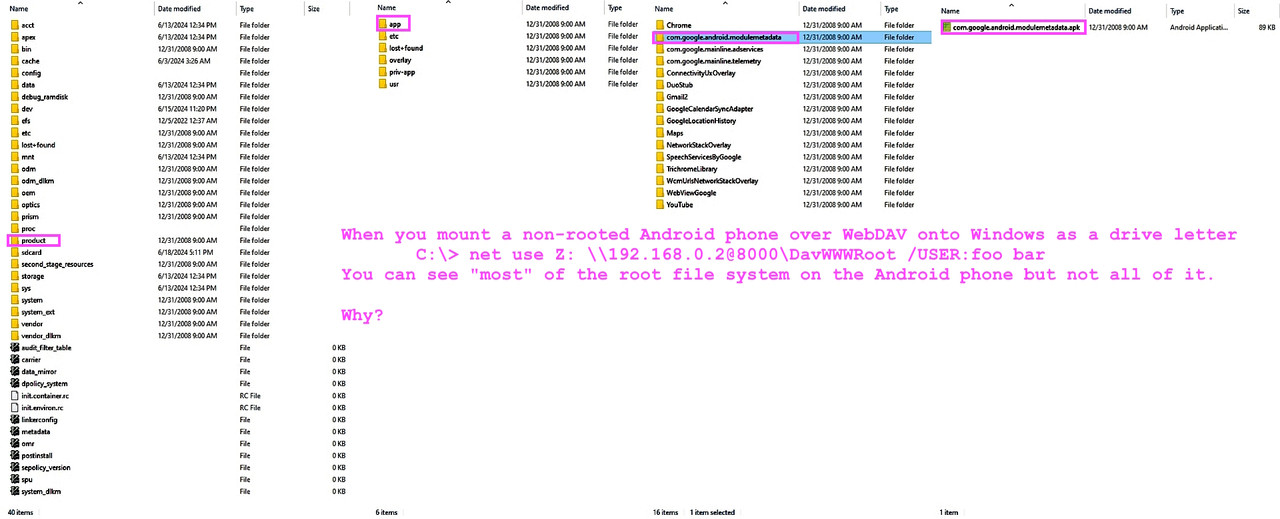
For example, when I mount the Android as a Windows drive letter, I can read "almost" the entire system (not all of it - but a lot more than you'd expect). And I can write to some of the system filesys too I think.
<https://i.postimg.cc/PJF1ZZwn/filesys05.jpg> Look at the dnsproxy file
In summary, given my observation that when mounting an Android filesystem
as a drive letter on Windows that you can see far more than you'd expect to see, one possible backup mechanism might be to use a Windows copy script.
<https://i.postimg.cc/2SxM8V16/rootfilesystem.jpg> Windows root access!
Marion <marion@facts.com> wrote:
On 15 Apr 2025 13:18:40 GMT, Frank Slootweg wrote :
This PC\Frank's Galaxy A51\Internal storage\Android\data\net.osmand.plus\files
But 'This PC\Frank's Galaxy A51\Internal storage' is only accessible
in File Explorer, it's not part of the normal file system, nor
accessible as a Network Share, so you can't use normal copy or backup
utilities. (Perhaps in Windows PowerShell one can 'program'/control File >>> Explorer? No idea.)
I will agree with anyone who says anything logically sensible, where I
agree with Frank that there must be a DIY backup mechanism to Windows.
On the one topic of the paradoxical observation that both Frank Slootweg
and I have experienced of what can be "seen" by the PC vs the phone...
<https://i.postimg.cc/1zrmSmQc/davroot.jpg> Windows can see Android root! >>
I also have been surprised when the PC can see *far* more of the Android
file system than the (non rooted) Android device itself can see.
<https://i.postimg.cc/Zngy0SGT/filesys03.jpg> Look at /etc/resolv.conf
Sure, we all know ADB can back up the system /etc/hosts file but even
without ADB, I can read (and write) to far more of the Android file system >> from the PC than from the phone itself. From the Windows command line!
<https://i.postimg.cc/nzFmPTKt/filesys04.jpg> cmd line access to /etc
For example, when I mount the Android as a Windows drive letter, I can read >> "almost" the entire system (not all of it - but a lot more than you'd
expect). And I can write to some of the system filesys too I think.
<https://i.postimg.cc/PJF1ZZwn/filesys05.jpg> Look at the dnsproxy file
In summary, given my observation that when mounting an Android filesystem
as a drive letter on Windows that you can see far more than you'd expect to >> see, one possible backup mechanism might be to use a Windows copy script.
<https://i.postimg.cc/2SxM8V16/rootfilesystem.jpg> Windows root access!
Yes, an app on Android - in your case the WebDAV Server - can see part/most of the *root* file system, but it can't look in the
*app-private data areas*: Internal storage\Android\data, etc..
So, as your last screenshot shows, you can look into the com.<name> folders of some apps, but you will find that those are only *built-in*
apps, i.e. the ones which came with the phone.
You can't get into the Internal storage\Android\data\com.<name>
folders of *user-installed* apps.
So this method is no solution for Android full backup, because it
can't backup the most important part, the user data and settings.
Yes, an app on Android - in your case the WebDAV Server - can see
part/most of the *root* file system, but it can't look in the
*app-private data areas*: Internal storage\Android\data, etc.
So, as your last screenshot shows, you can look into the com.<name>
folders of some apps, but you will find that those are only *built-in*
apps, i.e. the ones which came with the phone.
You can't get into the Internal storage\Android\data\com.<name>
folders of *user-installed* apps.
So this method is no solution for Android full backup, because it
can't backup the most important part, the user data and settings.
robocopy P:\ <destination> /E /COPYALL
This does exist, I worked for a company which allowed PGP in their
corporate email, but using a doctored version that added a key owned by
the company, so that they could read any email.
Is that Free Software? Well, their PGP version was published, license unchanged, AFAIK.
On Wed, 9 Apr 2025 12:42:59 +0200, Carlos E.R. wrote:
This does exist, I worked for a company which allowed PGP in their
corporate email, but using a doctored version that added a key owned by
the company, so that they could read any email.
Is that Free Software? Well, their PGP version was published, license
unchanged, AFAIK.
Did they prevent you from substituting your own version?
| Sysop: | DaiTengu |
|---|---|
| Location: | Appleton, WI |
| Users: | 1,090 |
| Nodes: | 10 (1 / 9) |
| Uptime: | 59:54:44 |
| Calls: | 13,948 |
| Calls today: | 1 |
| Files: | 187,035 |
| D/L today: |
2,695 files (773M bytes) |
| Messages: | 2,461,298 |